
General
ColoredChat is a simple plugin that allows you to write colorful text on chat.
Features
- Write colorful text on chat
- Custom character to write colorful
How to use
To write colorful text on chat (i love colorful text) just type your character (default is &) and the color code. Example:
&cI &0love &acolorful &etext.
I love colorful text.
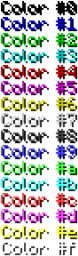
Here are the color codes:
Please notice: Number 6 is no more really gold, it's orange :D
Configuration
global: char: '&' #character to write colorful use permissions: true #enable or disable permissions support messages: permission message: '&cYou dont have permission to do that' #message that appears if a player doesn't have permission to use colors on chat
Permissions
coloredchat.use.* - Gives access to all colors on chat
coloredchat.use.black
coloredchat.use.darkblue
coloredchat.use.darkgreen
coloredchat.use.darkturquoise
coloredchat.use.darkred
coloredchat.use.purple
coloredchat.use.gold - Please notice: Gold is no more really gold, it's orange, but im going to change
nothing :D
coloredchat.use.gray
coloredchat.use.darkgray
coloredchat.use.blue
coloredchat.use.green
coloredchat.use.turquoise
coloredchat.use.red
coloredchat.use.pink
coloredchat.use.yellow
coloredchat.use.white
Video
Check out my channel!
Changelog
Version 0.3
- added permissions for all colors
Version 0.2
- added permissions support
Version 0.1
- Released plugin
Note:
Please tell me if you found Bugs or something which isn't correct :D
Kako instalirati ColoredChat
A server on Paper or Spigot
The plugin runs on the server core; players do not need to install anything.
File goes into the plugins folder
Download the file ColoredChat.jar (4 KB) and put it into the server’s plugins folder.
Restart the server
On startup the plugin creates its own settings folder in plugins.
Use the “To server” button
On Millida Hosting, the button at the top of the page uploads the file to your server and restarts it for you.
Verzije
Sa zavisnostima
| Minecraft | Loader | Fajl | Datum | Akcije |
|---|---|---|---|---|
| — | — | ColoredChat v0.33.8 KB |
Česta pitanja
Do players need to install ColoredChat?
No, the plugin goes only on the server, into the plugins folder: players do not need to download anything.
Where can I download ColoredChat safely?
On this page: the file ColoredChat.jar (4 KB) is stored on Millida’s server, with no link shorteners. SHA-1 checksum: 00878ce263bd267789cad8f6b86fee0aa51adab1.
Recenzije
Budi prvi koji će oceniti ColoredChat


