
O Chairs pluginovu
Chairs - Sit down on stairs
Source Code
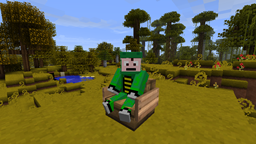
The Chairs plugin makes it possible to use stair-blocks as seats so that you are able to sit down on them. It is similar to the ChairCraft plugin. This one works properly, though.
Note: It appears that you will see yourself as sitting a bit higher than you are supposed to, other players will see you sitting normal, though (screenshot).
How To:
Thanks to the guys from WoopaGaming who did a showcase of this plugin: https://www.youtube.com/watch?v=PbUxIiBYJ6k
To sit down on a chair, you simply have to rightclick on the stairs-block.
- If you have the "sneaking"-option in the config.yml enabled, you have to sneak while rightclicking.
- If you have set the "distance"-option to a value higher than 0, you have to be close enough to the chair to be able to sit down.
- If you have the "sign-check"-option enabled, there have to be signs at the end of the chair/row of chairs to be able to sit down.
- If you have set the "max-chair-width"-option to a value higher than 0, the chair/row of chairs must not be longer than this value.
To stand up from a chair, you have to rightclick on it. You can also destroy the chair to stand up.
The config.yml contains an explanation to all the options you can set, please read it before asking questions.
Note: The "item"-option in the config.yml if the type of item you are sitting on. Players can only "sit" on entities (like minecarts or mobs. Item drops are entities, too). This plugin uses item drops on which the player sits down. You can configure the type of item drop, because it is possible that you will sometimes see it floating through the player's body. A lever is quite small, that's why it is the default value
Commands & Permissions:
chairs.reload
- /chairs reload - Reload the Chairs configuration file.
chairs.sit
- Sit down on chairs.
Kako instalirati Chairs
A server on Paper or Spigot
The plugin runs on the server core; players do not need to install anything.
File goes into the plugins folder
Download the file Chairs-1.4.jar (8 KB) and put it into the server’s plugins folder.
Restart the server
On startup the plugin creates its own settings folder in plugins.
Use the “To server” button
On Millida Hosting, the button at the top of the page uploads the file to your server and restarts it for you.
Verzije
Sa zavisnostima
| Minecraft | Loader | Fajl | Datum | Akcije |
|---|---|---|---|---|
| — | — | Chairs 1.48.1 KB |
Česta pitanja
Do players need to install Chairs?
No, the plugin goes only on the server, into the plugins folder: players do not need to download anything.
Where can I download Chairs safely?
On this page: the file Chairs-1.4.jar (8 KB) is stored on Millida’s server, with no link shorteners. SHA-1 checksum: 31a95cd107fb7c56f57bf5714782256699ae2ff7.
Recenzije
Budi prvi koji će oceniti Chairs


