
AntiJoinBot Plugin za Minecraft 1.10
AntiJoinBot

Bukkit Firewall / Proxy Blocker
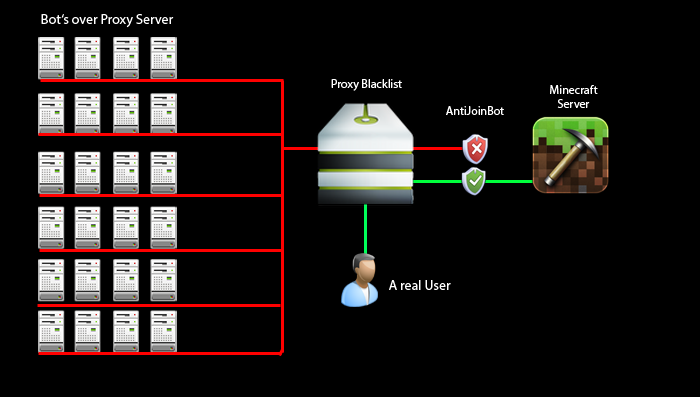
This plugin protects your server from bots that use proxies!
The players IP will be automatically verified when they join.
The plugin has been written to have an High level of performance.
Features:
- Works with potentially any Minecraft version
- UUID Support aswell as Nickname support (for Offline mode Servers)
- Whitelistless (Doesn't require to activate a Whitelist to block the bots)
- Configurable delayed start (to reduce plugin load on server start/restart)
- MySQL/SQLite support
- Downloadable Blacklist on server start
- Customizable Blacklists ("URL:Response" format) (Paste the URL with , instead of .)
- Customizable Kick Messages
- Quickly Disable/Enable the plugin via command
- Reload the config in game
- Permission to bypass checks
- User Whitelist/Blacklist
- Force check mode (Kick everyone for the first check, player is asked to rejoin)
- Permission support
- Proxy check from Server List and change MoTD if a proxy is found (Beta)
- Debug mode available
- Plugin Metrics
Video
Installation:
- Put the "AntiJoinBot.jar" in the plugin folder and run the server.
- It will create a folder called "AntiJoinBot" containing the "config.yml" (Default Config) and the "offline_data.db".
- Ready ;D
Permissions and Commands:
Bypass checks:
Permission: "ajb.bypass"
Add/block players in whitelist:
Permission: "ajb.add"
- "/ajb add <player>" -> (add player to whitelist)
- "/ajb block <player>" -> (add player to blacklist)
Toggle AntiJoinBot:
Permission: "ajb.toggle"
- "/ajb toggle"
Reload Configuration and Database Connection:
Permission: "ajb.reload"
- "/ajb reload"
Note:
If you can not connect, please wait 24 hours and try it again or restart your router.
If this plugin helped you, please Donate ;D
Default Blacklist API's:
http://www.shroomery.org/ythan/proxycheck.php?ip=
http://www.stopforumspam.com/api?ip=
http://yasb.intuxication.org/api/check.xml?ip=
Source:
https://bitbucket.org/NullP0interEx/antijoinbot (Before 5.0)
https://github.com/Maxetto/AntiJoinBot (After 5.0)
Sponsors:
Minecraft Serverlist (DE)
Minecraft Serverlist (EN)
Kako instalirati AntiJoinBot
A server on Paper or Spigot
The plugin runs on the server core for Minecraft 1.5.2–1.10; players do not need to install anything.
File goes into the plugins folder
Download the file AntiJoinBot.jar (28 KB) and put it into the server’s plugins folder.
Restart the server
On startup the plugin creates its own settings folder in plugins.
Use the “To server” button
On Millida Hosting, the button at the top of the page uploads the file to your server and restarts it for you.
Minecraft 1.10 runs on Java 8: with a different Java version the game may close right after launch.
Verzije
Sa zavisnostima
| Minecraft | Loader | Fajl | Datum | Akcije |
|---|---|---|---|---|
| 1.5.2 | — | AntiJoinBot-5.027.6 KB |
Česta pitanja
Which Minecraft versions does AntiJoinBot work on?
There are files for 1.10, 1.8, 1.5.2. The newest is 1.10.
Which Java does AntiJoinBot need?
Minecraft 1.10 runs on Java 8. If the game closes right after launch, the usual cause is the wrong Java version in the profile settings.
Where can I download AntiJoinBot safely?
On this page: the file AntiJoinBot.jar (28 KB) is stored on Millida’s server, with no link shorteners. SHA-1 checksum: 7d1a0efff89ac9e371c0ab93a187c0fb7710407a.
Recenzije
Budi prvi koji će oceniti AntiJoinBot


