
World Jump Mapa za Minecraft 1.7.10
Multi-tematska jump mapa.
O World Jump mapi
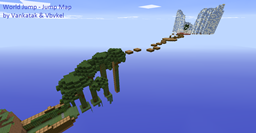
Welcome to vankatak and vbvkel's jump map. This is a multi-thematic jump map that includes several of the most popular biomes in Minecraft and some additions from us. There could be a few bugs, so if you find any report them to us. Thanks. The map has been tested and all jumps are possible.
If you like the map make sure to leave us a like on our YouTube channels. If you have any suggestions - send them to us.
If you decide to film a gameplay, leave a link to the map in the clip's description.
Hope you like our map.
Vankatak & Vbvkel
Kako instalirati World Jump
With Millida Launcher
Install Millida Launcher
The launcher is free: download it at millida.net/launcher and sign in with any nickname.
Click “Install” on this page
The launcher opens and installs the map for Minecraft 1.7.2–1.7.10 automatically.
Launch the game
A profile with it appears in the launcher: click “Play”.
Manually
Download the map archive
Pick the file Jump Map.zip (6.2 MB).
Unpack it into the saves folder
The world folder (with level.dat inside) must sit directly in .minecraft/saves.
Open the world
“Singleplayer”: the map will be in your world list.
On a server
Replace the world folder
Stop the server and put the map folder in place of world (or set its name in level-name).
Use the “To server” button
On Millida Hosting, the button at the top of the page uploads the file to your server and restarts it for you.
Verzije
Sa zavisnostima
| Minecraft | Loader | Fajl | Datum | Akcije |
|---|---|---|---|---|
| 1.7.6 | — | Jump Map.zip6.2 MB |
Česta pitanja
Which Minecraft versions does World Jump work on?
There are files for 1.7.2–1.7.10, 8 versions in total. The newest is 1.7.10.
Where can I download World Jump safely?
On this page: the file Jump Map.zip (6.2 MB) is stored on Millida’s server, with no link shorteners. SHA-1 checksum: bfdd00e17b1a3c607069fba6637833aba3e1151e.
Recenzije
Budi prvi koji će oceniti World Jump



