

Smart Items Plugin para Minecraft
Os itens reagem aos blocos abaixo deles.
Sobre o plugin Smart Items
Smart-items
The goal of this mod is to allow items on the ground to interact with the block below and give Dispenser some new abilities.
- Saplings that land on dirt or grass will plant themselves.
- Crops that land on farmland will become Planted in a 3x3 area.
- Nether wart will plant on its self on soul sand in a 3x3 area.
- Bone meal that lands on/in a plant will cause it to grow.
- Items Passing over a powered workbench will be Crafted into the item in its Item frame.
- A powered workbench can Craft water potions if water is above the workbench.
- A Powered cauldron will pick up Items Below it, and place into a container, or on top.
- If an Item Frame is placed on a cauldron or hopper it will only accept items like the one in the frame.
- Tools in dispensers will affect a cone of blocks directly in front the dispenser, and animals. (Shovels , Axes, Pickaxes, Hoes, Fishing Rods, and Shears)
- Food near two animals will cause them to breed.
- Empty buckets near cows will fill with milk.
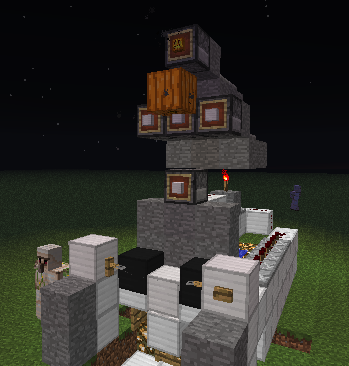
Tips and Tricks
Images of some Gagets Vsit the Tips and Tricks Page for more ideas.
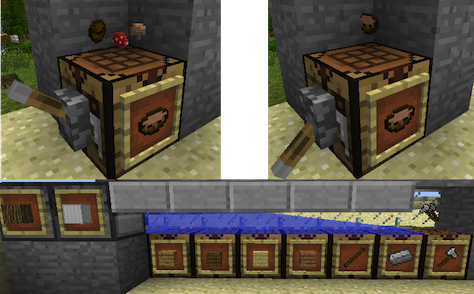
How To Install and run
- Download the plugin
- Place .jar file in your plugins directory.
- edit/create Config File
- Run the server.
config.yml
CropPlantingTimer: 120 # time in ticks before a seed plants TreePlantingTimer: 120 # time in ticks before a sapling becomes a sapling block UseWorldGuard: true # Will disable tree planting, dispenser tools and blocks in any region. AllowAutoCraft: true # allows auto craft system AllowBreeding: true # Stops animals from making babes when near food. AllowCauldronLift: true # turns off Cauldron ability to lift items. Arrows2Items: true # arrows become arrow items after impact. DispenserUsesTools: true # allows Dispenser to use Tools AllowDispensingBlocks: true # allows Dispenser to drop blocks as blocks DispenserRange: 1 # extends range of Dispensers tool use 0 = 3x3, 3 = 3x6 DisabledWorlds: world1_nether,world1 # worlds ignored by the mod.
Know Problems
- Delete old Config Files to prevent crashes!
- Problems with new Tree types
- Some Auto Crafting problems with complex items, like fireworks.
Como instalar Smart Items
A server on Paper or Spigot
The plugin runs on the server core; players do not need to install anything.
File goes into the plugins folder
Download the file Smart_Items.jar (25 KB) and put it into the server’s plugins folder.
Restart the server
On startup the plugin creates its own settings folder in plugins.
Or use the “To hosting” button
On Millida Hosting, the button at the top of the page uploads the file to your server and restarts it for you.
Versões
Com dependências
| Minecraft | Loader | Arquivo | Data | Ações |
|---|---|---|---|---|
| — | — | Smart_Items V6.4.124.5 KB | ||
| — | — | Smart_Items VB.6.2 Experimental21.8 KB |
FAQ
Where can I download Smart Items safely?
On this page: the file Smart_Items.jar (25 KB) is stored on Millida’s server, with no link shorteners. SHA-1 checksum: 711858008dbbaa124e3fdbd6256f2170747dc3b0.
Avaliações
Seja o primeiro a avaliar Smart Items


