

SimpleWarnings Plugin para Minecraft
um sistema de avisos simples e eficaz para servidores bukkit.
Sobre o plugin SimpleWarnings

Description: SimpleWarnings is just that, a simple warnings system which allows server admins to set, check, and delete warnings. SimpleWarnings can be easily configured to execute custom commands on warning, auto-ban a user and/or execute a custom command once they've exceeded a pre-defined warning limit, broadcast a users total number of warnings to the server on join, kick a user when they receive a warning and much more...
Quote:
Upgrading to 0.8.8 or above?
In Simplewarnings-0.8.8 the data handling is changed from YAML to MySQL/SQLite. However this doesn't mean you'll lose your previous warning data, as you can update your previous warning records quickly and easily.
To update your warning records to 0.8.8+ compatibility, simply type /fixwarn to begin the update process. Remember: You only need run it once, and only if you're upgrading from a version earlier than 0.8.8
Installation:
- Download the .jar
- Place the .jar in your plugins directory
- Restart the server
Configuration:
For details on configuration see here: Configuration
Commands:
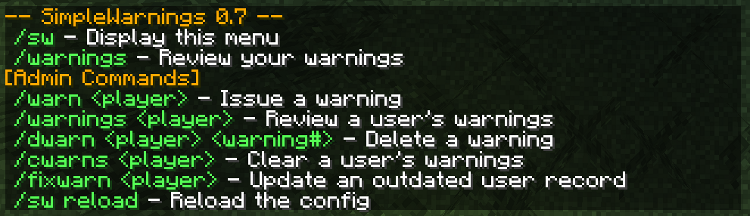
/sw or /warn View the SimpleWarnings Commands Menu
/sw reload Reload Simplewarnings config
/warn <playername> <warning> Issue a player with a warning
/warnings [playername] Review your own or another player's warnings
/dwarn <playername> <warning number> Delete a player's warning
/cwarns <playername> Clear a player's warnings
/fixwarn Update warnings records from YAML to SQL (0.8.8+)
Permissions:
sw.warn Users with this permission may issue a warning
sw.check Users with this permission may view their own warnings
sw.check.other Users with this permission may view other player's warnings
sw.delete Users with this permission may clear/delete other player's warnings
sw.mod Users with this permission may do all of the above
sw.reload Users with this permission may reload the config
sw.fix Users with this permission may update outdated warning records
Quote:
Recent ChangeLog: 1.0
- Updated for UUID compatability
0.9.3
- Updated: DefineFinalBanMsg now refers to the message a banned user will see upon attempting to rejoin, if not set they will see their last warning instead
- Updated: Final warning will be shown as kick message and in the final warning broadcast, instead of the final BanMsg
- Fixed: SimpleWarnings no longer interferes with other banned players ban messages, only banned players with the max number of warnings.
0.9.2
- Fixed bug introduced in v0.9.1 - config.yml not generating on first use due to character conflict
0.9.1
- Updated Autoban BanMsg to be displayed when banned player attempts to log in, if BanMsg not defined the final warning is displayed instead.
- Added: Multiple commands for all custom commands & penalties
Como instalar SimpleWarnings
A server on Paper or Spigot
The plugin runs on the server core; players do not need to install anything.
File goes into the plugins folder
Download the file SimpleWarnings.jar (37 KB) and put it into the server’s plugins folder.
Restart the server
On startup the plugin creates its own settings folder in plugins.
Or use the “To hosting” button
On Millida Hosting, the button at the top of the page uploads the file to your server and restarts it for you.
Versões
Com dependências
| Minecraft | Loader | Arquivo | Data | Ações |
|---|---|---|---|---|
| — | — | SimpleWarnings.jar37.1 KB |
FAQ
Do players need to install SimpleWarnings?
No, the plugin goes only on the server, into the plugins folder: players do not need to download anything.
Where can I download SimpleWarnings safely?
On this page: the file SimpleWarnings.jar (37 KB) is stored on Millida’s server, with no link shorteners. SHA-1 checksum: 442499fc73972f072c895748cf54b637141d655c.
Avaliações
Seja o primeiro a avaliar SimpleWarnings


