
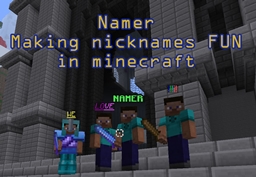
Namer Plugin para Minecraft
Namer Ability para dar apelidos a si mesmo e aos outros (PARA TODOS)
Sobre o plugin Namer
NOW WITH TagAPI SUPPORT! http://dev.bukkit.org/server-mods/tag/
The TagAPI enables users to display their nicknames above their head. This is toggleable with /toggledisplay
YOU MUST HAVE THE TagAPI.jar file in your plugins folder to enable using it.
RECENTLY ADDED VAULT SUPPORT. With vault all features (such as prefixes and suffixes) will work properly.
Namer is a special plugin that I've decided to release to the public. It has been running on the play.efcraft.net server for the past year and has made nicknames fun and entertaining for all.
What makes this plugin unique is the ability for any player to nickname another player. The way I manage this without getting endless nicknames is by having nick credits for each player. A nick credit is used to nickname yourself or another player. I have setup permissions for the plugin so admins can nickname without credits, while normal users must use credits to nickname.
I also support all colors, underline, bold, italic, and special characters. See http://www.minecraftwiki.net/wiki/Classic_server_protocol#Color_Codes for details about colors.
In the efcraft server we setup a donation option to obtain nick credits to nickname themselves or others. This was extremely popular, especially when users waged nickname wars with each other.
This plugin has been tested with bPermissions and PEX. It should support any permissions system that uses bukkit perms as well.

FEATURES
- Ability to nickname yourself or others
- Ability to give players nick credits to rename themselves or others. (nick.rename permission to enable this feature)
- Automatically converts player name to nicknames for join, quit, and death messages
- Updates the tab list with your nickname
- Manages list of unusable nicknames to prevent users from changing their nickname to admin names
- Ability to set the maximum length of a nickname
- Ability to lookup the real name of a player that has a nickname
- Ability to translate a nickname when using commands
- Use all color codes as well as underline, bold, and italics.
- Added ability to change prefix/suffix of players (PermissionsEx ONLY! ... Tested with Herochat)
- Added confirmation dialog for changing others or your own nick, prefix, suffix when using nick credits.
- NEWLY ADDED: Support with TagAPI to update the name above the player (THIS CHANGES THEIR SKIN)
- Added a /toggledisplay [name] to enable/disable displaying nickname above the player
- Ability to reset your nick, prefix, or suffix with /resetpriefix, /resetsuffix, /resetnick
- New Vault support added.
COMMANDS
Commands with [ ] are optional, commands with $ are mandatory
/nick help [#] Displays nick help menu
/nick info [player] Display player nick info about credits and nickname
/nick [player] $nickname$ Changes nickname for player
/prefix [player] $prefixname$ Changes prefix for player (PermissionsEx ONLY)
/suffix [player] $suffixname$ Changes suffix for player (PermissionsEx ONLY)
/credit [player] $#$ Adds # nick credits to player
/adddisabled $ Adds string value to disabled list
/listdisabled $ Displays disabled list
/setmaxlength $#$ Sets the max length for a nickname
/t $ Translates command example: /t 1 2 /tp nick1 nick2 (translates nick1 and nick2 to use the tp command on actual usernames... The 1 and 2 after /t indicate the location of the nicknames. /tp = 0, nick1 = 1, nick2 = 2)
/nick check $nick$ Looks up nickname for username
/toggledisplay [player] Toggles displaying a players nickname above their head (NOTE this can change a players skin)
/resetnick [player] Resets a player's nickname
/resetsuffix [player] Resets a player's suffix
/resetprefix [player] Resets a player's prefix
Permissions
nick.help /nick help
nick.check /nick check
nick.listdisabled /listdisabled
nick.adddisabled /adddisabled
nick.length /setmaxlength
nick.info /nick info
nick.name /nick [player] $nickname$ nicknames yourself or other players without using credits. Also gives access to /resetnick without credits. Alternative permission for nick.name: nick.name.admin
nick.rename /nick $nickname$ nicknames yourself using nick credits. Also gives access to /resetnick. Alternative permission for nick.rename: nick.name.player
nick.rename.other /nick [player] $nickname$ nicknames OTHERS using nick credits Alternative permission for nick.rename.other: nick.name.player.other
nick.prefix.admin /prefix [player] $prefixname$ Changes prefix of yourself or others without using credits. Also gives access to /resetprefix without credits.
nick.prefix.player /prefix $prefixname$ Changes prefix of yourself using credits. Also gives access to /resetprefix.
nick.prefix.player.other /suffix [player] $prefixname$ Changes prefix of OTHERS using nick credits
nick.suffix.admin /suffix [player] $suffixname$ Changes suffix of yourself or others without using credits. Also gives access to /resetsuffix without credits.
nick.suffix.player /suffix $suffixname$ Changes suffix of yourself using credits. Also gives access to /resetsuffix.
nick.suffix.player.other /suffix [player] $suffixname$ Changes suffix of OTHERS using nick credits
nick.credit /credit [player] $#$ give credits to players to nickname their own or other names
nick.translate /t translate command
nick.toggledisplay /toggledisplay command
nick.toggledisplay.other /toggledisplay [player] command
Really love the plugin?
Check out my other plugin(s)! efCraftTickets http://dev.bukkit.org/bukkit-plugins/efcrafttickets/
WEprotect - WorldEdit Protection http://dev.bukkit.org/bukkit-plugins/weprotect/
Como instalar Namer
A server on Paper or Spigot
The plugin runs on the server core; players do not need to install anything.
File goes into the plugins folder
Download the file Namer_v1.7.2_a.jar (30 KB) and put it into the server’s plugins folder.
Restart the server
On startup the plugin creates its own settings folder in plugins.
Or use the “To hosting” button
On Millida Hosting, the button at the top of the page uploads the file to your server and restarts it for you.
Versões
Com dependências
| Minecraft | Loader | Arquivo | Data | Ações |
|---|---|---|---|---|
| — | — | Namer_1.7.2_a29.6 KB |
FAQ
Do players need to install Namer?
No, the plugin goes only on the server, into the plugins folder: players do not need to download anything.
Where can I download Namer safely?
On this page: the file Namer_v1.7.2_a.jar (30 KB) is stored on Millida’s server, with no link shorteners. SHA-1 checksum: d116fca8f49f42e7dafb4f2b35531a540455ece6.
Avaliações
Seja o primeiro a avaliar Namer


