
MotdManager
version 1.41
Description:
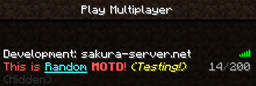
You can change server list motd (displayed to the player before they join) on game command! This plugin allows display random message with any formatting code!
Features:
- Very easy to use!
- Support Permission!
- Support random MOTD!
- Support coloring & formatting code!
- Can show fake max server players count!
- Replace strings!
- Lightweightly!
Planned updates:
- Add send motd mode (random/select)
- Random color support
Please give me ideas!
Installation:
- Put the MotdManager.jar into your plugin folder and reload/restart your server.
- Open config.yml and make any changes you want, then use "/motdmanager reload" command.
Permissions:
- motdmanager.add
Allow using /motdmanager add command! (default: op)
- motdmanager.remove
Allow using /motdmanager remove command! (default: op)
- motdmanager.list
Allow using /motdmanager list command! (default: op)
- motdmanager.maxplayer
Allow using /motdmanager maxplayer command! (default: op)
- motdmanager.reload
Allow reloading configuration file! (default: op)
Commands:
/motdmanager Aliases: /motd, /mm
- /motdmanager add <motd>
To add motd to motd list (permission: motdmanager.add)
- /motdmanager remove <id>
To remove motd from motd list (permission: motdmanager.remove)
- /motdmanager list
To see current motd list (permission: motdmanager.list)
- /motdmanager maxplayer <maxplayer>|disable
To change fake server maxplayer count (permission: motdmanager.maxplayer)
- /motdmanager reload
To reload config.yml (permission: motdmanager.reload)
Supporting Color & Format Codes
Color Codes:
Format Codes:
- &k Random
- &l Bold
- &m Strike
- &n Underlined
- &o Italics
- &r Reset
- &p Random Color (original format code!)
( Check: http://www.minecraftwiki.net/wiki/Formatting_codes )
What's replace strings?:
It's constant strings for set dynamically changes value.
String Description Example Usage
%ver Server minecraft version 1.4.2 [%ver] Welcome to our server!
%players Online players count 19 Currently Online: %players
Bugs and Feature Requests:
Use the Tickets tab to submit any bug reports or feature requests. Or Post them in this thread.
Links:
Full Changelog Source - Github Dev builds - Jenkins Development builds of this project can be acquired at the provided continuous integration server. These builds have not been approved by the BukkitDev staff. Use them at your own risk.
Como instalar MotdManager
A server on Paper or Spigot
The plugin runs on the server core; players do not need to install anything.
File goes into the plugins folder
Download the file MotdManager.jar (39 KB) and put it into the server’s plugins folder.
Restart the server
On startup the plugin creates its own settings folder in plugins.
Or use the “To hosting” button
On Millida Hosting, the button at the top of the page uploads the file to your server and restarts it for you.
Versões
Com dependências
| Minecraft | Loader | Arquivo | Data | Ações |
|---|---|---|---|---|
| — | — | MotdManager v1.4139.4 KB |
Avaliações
Seja o primeiro a avaliar MotdManager


