
Sobre o plugin LikeSigns
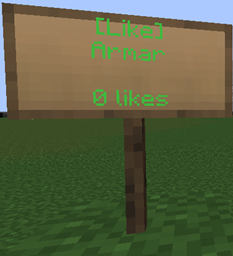
LikeSigns adds the Facebook like button to minecraft and allows you to show your appreciation for something a player did or to just brag about how your building has more likes then the next guy's.
How to use
- Drop the plugin in your plugins folder
- Put [like] on the top row of a sign
- Right click a LikeSign to like it :)
Features
- Only uses the signs as data and thus allows the signs to be moved with things like WorldEdit or restored from a backup.
- You can only delete your own LikeSigns (except if done with something like WorldEdit)
- You can not Like your own LikeSign
- You can only give a specific player 1 like every 24 hours
- You can like a maximum of 3 LikeSigns every 24 hours
- Can give money to players that get likes (requires vault http://dev.bukkit.org/server-mods/vault/)
Config
Money reward: 10 # money a player gets when his sign is liked, requires Vault
Commands
None
Permissions
likesigns.create: Lets players make LikeSigns. likesigns.like: Lets players give likes. likesigns.break: Lets players destroy LikeSigns that aren't theirs.
Todo (if there's demand for it)
- configurable amount of likes a player can give each day
Changelog
v0.1: - first release
v0.2: - added permissions
v0.3: - added money rewards (requires vault)
Donate
Como instalar LikeSigns
A server on Paper or Spigot
The plugin runs on the server core for Minecraft 1.5.1; players do not need to install anything.
File goes into the plugins folder
Download the file LikeSigns.jar (23 KB) and put it into the server’s plugins folder.
Restart the server
On startup the plugin creates its own settings folder in plugins.
Or use the “To hosting” button
On Millida Hosting, the button at the top of the page uploads the file to your server and restarts it for you.
Minecraft 1.5.1 runs on Java 8: with a different Java version the game may close right after launch.
Versões
Com dependências
| Minecraft | Loader | Arquivo | Data | Ações |
|---|---|---|---|---|
| 1.5.1 | — | LikeSigns v0.4.122.6 KB |
FAQ
Which Minecraft versions does LikeSigns work on?
Only Minecraft 1.5.1: there are no files for other versions.
Do players need to install LikeSigns?
No, the plugin goes only on the server, into the plugins folder: players do not need to download anything.
Which Java does LikeSigns need?
Minecraft 1.5.1 runs on Java 8. If the game closes right after launch, the usual cause is the wrong Java version in the profile settings.
Where can I download LikeSigns safely?
On this page: the file LikeSigns.jar (23 KB) is stored on Millida’s server, with no link shorteners. SHA-1 checksum: 5516b20f20e2e18faf0cd8c56718131388d0999b.
Avaliações
Seja o primeiro a avaliar LikeSigns


