

DynTrack Plugin para Minecraft 1.9
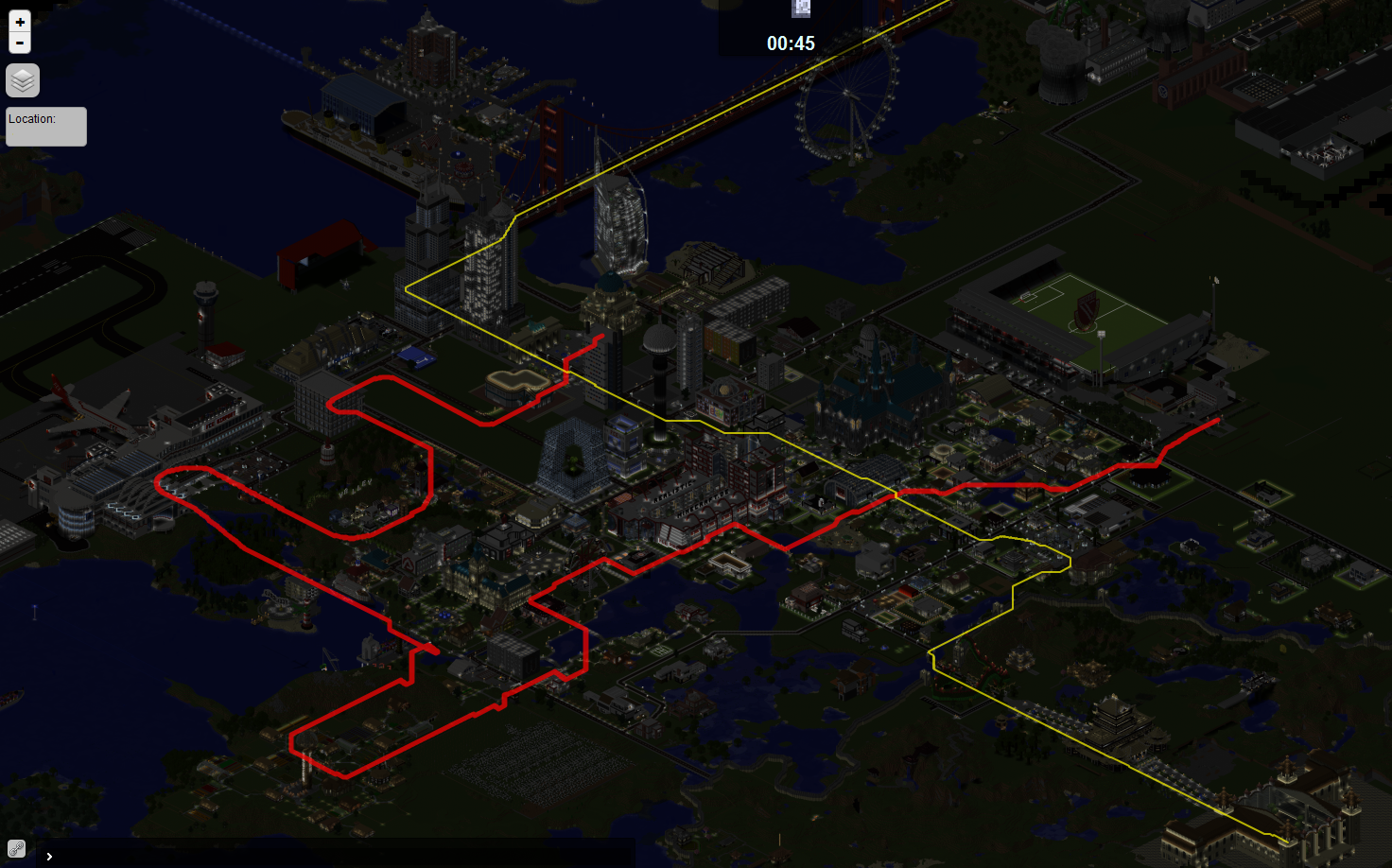
Mostra Trilhas/Caminhos no Livemap com o Dynmap
DynTrack
Idea
- The Main Idea was to show Paths or Railtracks on the Dynmap, as a small colored Line.
- If you track the whole trail network for your server, then you can easily navigate through that network via the Dynmap to arrive quickly at your destination.
5 Elements, which you should know, before reading the following...
Element Function
Style Gives other elements a color, opacity and width.
Layer Enables/disables contained elements on the Dynmap.
Path Represents a line on the Dynmap.
Square Represents an area on the Dynmap.
Link Connects different paths and squares.
Features
- Track your paths and squares, to display them on the Dynmap.
- Create connections between paths and squares.
- Color you paths, squares and links. Also set an opacity and width for them.
- Sort your elements in different layers.
- Many options for elements to display, for a better overview:
- Name the elements.
- Set, where a path comes from and where it goes to.
- Display a list, with which Links the Path is connected, in chronological order.
- Create elements with an easy-to-use setup:
- Just start the setup.
- The setup will request you, to type in the specific values.
- The setup will also explain you, which effect the options have.
- The setup will tell you, which values are valid.
- Edit elements with an easy-to-use editor:
- This works in the same way, as setups do. ;-)
- Integrated Intro, which helps you understanding DynTrack:
- The Intro will start automatically, after a while.
- The Intro will NOT start, if you already have a path or a square.
- If the Intro annoyes you anyway, then set your permission "dyntrack.info.intro.noauto" to "true"!
Commands & Permissions
- There are only a few commands, to keep it simple. :)
- The main command is /dynTrack
- All commands can be found on this page.
- And there are some permissions to be flexible.
- The main permission (for everything) is dyntrack.*
- All permissions can be found on this page.
Server List
- A list of Servers using DynTrack: Serverlist
Download & Installation
- Follow the installation introductions!
- The current version is 2.4b1
- Currently, there is no new version in development.
- If you need an update for a newer Minecraft version, let me know it.
- If you found an error / bug, please report it to me.
- New ideas or suggestions are always welcome.
For Developers
- If you need a DynTrackAPI, write a commend what the API should include!
I'ld like to work with you together!
Support
- An Error occured? Perhaps this page can help you.
- Support is available in english and german. Just contact me.
Como instalar DynTrack
A server on Paper or Spigot
The plugin runs on the server core for Minecraft 1.9; players do not need to install anything.
File goes into the plugins folder
Download the file DynTrack-2.4b3.jar (475 KB) and put it into the server’s plugins folder.
Restart the server
On startup the plugin creates its own settings folder in plugins.
Or use the “To hosting” button
On Millida Hosting, the button at the top of the page uploads the file to your server and restarts it for you.
Minecraft 1.9 runs on Java 8: with a different Java version the game may close right after launch.
Versões
Com dependências
| Minecraft | Loader | Arquivo | Data | Ações |
|---|---|---|---|---|
| 1.9 | — | DynTrack_v2.4b3475 KB | ||
| — | — | DynTrack_v0.220.7 KB | ||
| — | — | DynTrack_v0.120.7 KB |
Avaliações
Seja o primeiro a avaliar DynTrack


