
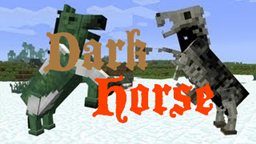
DarkHorse Plugin para Minecraft 1.8.1
O DarkHorse permite que você invoque todas as bestas montáveis, INCLUINDO os cavalos "mais sombrios". Isso mesmo - cavalos zumbis e esqueletos!
Sobre o plugin DarkHorse
DarkHorse
Please give me a diamond on Planet Minecraft!
What is it?
DarkHorse is a simple, lightweight plugin that lets you spawn all types of rideable beasts in Minecraft, INCLUDING the "darker" horses in the game. That's right - zombie and skeleton horses! Using a simple set of commands, you can spawn in these mobs immediately and shock people with the unnatural horses!
And now, not only can you spawn all the types of horses, you can even ride them too! Spawn a tamed horse, right-click with a saddle, and travel through the countryside on your noble undead steed!
Commands
Finished
Command Description
/dh horse Spawn a normal horse at your current location
/dh horse tamed Spawn a normal, tamed horse at your current location
/dh horse tamed chest Spawn a normal, tamed horse with chests at your current location
/dh donkey Spawn a donkey at your current location
/dh donkey tamed Spawn a tamed donkey at your current location
/dh donkey tamed chest Spawn a normal, tamed donkey with chests at your current location
/dh mule Spawn a mule at your current location
/dh mule tamed Spawn a tamed mule at your current location
/dh mule tamed chest Spawn a normal, tamed mule with chests at your current location
/dh skeleton Spawn a skeleton horse at your current location
/dh skeleton tamed Spawn a tamed skeleton horse at your current location
/dh skeleton tamed chest Spawn a normal, tamed skeleton horse with chests at your current location (makes it rideable)
/dh zombie Spawn a zombie horse at your current location
/dh zombie tamed Spawn a tamed zombie horse at your current location
/dh zombie tamed chest Spawn a normal, tamed zombie horse with chests at your current location (makes it rideable)
Planned
- Choose a specific color scheme or style of horse
Leave me suggestions in a ticket!
Permissions
- darkhorse.*
- Allows access to all commands in the plugin
- darkhorse.horse
- darkhorse.donkey
- darkhorse.mule
- darkhorse.skeleton
- darkhorse.zombie
Known Bugs / Issues
No current bugs or issues! To report a bug or issue, please make a ticket HERE.
Stats
Donate
Enjoy DarkHorse? It would help me greatly if you'd donate a few extra dollars for developing the plugin! I'm a student, so I don't have much time or money, and any sized contribution would be more than welcome. :)
Page Views:
Como instalar DarkHorse
A server on Paper or Spigot
The plugin runs on the server core for Minecraft 1.8–1.8.1; players do not need to install anything.
File goes into the plugins folder
Download the file DarkHorse.jar (24 KB) and put it into the server’s plugins folder.
Restart the server
On startup the plugin creates its own settings folder in plugins.
Or use the “To hosting” button
On Millida Hosting, the button at the top of the page uploads the file to your server and restarts it for you.
Minecraft 1.8.1 runs on Java 8: with a different Java version the game may close right after launch.
Versões
Com dependências
| Minecraft | Loader | Arquivo | Data | Ações |
|---|---|---|---|---|
| 1.8.1 | — | DarkHorse v1.3.1a24.4 KB |
FAQ
Which Minecraft versions does DarkHorse work on?
There are files for 1.8.1, 1.8. The newest is 1.8.1.
Do players need to install DarkHorse?
No, the plugin goes only on the server, into the plugins folder: players do not need to download anything.
Which Java does DarkHorse need?
Minecraft 1.8.1 runs on Java 8. If the game closes right after launch, the usual cause is the wrong Java version in the profile settings.
Where can I download DarkHorse safely?
On this page: the file DarkHorse.jar (24 KB) is stored on Millida’s server, with no link shorteners. SHA-1 checksum: 68b56772f61d20aee020c80411dc4bf64b42be72.
Avaliações
Seja o primeiro a avaliar DarkHorse


