
Sobre o plugin ColoredGroups
ColoredGroups - Simple, yet powerful!
Description
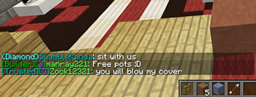
- Format chat with incredible ease!
- COLOREDGROUPS IS NOT A PERMISSIONS PLUGIN, CHAT FORMATTER ONLY
QuickLinks
- Downloads
- Source Code
- Feature requests, Suggestions and Issues
- Example groups.yml
- Permissions
Permissions Support
- Supports all permissions systems that Vault supports.
Features
- Extremely optimized code, Average chat execution is around 0.10ms
- Ability to color players nametags based on their colored group!
- Full control over your servers chat formatting
- Ability to test what the chat would look like with /cg test all or /cg test <group>
- Importation ability using Vault, loads your chat settings from your previous Chat formatter (if applicable)
- Attention: ColoredGroups disregards prefixes from your permissions system, it allows you to easily set chat colors in the ColoredGroups config.yml rather than with your permissions system.
Commands
- /cg help - Lists all available commands
- /cg reload config - Reloads variables from config
- /cg reload tags - Reloads tags if they are enabled
- /cg test all - Sends you an example message of what all groups looks like in chat
- /cg test <group> - Sends you an example of what that groups chat would look like
- /cg import - Imports chat profiles using vault from your previous chat provider
Installation
- Drag and drop the .jar into the plugins directory and restart the server.
How to set groups
- ColoredGroups works by "hooking" into your permissions plugin to see how to format chat messages.
- You need to properly configure ColoredGroups in order to work, however it is very simple.
Easy method
- If you have vault installed, simply run /cg import
- Vault will scan what permissions system you use, and then fill our config nicely :)
More involved method
..............bPermissions......................|.............ColoredGroups.......
- Once you map all your ranks over to ColoredGroups, you can now configure the colors how you please.
Author
- Visit my website for more information.
Como instalar ColoredGroups
A server on Paper or Spigot
The plugin runs on the server core for Minecraft 1.11–1.14; players do not need to install anything.
File goes into the plugins folder
Download the file ColoredGroups.jar (49 KB) and put it into the server’s plugins folder.
Restart the server
On startup the plugin creates its own settings folder in plugins.
Or use the “To hosting” button
On Millida Hosting, the button at the top of the page uploads the file to your server and restarts it for you.
Minecraft 1.14 runs on Java 8: with a different Java version the game may close right after launch.
Versões
Com dependências
| Minecraft | Loader | Arquivo | Data | Ações |
|---|---|---|---|---|
| 1.11 | — | v2.1.048.7 KB |
FAQ
Which Minecraft versions does ColoredGroups work on?
There are files for 1.14, 1.13, 1.12, 1.11. The newest is 1.14.
Which Java does ColoredGroups need?
Minecraft 1.14 runs on Java 8. If the game closes right after launch, the usual cause is the wrong Java version in the profile settings.
Where can I download ColoredGroups safely?
On this page: the file ColoredGroups.jar (49 KB) is stored on Millida’s server, with no link shorteners. SHA-1 checksum: 3b9a6208ff18f7138edf9a62a999ce61272d695b.
Avaliações
Seja o primeiro a avaliar ColoredGroups


