

Oritech Things Mod para Minecraft 1.21.1, 26.1.2
Algumas coisas adicionais para o mod Oritech
- downloads
- 3 downloads
- visualizações
- 15 visualizações
- Atualizado
- Atualizado 02.11.2026
- 1.21.1 — 26.1.2
 NeoForge
Sobre o mod Oritech Things
Oritech Things
Oritech Things is an open-source tech mod (currently for Minecraft 1.21) with the goal to add additional things for Oritech Mods ( 1.12.0 and above ) !!!
- 0.14.0 and above from 0.0.20
- 0.15.0 and above from 0.0.21
- 0.17.0 and above from 0.0.23 Now with chinese traslations
- 0.0.25 russian traslations !
- 0.0.26 cross dimensional Drone port!
- 0.0.27 accelerator magnetic field and motor addons compatibility
- 0.0.33 fix Target and Advanced Target server crash
- 0.0.34 Particle Accelerator Speed Sensor update - Thanks to DevDyna
- 0.0.36 brazilian traslations
- 0.0.37 Auto mode in Particle Accelerator Speed Sensor
- 0.0.38 Better GUI for Particle Accelerator Speed Sensor and Magnetic Field core and addons
- 0.0.42 Fix Particle Accelerator for Oritech 1.2.0 or Greater
- 0.0.45 Ukraine traslations - credits Tenwoc
- 0.1.0 26.1.2 version beta ✨✨✨✨✨✨✨✨✨✨
- 0.1.3 Fix Drone and Target designator - compatible from oritech-2.0.0-exp10 and above
- 0.1.4 Fix target designator with particle accelerator
Features include ✨
- Speed Addons Tiered from 2 to 9
- Efficiency Addons Tiered from 2 to 9
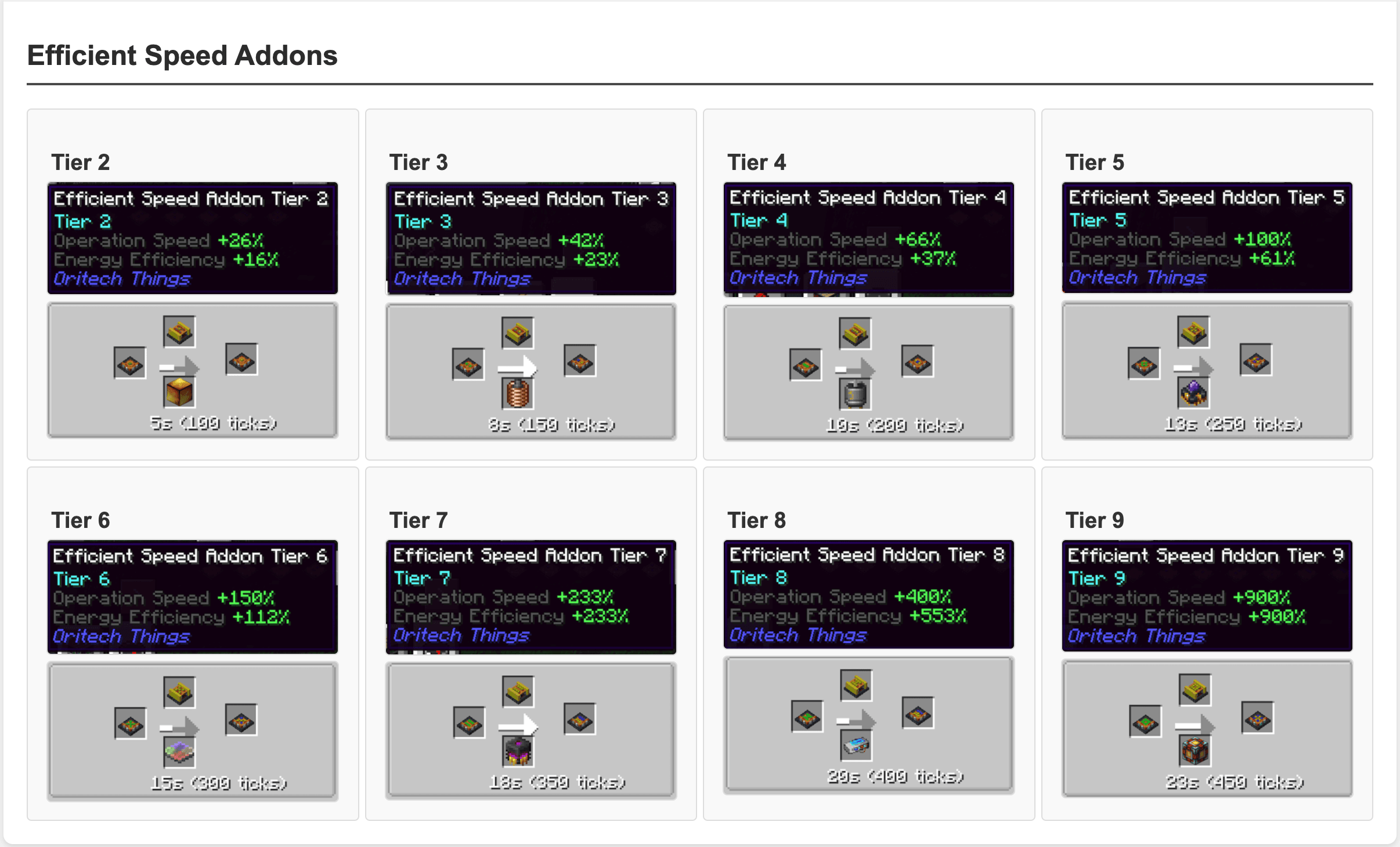
- Efficient Speed Addons Tiered from 2 to 9 (combines Speed and Efficiency in one addons)
- Processing Addons Tiered from 2 to 9
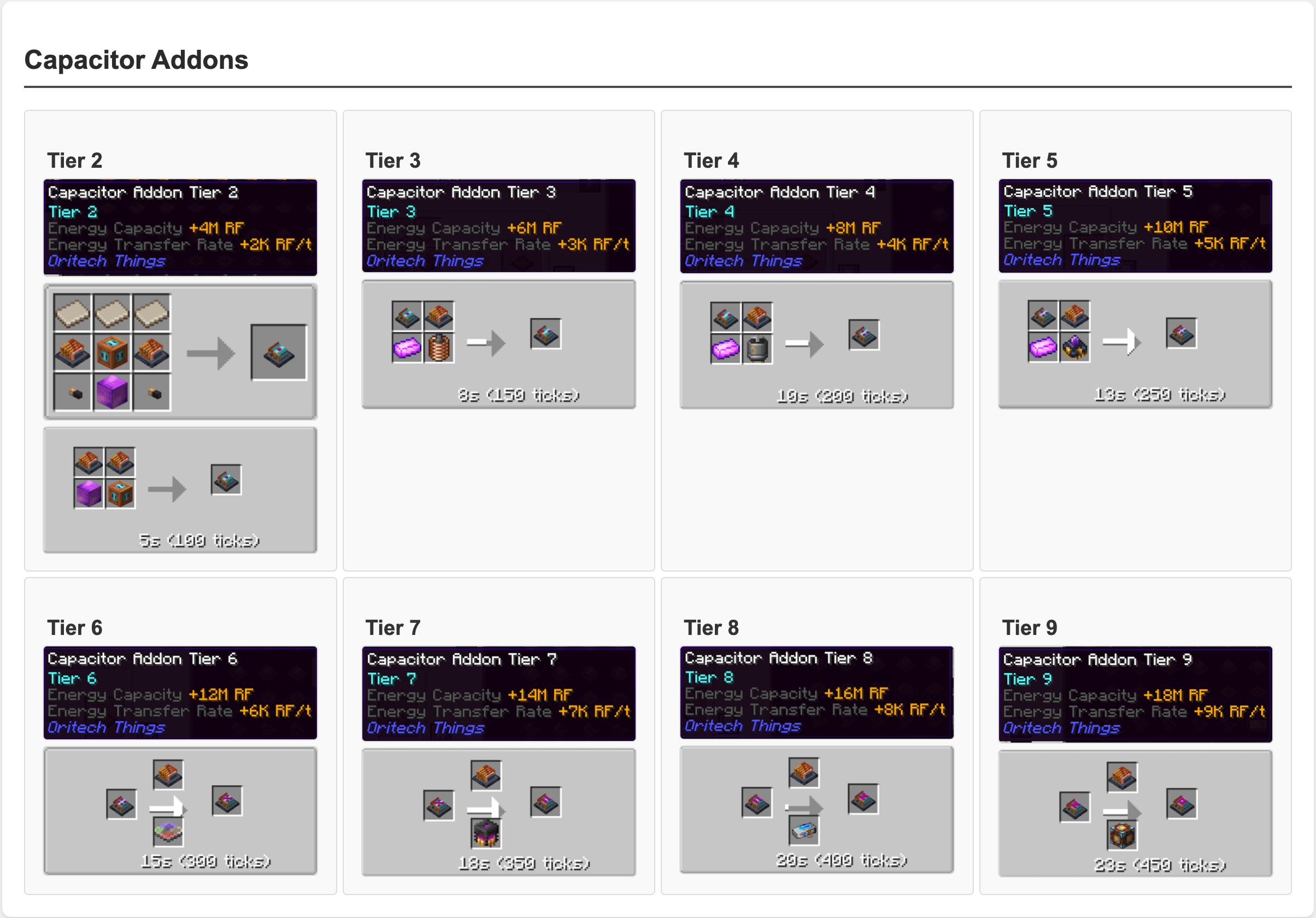
- Capacitor Addons Tiered from 2 to 9
- Acceptor Addons Tiered from 2 to 9
- Exo JetPack it grants you creative flight consuming enery\turbo fuel
- Advanced Target Designator - used to store the position of a Particle Accelerator
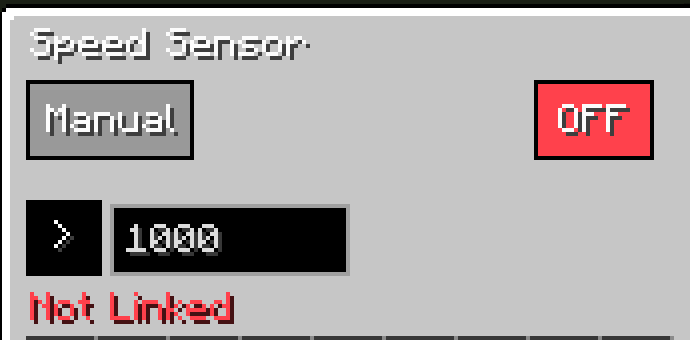
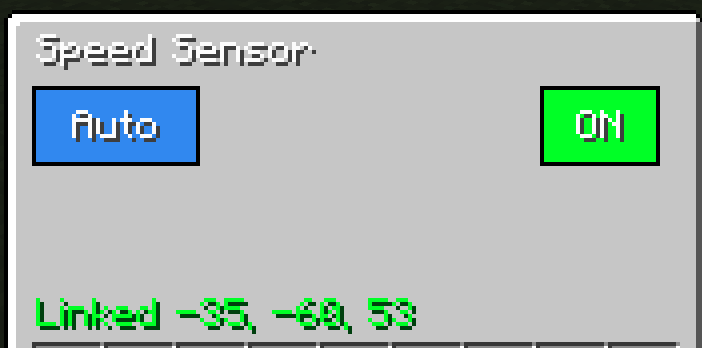
- Particle Accelerator Speed Control - a new Block that emits a redstone signal 15 when the accelarator
speed is greater than the provided value. From 0.0.37 you can also enable Auto mode in order to auto detect the required speed for the in progress recipe
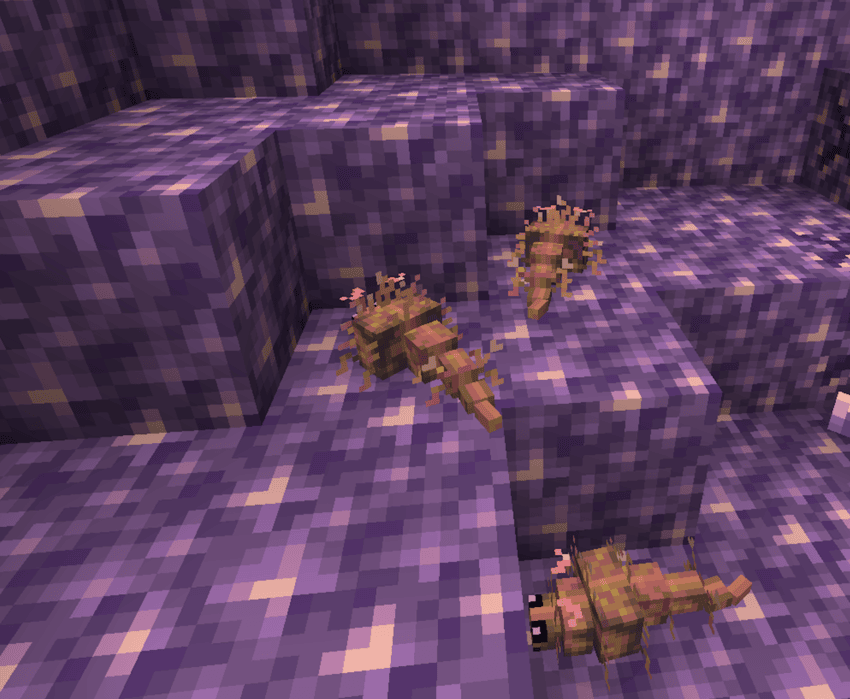
- Infested Amethyst Block - now in Geode some of the Amethyst Block are replaced with Infested one
- Amethyst Fish - new mob spawned when Infested Amethyst is broke.
It can drop fluxite, amethyst shard and with a lesser possibility amethyst block and amethyst budding
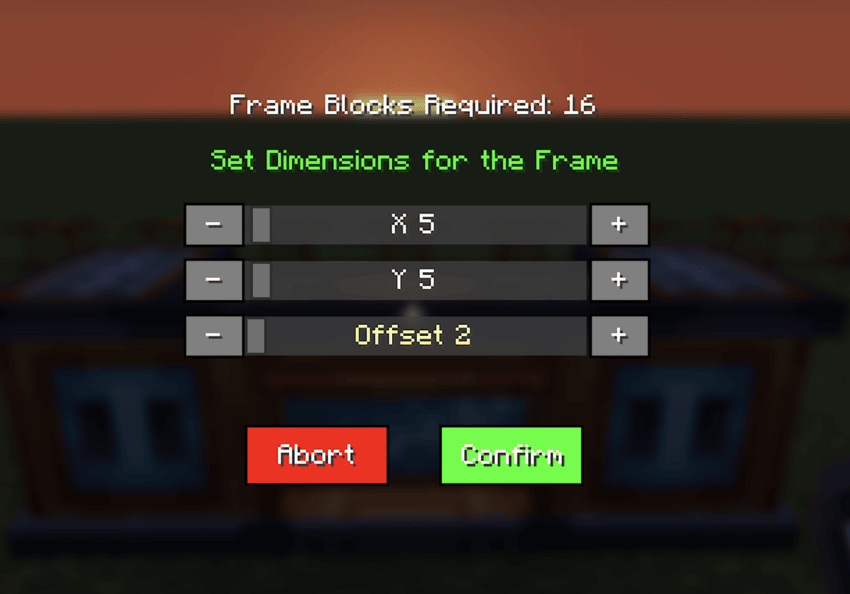
- Frame Placer - a new tool to define and autobuild the Frame Structure for the Destroyer. It automatically
destroy all the blocks in the area and auto place the frame in perimeter
- Cross Dimensional Drone + Addon (from 0.0.26): attaching a Cross dimensional addon to a Drone Port
you can set a Drone Port destination in another dimension using the Advanced Target Designator
- Accelerator Linear Motor compatible with Efficiency and Speed addons
- Accelerator Magnetic Field - a new block that linked to a Particle Accelerator ( with Advanced Target Designator) grants to you the possibility to significantely reduce the size of the particle ring using energy. Efficiency and Capacitor addons are compatible
The following translations are available:
- English
- Chinese
- Russian
- Brazilian
Credits 🙏
This mod of course has a strong dependency with Oritech mod.
Tiered Addons
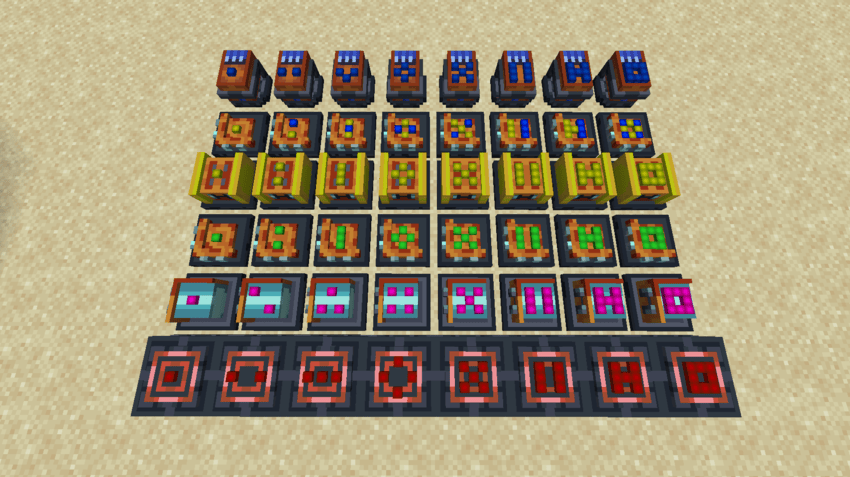
These new addons when attached to a machine (or an extender) they emit light ( level 15 ) if they are used. All the stats can be edited in config but the tooltip inside the Machine ( under addons section is bugged from Oritech)
See the images for stats and recipes
Speed Sensor
We add the item Advanced Target Designator used to store the position of a Particle Accelerator (shift right click) This will be used to the new block Particle Accelerator Speed Sensor(shift right click) This can be turn ON\OFF and you can specify a Limit Speed and if check Spess Greater or Lesser using its GUI Accepts up to 999999 as Speed From 0.0.37 you can also select the mode Auto or Manual. With auto the required speed in auto detect from the current recipe in progress From 0.0.38 we have a new GUI
Amethyst Fish
Frame Placer
Como instalar Oritech Things
With Millida Launcher
Install Millida Launcher
The launcher is free: download it at millida.net/launcher and sign in with any nickname.
Click “Install” on this page
The launcher opens and installs the mod for Minecraft 1.21.1–26.1.2 on NeoForge automatically.
Launch the game
A profile with it appears in the launcher: click “Play”.
Manually
Install NeoForge
The loader must match the game version of the mod file, for example Minecraft 26.1.2. After installing it, a separate profile appears in your launcher.
Download the file for your version
In the version list above, pick the file oritechthings-0.1.0.jar (385 KB) for your game version.
Put it in the mods folder
The folder is inside .minecraft (Windows: %appdata%\.minecraft\mods). If it does not exist, create it.
Launch the loader profile
Open “Mods” in the main menu: Oritech Things should be in the list.
Versões
Com dependências
| Minecraft | Loader | Arquivo | Data | Ações |
|---|---|---|---|---|
| 26.1.2 | NeoForge | oritechthings-0.1.0.jar385 KB | ||
| 1.21.1 | NeoForge | oritechthings-0.0.46.jar392 KB 3 | ||
| 1.21.1 | NeoForge | oritechthings-0.0.6.jar75.8 KB |
FAQ
Which Minecraft versions does Oritech Things work on?
There are files for 26.1.2, 1.21.1. The newest is 26.1.2.
Is Oritech Things for Forge or Fabric?
Only for NeoForge: 1.21.1–26.1.2. There are no files for Forge or Fabric: a mod for another loader will not start.
Does Oritech Things need other mods?
The author lists no required dependencies: the NeoForge loader is enough.
Where can I download Oritech Things safely?
On this page: the file oritechthings-0.1.0.jar (385 KB) is stored on Millida’s server, with no link shorteners. SHA-1 checksum: 3278a6a051308c970d504191e858e94b64f4c425.
Avaliações
Seja o primeiro a avaliar Oritech Things


