

Mob Plaques Mod para Minecraft 26.3
Exibições de atributos organizadas e compactas para todos os mobs, com ótima personalização!
 Fabric
 NeoForge
 Forge
Sobre o mod Mob Plaques
         
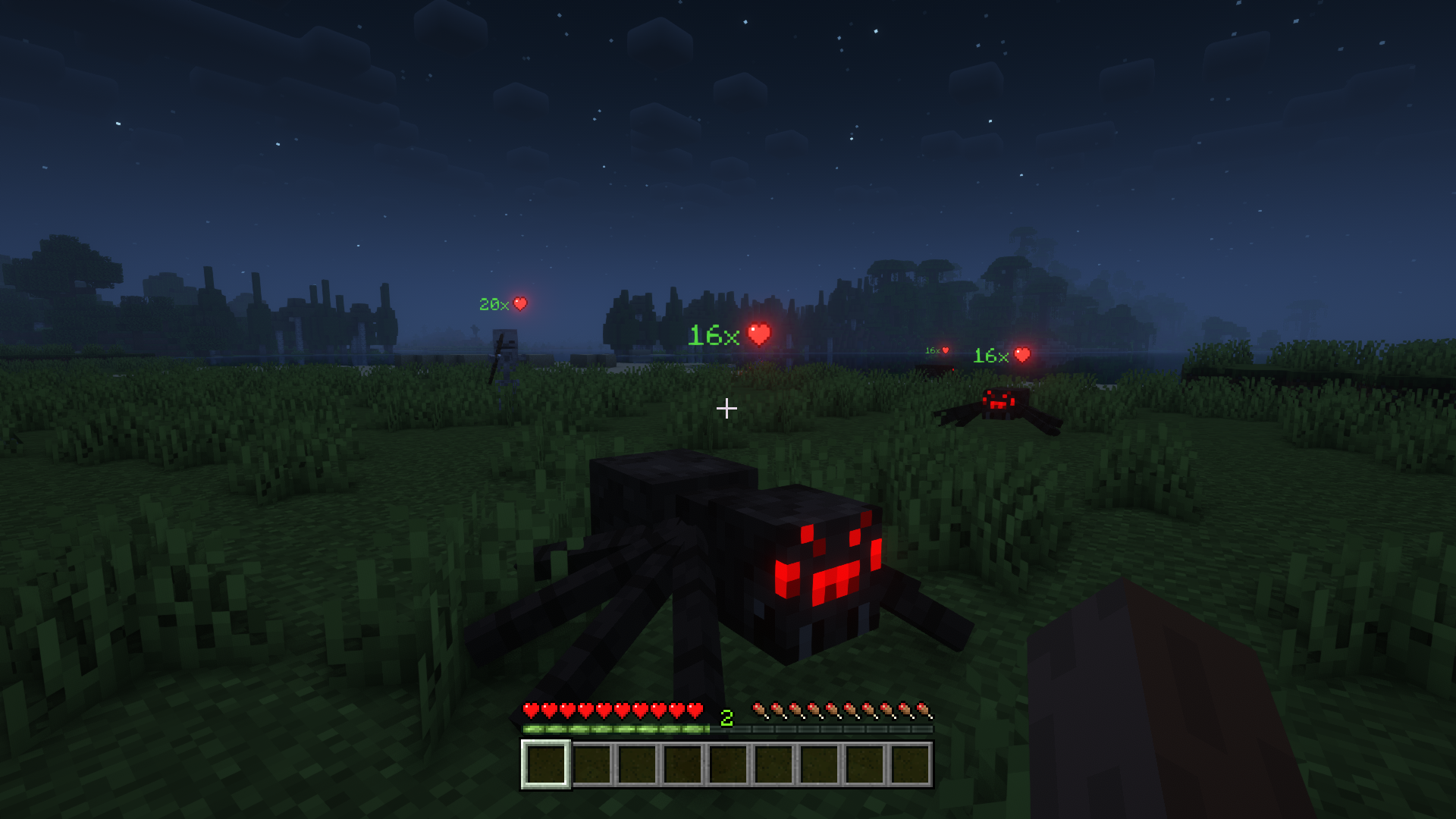
Mob Plaques adds compact status displays above mobs, letting you quickly see important information without cluttering your screen. Health, armor, armor toughness, and air supply are shown using familiar Minecraft-style icons that feel right at home in the game. ❤️
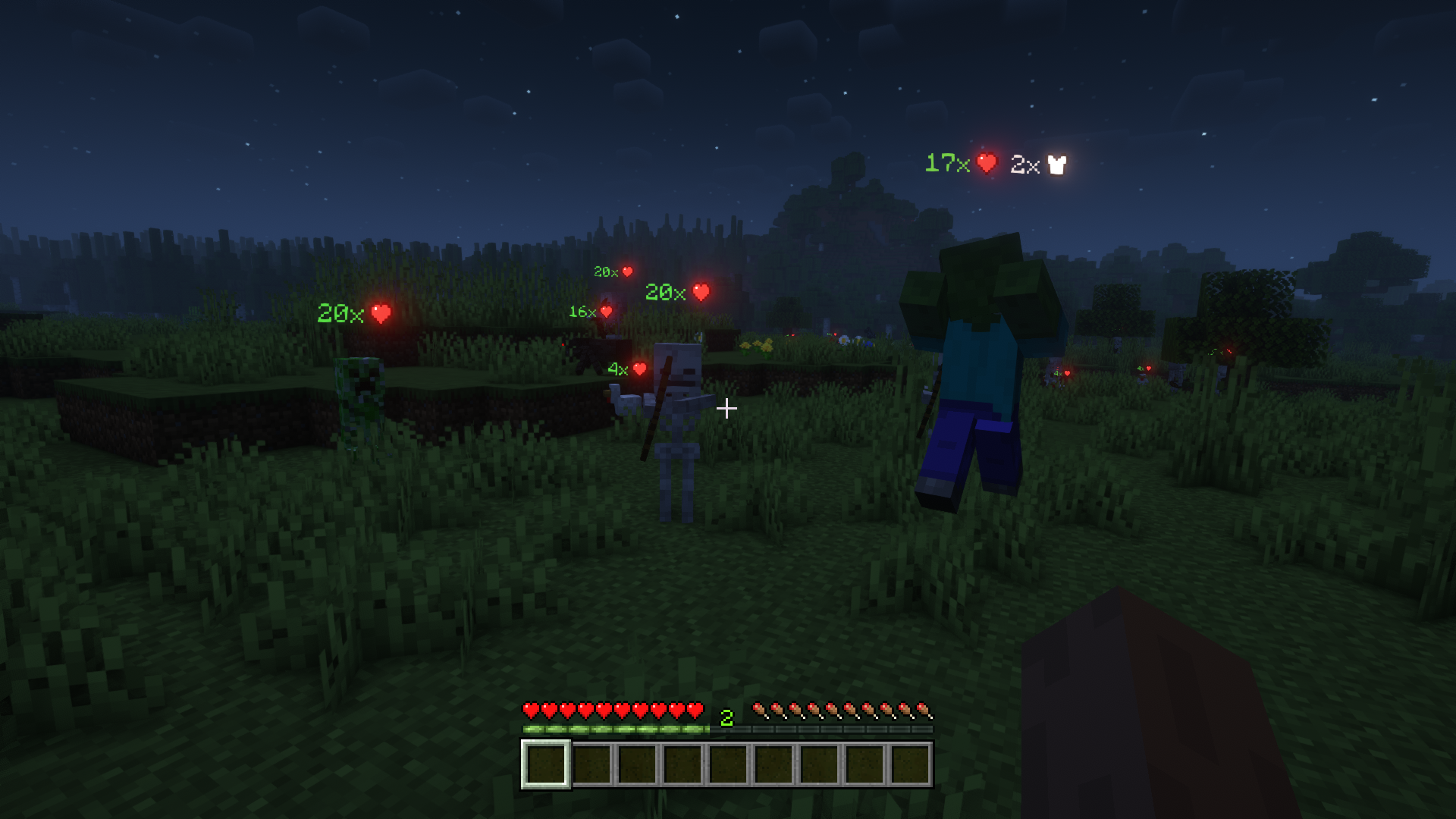
Whether you're fighting monsters, managing animals, exploring underwater, or taking on bosses, the mod helps you judge a mob's condition at a glance. The plaques stay small and unobtrusive while still providing the information that matters most. 🛡️
This mod is designed to fit a wide range of playstyles, with flexible visibility options, support for many different entity types, and an in-game toggle whenever you want a cleaner view. 👁️
- ❤️ Health Plaques: Display mob health above entities using familiar Minecraft heart icons.
- 🛡️ Armor & Toughness: See armor and armor toughness values without guessing.
- 🫧 Air Supply Display: Track remaining air when mobs are underwater and running out of breath.
- 🎯 Focus Mode: Optionally show plaques only for the entity you are looking at.
- 🐺 Flexible Entities: Display plaques for mobs, monsters, bosses, players, mounts, tamed animals, and more.
- 🪄 Distance Scaling: Scale plaques based on proximity for better readability.
- 👁️ Visibility Options: Adjust render distance, scaling, positioning, brightness, wall visibility, and other display settings.
- ⌨️ Quick Toggle Keybind: Enable or disable all plaques at any time with a configurable keybind.
⏩ INSTALLATION REQUIRED ON CLIENT
⏩ REQUIRES PUZZLES LIB TO BE INSTALLED (FABRIC & NEOFORGE)
⏩ REQUIRES FABRIC API TO BE INSTALLED (FABRIC)
⏩ REQUIRES FORGE CONFIG API PORT TO BE INSTALLED (FABRIC)
If available for a mod, configuration is possible directly from in-game using the mod menu (requires Mod Menu by Prospector to be installed on Fabric).
For manual configuration using an external text editor all files are found at .minecraft/config, named as MOD_ID-client.toml, MOD_ID-common.toml, or MOD_ID-server.toml, depending on the type of config. Not all types might exist for a mod, if any at all.
🌟 Thanks to satyrnidae for creating Wolf Armor and Storage, whose wolf information display inspired the creation of this mod.
🌟 Several configuration options and customization ideas were inspired by Vazkii's excellent Neat mod.


(c) 2026 @heyitsfuzs. All rights reserved. This page was last edited on 11 September 2026, at 06:44 (UTC).
Como instalar Mob Plaques
With Millida Launcher
Install Millida Launcher
The launcher is free: download it at millida.net/launcher and sign in with any nickname.
Click “Install” on this page
The launcher opens and installs the mod for Minecraft 1.20.4–26.3 on Fabric, Forge or NeoForge automatically.
Launch the game
A profile with it appears in the launcher: click “Play”.
Manually
Install Fabric, Forge or NeoForge
The loader must match the game version of the mod file, for example Minecraft 26.3. After installing it, a separate profile appears in your launcher.
Download the file for your version
In the version list above, pick the file mobplaques-v26.3.0-mc26.3.x+fabric.jar (72 KB) for your game version and loader.
Put it in the mods folder
The folder is inside .minecraft (Windows: %appdata%\.minecraft\mods). If it does not exist, create it.
Launch the loader profile
Open “Mods” in the main menu: Mob Plaques should be in the list.
Versões
Com dependências
| Minecraft | Loader | Arquivo | Data | Ações |
|---|---|---|---|---|
| 26.3 | Fabric | v26.3.0-mc26.3.x+fabric72.2 KB 3 | ||
| 26.3 | NeoForge | v26.3.0-mc26.3.x+neoforge71.7 KB | ||
| 1.20.4 | Forge | [FORGE] [1.20.4] MobPlaques-v20.4.080 KB |
FAQ
Which Minecraft versions does Mob Plaques work on?
There are files for 26.3, 1.20.4. The newest is 26.3.
Is Mob Plaques for Forge or Fabric?
There are files for Fabric: 26.3, for Forge: 1.20.4 and for NeoForge: 26.3.
Does Mob Plaques need other mods?
The author lists no required dependencies: the Fabric, Forge or NeoForge loader is enough.
Where can I download Mob Plaques safely?
On this page: the file mobplaques-v26.3.0-mc26.3.x+fabric.jar (72 KB) is stored on Millida’s server, with no link shorteners. SHA-1 checksum: f9b2775ec7b24b70f2c588b1ffc44b2f423d1fd4.
Avaliações
Seja o primeiro a avaliar Mob Plaques


