
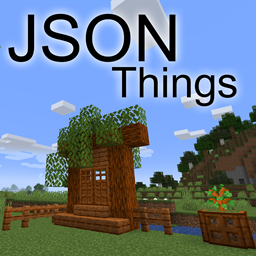
Json Things Mod para Minecraft 1.20.1, 26.2
Um mod que permite aos jogadores definir blocos e itens (e mais!) por meio de thingpacks, arquivos zip semelhantes a datapacks e pacotes de recursos
 NeoForge
 Forge
ForgeJson Things
A mod that enables players to define blocks, items, and more... all via json!
Features
Json Things lets you define, via json files
- Items (including food, tools, armor, block items, ...)
- Item tiers (new tiers for tools)
- Armor materials (new tiers for armor)
- Creative Mode Tabs
- Blocks (including slabs, stairs, fences, doors, ...)
- Block Shapes (Voxel Shapes)
- Block Sets (wood sets including stairs and fences, with their corresponding sounds)
- Fluids
- Enchantments
- Sounds
TODO
- Scripting (WIP)
- ... feel free to suggest more!
HOW?
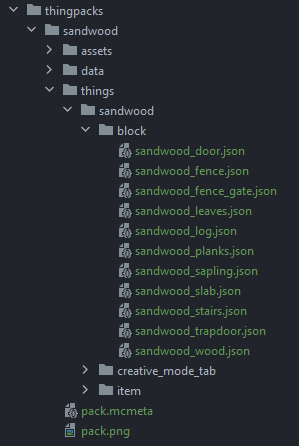
Json Things works via Thingpacks, which are similar to resource packs or datapacks. Thingpacks contain thing jsons, along with resources and data.
To install a thingpack, place it in the thingpacks directory in your game installation, or drag&drop it in the Json Things configuration screen.
You can also place a resource pack or datapack there, since the thingpack loader also adds the packs to the list of resourcepa ls and to the list of datapacks. Yes this means this mod works as a global datapack loader, even if unintentionally!
Documentation
If you want to create your own thingpacks, you can find the official documentation here. It's a bit barebones right now, but it describes the json files' structure as completely as I could.
Sandwood: A Json Things example pack
You can find the Sandwood example as an additional file in the release (look for the "+1 More" text in the Files page). I will try very hard to keep the sandwood example updated with the latest features, so it can work as a reference.
Can I use this in <X>?
Yes. Unless <X>'s license is incompatible with this mod's, which is unlikely.
Help and Support
For bug reports and feature requests, visit the issue tracker (link above)
You can also find me on discord, in my little discord server (please use the support forum channels! DO NOT DM me unless strictly necessary).
I've got a Patreon!
Help me continue making games and mods! Click here
Como instalar Json Things
With Millida Launcher
Install Millida Launcher
The launcher is free: download it at millida.net/launcher and sign in with any nickname.
Click “Install” on this page
The launcher opens and installs the mod for Minecraft 1.18.1–26.2 on Forge or NeoForge automatically.
Launch the game
A profile with it appears in the launcher: click “Play”.
Manually
Install Forge or NeoForge
The loader must match the game version of the mod file, for example Minecraft 26.2. After installing it, a separate profile appears in your launcher.
Download the file for your version
In the version list above, pick the file JsonThings-26.2-0.19.0.jar (1.2 MB) for your game version and loader.
Put it in the mods folder
The folder is inside .minecraft (Windows: %appdata%\.minecraft\mods). If it does not exist, create it.
Launch the loader profile
Open “Mods” in the main menu: Json Things should be in the list.
Versões
Com dependências
| Minecraft | Loader | Arquivo | Data | Ações |
|---|---|---|---|---|
| 26.2 | NeoForge | JsonThings-26.2-0.19.0.jar1.2 MB | ||
| 1.20.1 | Forge | JsonThings-1.20.1-0.9.13.jar517 KB 1 | ||
| 1.20.6 | NeoForge | JsonThings-1.20.6-0.11.2.jar1.3 MB | ||
| 1.18.1 | Forge | JsonThings-1.18.1-0.3.0.jar371 KB |
Avaliações
Seja o primeiro a avaliar Json Things


