

Flow Mod para Minecraft 1.20.1, 1.21.1
Transições de interface do inventário com ease in-out configurável.
- downloads
- 3 downloads
- visualizações
- 22 visualizações
- Atualizado
- Atualizado 02.10.2026
- 1.20 — 1.21.1
 Fabric
- Cliente
Flow is on hold
Mojang's UI refactors across 1.21 have made updating Flow for 1.21.3, 1.21.4 and 1.21.5 near impossible. Should UI refactors calm down, Flow will be remade for a future update, at a minimum 26.1+. Contributions through PRs are welcome.

Flow
Flow is a inventory UI animation mod that allows you to configure an ease in-out animation when opening and closing any inventory screens.

Compatability
Flow is likely already compatible with a wide range of mods, but has built in fixes to work with many mods, such as EMI.
Configuration
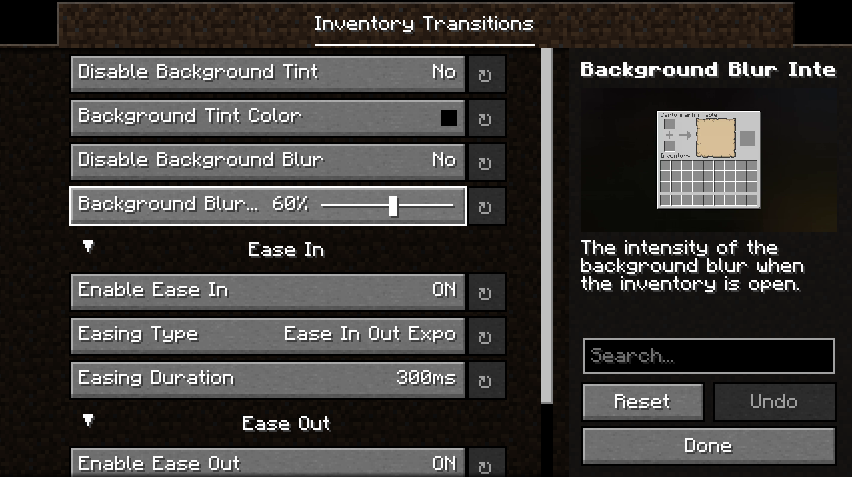
Flow has a wide range of configuration options, from background tint and blur, to the type of easing used to animate the movement in or out.
Roadmap
- Animation directions, more complex transitions. Slide in from left/right etc.
- More configurable blur/tint animations.
By using my mods, you agree to the Modpack Distribution Guidelines and the End User License Agreement
Como instalar Flow
With Millida Launcher
Install Millida Launcher
The launcher is free: download it at millida.net/launcher and sign in with any nickname.
Click “Install” on this page
The launcher opens and installs the mod for Minecraft 1.20–1.21.1 on Fabric automatically, together with its dependencies: Fabric API, MRU.
Launch the game
A profile with it appears in the launcher: click “Play”.
Manually
Install Fabric
The loader must match the game version of the mod file, for example Minecraft 1.21.1. After installing it, a separate profile appears in your launcher.
Download the file for your version
In the version list above, pick the file flow-2.2.0+1.21.jar (2.7 MB) for your game version.
Put it in the mods folder
The folder is inside .minecraft (Windows: %appdata%\.minecraft\mods). If it does not exist, create it. Required dependencies go there too: Fabric API, MRU.
Launch the loader profile
Open “Mods” in the main menu: Flow should be in the list.
Flow works on the player’s side only: there is no need to install it on a server.
Minecraft 1.21.1 runs on Java 21: with a different Java version the game may close right after launch.
Versões
Com dependências
| Minecraft | Loader | Arquivo | Data | Ações |
|---|---|---|---|---|
| 1.20.1 | Fabric | 1.20.12.7 MB 2 | ||
| 1.21.1 | Fabric | 1.21.12.7 MB 1 | ||
| 1.20.4 | Fabric | 1.20.42.6 MB | ||
| 1.21.1 | Fabric | 1.21.12.6 MB | ||
| 1.20.1 | Fabric | 1.20.12.6 MB | ||
| 1.20.6 | Fabric | 1.20.62.6 MB | ||
| 1.20.6 | Fabric | 1.20.62.6 MB | ||
| 1.20.4 | Fabric | 1.20.42.6 MB |
O que é necessário para funcionar
- Fabric APIobrigatório
- MRUobrigatório
Avaliações
Seja o primeiro a avaliar Flow


