
Entity Culling Mod para Minecraft 1.12.2
Pula a renderização de entidades ocultas
- downloads
- 7 downloads
- visualizações
- 28 visualizações
- Atualizado
- Atualizado 17.10.2026
- 1.12.2
 Forge
Forge
Sobre o mod Entity Culling
Entity Culling - 1.16.5 - 2.1.4 e versões mais recentes são compatíveis apenas com Optifine G8! Entity Culling - 1.16.5 - 2.1.3 e versões mais antigas são compatíveis apenas com Optifine G7! Entity Culling - 1.12.2 - 2.0.8 e versões mais recentes são compatíveis apenas com Optifine G5! Entity Culling - 1.12.2 - 2.0.7 e versões mais antigas são compatíveis apenas com Optifine F5!
Este mod requer MixinBootstrap (curseforge, modrinth) e RenderLib (curseforge, modrinth) para funcionar (apenas MC 1.12.2)! Mixin 0.7-0.8 Compatibility (curseforge, modrinth) pode ser útil quando outro mod usa uma versão mais antiga do mixin e você, por isso, não consegue iniciar o jogo (apenas MC 1.12.2).
Entity Culling é um mod de desempenho do lado do cliente que tem como objetivo pular a renderização de (tile-)entities ocultas. No vanilla, ele simplesmente renderiza todas as (tile-)entities que estão no campo de visão do jogador. Isso significa que pode haver centenas de (tile-)entities consumindo seus fps enquanto você nem consegue vê-las porque estão escondidas atrás de uma parede.
Culling de Entities ocultas Por padrão, este mod usa uma implementação de occlusion culling em OpenGL que oferece culling de bounding box com precisão de pixel com apenas um frame de atraso e uma sobrecarga muito pequena.
Se o seu hardware não suporta OpenGL 4.3, então este mod usa uma implementação de culling por raytracing. O culling por raytracing é mais intensivo em CPU enquanto o culling em OpenGL é mais intensivo em GPU e, portanto, dependendo do seu hardware, você pode preferir um em vez do outro. Isso pode resultar em melhorias massivas de FPS quando muitas (tile-)entities estão na tela mas não são visíveis porque estão ocluídas.
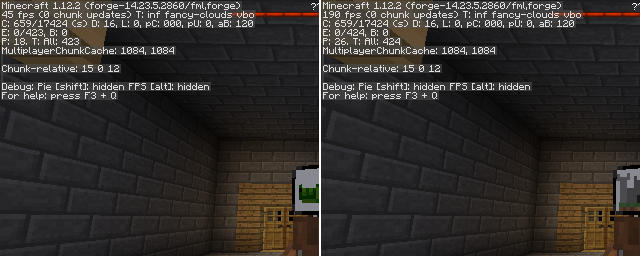
Teste com EntityCulling-1.12.2-6.0.2 dentro de uma dungeon do Chocolate Quest Repoured com ~200 entities na tela mostra melhorias enormes!
Como instalar Entity Culling
With Millida Launcher
Install Millida Launcher
The launcher is free: download it at millida.net/launcher and sign in with any nickname.
Click “Install” on this page
The launcher opens and installs the mod for Minecraft 1.12.2 on Forge automatically.
Launch the game
A profile with it appears in the launcher: click “Play”.
Manually
Install Forge
The loader must match the game version of the mod file, for example Minecraft 1.12.2. After installing it, a separate profile appears in your launcher.
Download the file for your version
In the version list above, pick the file EntityCulling-1.12.2-6.5.0.jar (62 KB) for your game version.
Put it in the mods folder
The folder is inside .minecraft (Windows: %appdata%\.minecraft\mods). If it does not exist, create it.
Launch the loader profile
Open “Mods” in the main menu: Entity Culling should be in the list.
Minecraft 1.12.2 runs on Java 8: with a different Java version the game may close right after launch.
Versões
Com dependências
| Minecraft | Loader | Arquivo | Data | Ações |
|---|---|---|---|---|
| 1.12.2 | Forge | EntityCulling-1.12.2-6.5.0.jar62.4 KB 6 | ||
| 1.12.2 | — | EntityCulling-1.12.2-6.3.1.jar64.4 KB 1 | ||
| 1.12.2 | — | EntityCulling-1.12.2-6.0.2.jar54.1 KB |
FAQ
Which Minecraft versions does Entity Culling work on?
Only Minecraft 1.12.2: there are no files for other versions.
Is Entity Culling for Forge or Fabric?
Only for Forge: 1.12.2. There are no files for Fabric or NeoForge: a mod for another loader will not start.
Does Entity Culling need other mods?
The author lists no required dependencies: the Forge loader is enough.
Which Java does Entity Culling need?
Minecraft 1.12.2 runs on Java 8. If the game closes right after launch, the usual cause is the wrong Java version in the profile settings.
Where can I download Entity Culling safely?
On this page: the file EntityCulling-1.12.2-6.5.0.jar (62 KB) is stored on Millida’s server, with no link shorteners. SHA-1 checksum: cf4a4a6b11b1721fbda1edeb32bdc3b1ac3a8560.
Avaliações
Seja o primeiro a avaliar Entity Culling


