

Constant Music Mod para Minecraft 1.20.1, 1.21.8
Controle o silêncio entre as músicas
 NeoForge
 Fabric
 Quilt
Quilt Forge
ForgeNever be stuck in silence again!
Minecraft has some of the most wonderful music. Atmospheric and ambience. However, there are times when you'll find yourself in silence, with only the sounds of mobs and breaking blocks keeping you company. This mod aims to fix that. With Constant Music, you can reduce or completely eliminate the amount of delay Minecraft adds between playing background tracks. It defaults to 0 seconds, which results in the next track playing immediately. But feel free to set it higher if you desire!
Versions for Fabric, Forge and NeoForge
The amount of time between tracks is easy to configure and can be done so in multiple locations. First, there is a slider in the "Music & Sounds Options" screen:
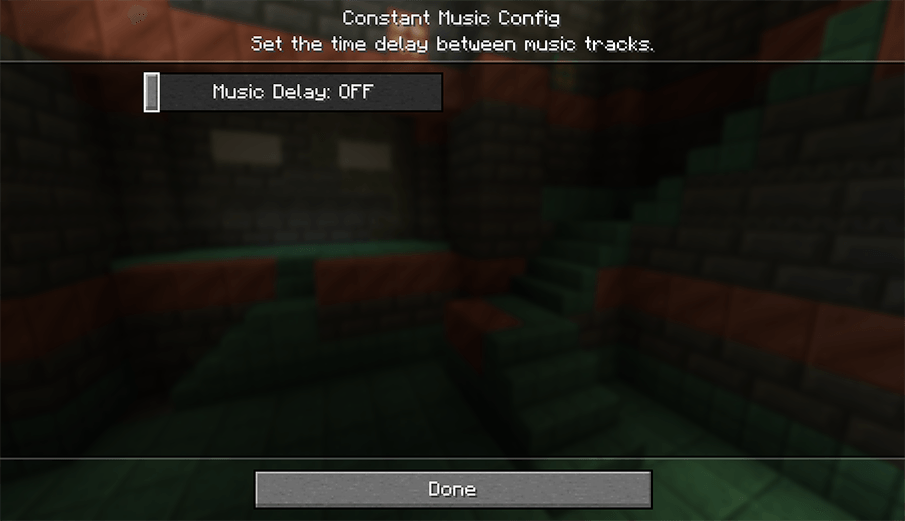
Second, there is a mod config screen with the same slider accessible through the mod menu. If you're using Fabric, it's only available with ModMenu installed:
And lastly, there is a config file created in the Minecraft folder that can edited directly if needed. The file is located within the Minecraft directory at config/constantmusic.toml
Dependencies
This mod requires the Fabric API if you are using the Fabric mod loader.
Alternative Mods
If you are looking for a mod that does the same thing but with a few more advanced features, such as skipping tracks and a now playing widget, check out Simple Music Control:
- Simple Music Control on Curseforge
License
This mod is under the GNU LESSER GENERAL PUBLIC LICENSE
Como instalar Constant Music
With Millida Launcher
Install Millida Launcher
The launcher is free: download it at millida.net/launcher and sign in with any nickname.
Click “Install” on this page
The launcher opens and installs the mod for Minecraft 1.20–1.21.8 on Fabric, Forge, NeoForge or Quilt automatically.
Launch the game
A profile with it appears in the launcher: click “Play”.
Manually
Install Fabric, Forge, NeoForge or Quilt
The loader must match the game version of the mod file, for example Minecraft 1.21.8. After installing it, a separate profile appears in your launcher.
Download the file for your version
In the version list above, pick the file constantmusic-neoforge-1.0.6+mc1.21.8.jar (772 KB) for your game version and loader.
Put it in the mods folder
The folder is inside .minecraft (Windows: %appdata%\.minecraft\mods). If it does not exist, create it.
Launch the loader profile
Open “Mods” in the main menu: Constant Music should be in the list.
Minecraft 1.21.8 runs on Java 21: with a different Java version the game may close right after launch.
Versões
Com dependências
| Minecraft | Loader | Arquivo | Data | Ações |
|---|---|---|---|---|
| 1.21.8 | NeoForge | [NeoForge 1.21.6-1.21.8] v1.0.6772 KB | ||
| 1.21.5 | Forge | [Forge 1.21.4-1.21.5] v1.0.6771 KB 1 | ||
| 1.21.8 | Fabric, Quilt | [Fabric 1.21.6-1.21.8] v1.0.6778 KB | ||
| 1.20.2 | Quilt | [Quilt 1.20.1+] v1.0.5149 KB |
FAQ
Which Minecraft versions does Constant Music work on?
There are files for 1.20–1.21.8, 9 versions in total. The newest is 1.21.8.
Is Constant Music for Forge or Fabric?
There are files for Fabric: 1.21.6–1.21.8, for Forge: 1.21.4–1.21.5, for NeoForge: 1.21.6–1.21.8 and for Quilt: 1.20–1.21.8.
Does Constant Music need other mods?
The author lists no required dependencies: the Fabric, Forge, NeoForge or Quilt loader is enough.
Which Java does Constant Music need?
Minecraft 1.21.8 runs on Java 21. If the game closes right after launch, the usual cause is the wrong Java version in the profile settings.
Where can I download Constant Music safely?
On this page: the file constantmusic-neoforge-1.0.6+mc1.21.8.jar (772 KB) is stored on Millida’s server, with no link shorteners. SHA-1 checksum: 42ac95868dcec3b791965891aa62967ddb33e2be.
Avaliações
Seja o primeiro a avaliar Constant Music


