
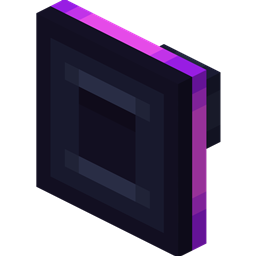
Cable Tiers Mod para Minecraft 1.20.1, 1.18.2
Adiciona Exporter, Importer, Constructor, Destructor, Disk Interface, Autocrafter, Interface e Requester melhores do Refined Storage e do RSRequestify
 Fabric
 NeoForge
 Forge
ForgeESTE MOD REQUER REFINED STORAGE
Se você quiser colocar este mod no seu modpack, fique à vontade para usá-lo :) Este mod adiciona Exporter, Importer, Constructor, Destructor, Disk Interface, Autocrafter, Interface e Requester melhores do Refined Storage e do RSRequestify
1.20.1 ou inferior: Elite: 9 slots de filtro a mais, 2x mais rápido Ultra: 27 slots de filtro a mais, 5x mais rápido, stack upgrade integrado Mega: 45 slots de filtro a mais, 6.5x mais rápido, stack upgrade integrado
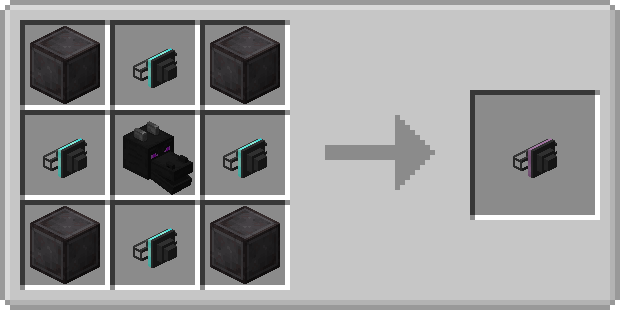
1.21.1 ou superior: Elite: 9 slots de filtro a mais, 2x mais rápido Ultra: 27 slots de filtro a mais, 5x mais rápido, stack upgrade integrado Mega: 45 slots de filtro a mais, 8x mais rápido, stack upgrade integrado Creative: 45 slots de filtro a mais, 15000x mais rápido, stack upgrade integrado
Recursos especiais:
- Filtragem por tag
- Entradas específicas por lado para autocrafting
- Modo de importação para Autocrafters
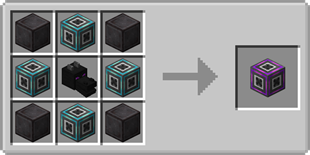
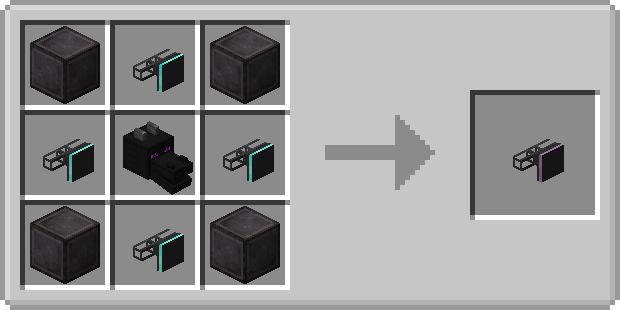
Receitas do Importer:
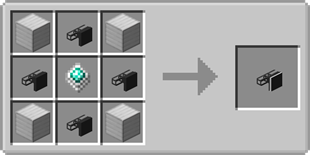


Receitas do Exporter:
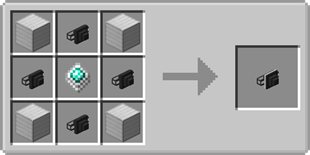
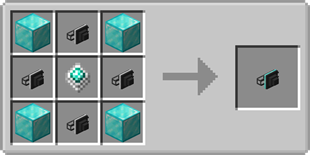
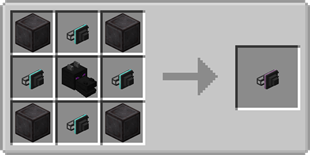
Receitas do Constructor:
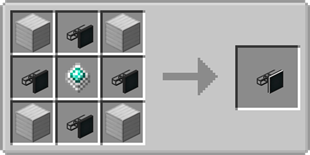
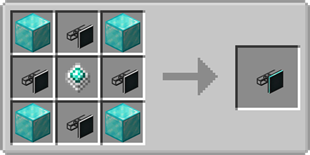
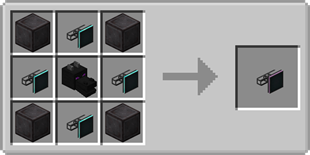
Receitas do Destructor:
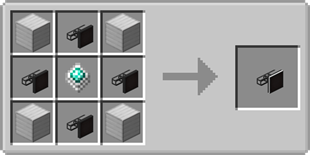
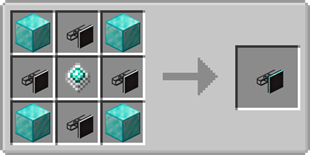
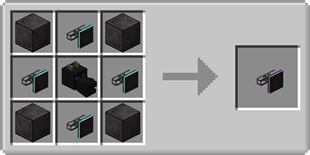
Receitas do Disk Manipulator:
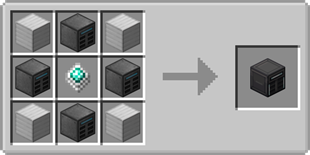
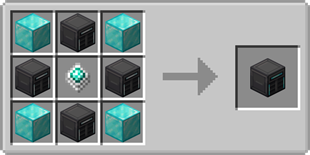
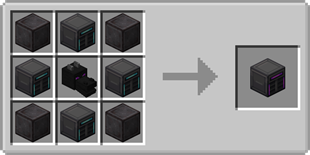
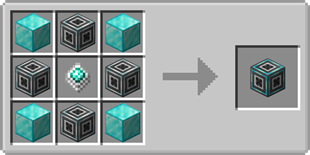
Receitas do Requester:

Precisa de um servidor? Ganhe 20% de desconto no seu primeiro mês usando o código promocional "ultra"
Como instalar Cable Tiers
With Millida Launcher
Install Millida Launcher
The launcher is free: download it at millida.net/launcher and sign in with any nickname.
Click “Install” on this page
The launcher opens and installs the mod for Minecraft 1.18.2–26.1.2 on Fabric, Forge or NeoForge automatically.
Launch the game
A profile with it appears in the launcher: click “Play”.
Manually
Install Fabric, Forge or NeoForge
The loader must match the game version of the mod file, for example Minecraft 26.1.2. After installing it, a separate profile appears in your launcher.
Download the file for your version
In the version list above, pick the file cabletiers-fabric-26.1.2-1.0.2.jar (1.4 MB) for your game version and loader.
Put it in the mods folder
The folder is inside .minecraft (Windows: %appdata%\.minecraft\mods). If it does not exist, create it.
Launch the loader profile
Open “Mods” in the main menu: Cable Tiers should be in the list.
Versões
Com dependências
| Minecraft | Loader | Arquivo | Data | Ações |
|---|---|---|---|---|
| 26.1.2 | Fabric | cabletiers-fabric-26.1.2-1.0.2.jar1.4 MB | ||
| 26.1.2 | NeoForge | cabletiers-neoforge-26.1.2-1.0.2.jar1.3 MB | ||
| 1.20.1 | Forge | cabletiers-1.20.1-1.2.2.jar292 KB | ||
| 1.18.2 | Forge | cabletiers-1.18.2-0.56.jar220 KB |
FAQ
Which Minecraft versions does Cable Tiers work on?
There are files for 26.1.2, 1.20.1, 1.18.2. The newest is 26.1.2.
Is Cable Tiers for Forge or Fabric?
There are files for Fabric: 26.1.2, for Forge: 1.18.2–1.20.1 and for NeoForge: 26.1.2.
Does Cable Tiers need other mods?
The author lists no required dependencies: the Fabric, Forge or NeoForge loader is enough.
Where can I download Cable Tiers safely?
On this page: the file cabletiers-fabric-26.1.2-1.0.2.jar (1.4 MB) is stored on Millida’s server, with no link shorteners. SHA-1 checksum: c6bd14b51cb80678313a3914b01c6a4f93513885.
Avaliações
Seja o primeiro a avaliar Cable Tiers


