
 NeoForge
 Forge
Sobre o mod Blue Flame Burning
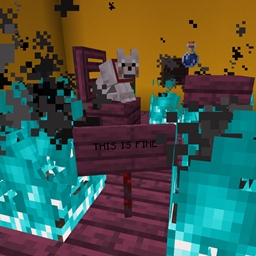
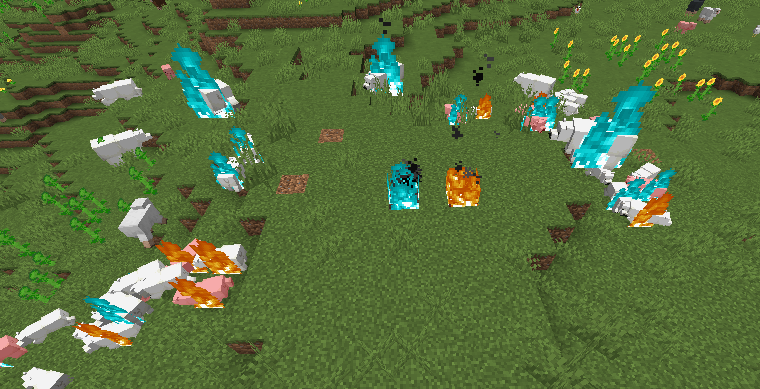
Faz o fogo das almas queimar as entidades com uma chama azul em vez das chatas chamas amarelas comuns quando incendiadas por uma fonte de fogo das almas.
- O Fogo das Almas, ao incendiar o jogador ou uma entidade, fará a entidade queimar com uma chama azul
- Um zumbi queimando com uma chama azul e incendiando outras entidades fará com que essas entidades também queimem em azul
- Suporte a fluidos de mods que incendeiam o jogador
A mudança adicionada por este mod é puramente visual.
O mod é necessário em ambos os lados.
Venha ao Discord se precisar de ajuda ou tiver dúvidas: https://discord.gg/69YVMbvhTC
Muitos ursos polares foram feridos na criação deste mod
Como instalar Blue Flame Burning
With Millida Launcher
Install Millida Launcher
The launcher is free: download it at millida.net/launcher and sign in with any nickname.
Click “Install” on this page
The launcher opens and installs the mod for Minecraft 1.18.2–1.21.1 on Forge or NeoForge automatically.
Launch the game
A profile with it appears in the launcher: click “Play”.
Manually
Install Forge or NeoForge
The loader must match the game version of the mod file, for example Minecraft 1.21.1. After installing it, a separate profile appears in your launcher.
Download the file for your version
In the version list above, pick the file blueflame-1.21.1-1.1.1.jar (18 KB) for your game version and loader.
Put it in the mods folder
The folder is inside .minecraft (Windows: %appdata%\.minecraft\mods). If it does not exist, create it.
Launch the loader profile
Open “Mods” in the main menu: Blue Flame Burning should be in the list.
Minecraft 1.21.1 runs on Java 21: with a different Java version the game may close right after launch.
Versões
Com dependências
| Minecraft | Loader | Arquivo | Data | Ações |
|---|---|---|---|---|
| 1.21.1 | NeoForge | blueflame-1.21.1-1.1.1.jar17.5 KB 1 | ||
| 1.20.1 | NeoForge, Forge | blueflame-1.20.0-1.0.3.jar26 KB | ||
| 1.18.2 | Forge | blueflame-1.18.2-0.1.0.0.jar26.2 KB |
FAQ
Which Minecraft versions does Blue Flame Burning work on?
There are files for 1.21.1, 1.20.1, 1.20, 1.18.2. The newest is 1.21.1.
Is Blue Flame Burning for Forge or Fabric?
There are files for Forge: 1.18.2–1.20.1 and for NeoForge: 1.20–1.21.1. There are no files for Fabric: a mod for another loader will not start.
Does Blue Flame Burning need other mods?
The author lists no required dependencies: the Forge or NeoForge loader is enough.
Which Java does Blue Flame Burning need?
Minecraft 1.21.1 runs on Java 21. If the game closes right after launch, the usual cause is the wrong Java version in the profile settings.
Where can I download Blue Flame Burning safely?
On this page: the file blueflame-1.21.1-1.1.1.jar (18 KB) is stored on Millida’s server, with no link shorteners. SHA-1 checksum: 0e78defafd6cf08759c656a54f8a33315e3ab924.
Avaliações
Seja o primeiro a avaliar Blue Flame Burning


