
O pakiecie zasobów Wolfhound
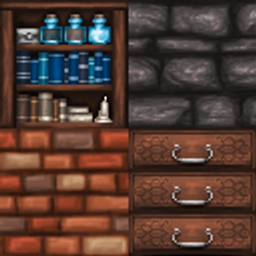
Are you the kind of person that doodles in the margin of notebooks or do you find yourself drawn to antique store shelves filled with strange bottles and cups? Do you like to see crowded bookcases, ornate carvings, and intricate patterns? Wolfhound just might be your texture pack, then. It's a pack that is meant to put a new look to Minecraft, staying just true enough to original textures so you know what the blocks are, but then adding a personal touch to them with tiny details and delicate patterns. Every texture is hand-drawn on the computer or a sketch scanned from my sketchbook - you won't find a single photo pasted into this texture pack. So give it a try, download, and watch your game be transformed.

Jak zainstalować Wolfhound
With Millida Launcher
Install Millida Launcher
The launcher is free: download it at millida.net/launcher and sign in with any nickname.
Click “Install” on this page
The launcher opens and installs the resource pack for Minecraft 26.3 automatically.
Launch the game
A profile with it appears in the launcher: click “Play”.
Manually
Download the archive
Pick the file Wolfhound.zip (41 MB) for your game version. No need to unpack it.
Put it in the resourcepacks folder
The easiest way: “Options”, then “Resource Packs”, then “Open Pack Folder”, and drag the archive there.
Enable the pack
In the same window, move the pack to the right-hand “Selected” column and click “Done”.
Wersje
Z zależnościami
| Minecraft | Loader | Plik | Data | Akcje |
|---|---|---|---|---|
| 26.3 | — | Wolfhound.zip40.7 MB 2 |
FAQ
Which Minecraft versions does Wolfhound work on?
Only Minecraft 26.3: there are no files for other versions.
Where can I download Wolfhound safely?
On this page: the file Wolfhound.zip (41 MB) is stored on Millida’s server, with no link shorteners. SHA-1 checksum: 8a35f54fe618c16d244235185ebd1be275ad2091.
Opinie
Oceń Wolfhound jako pierwszy


