

Visuals Paczka zasobów do Minecraft 26.1.2
Wyraźne tekstury przedmiotów! Zobacz sekrety, które skrywają twoje przedmioty. Działa w Vanilla 1.21.5+ 🌈
- pobrań
- 5 pobrań
- wyświetleń
- 16 wyświetleń
- Zaktualizowano
- Zaktualizowano 03.10.2026
- 1.21.5 — 26.1.2
 Gra vanilla
- Klient
📸 Visuals 👀
FAQ
What is this?
Click for answer
The goal of this resource pack is to give any items (and blocks) that have extra data associated with them unique textures, showing as much information about the block/item as possible. This usually comes in the form of checking unused block states for blocks and unused item components for items.
Visuals is a superset of Visual: Armor Trims and Visual: Paintings.
Polytone Recommended (for creative mode spawn eggs tab). Be warned though I do not know how server anticheats will react if you are pulling normally inaccessible items out of thin air.
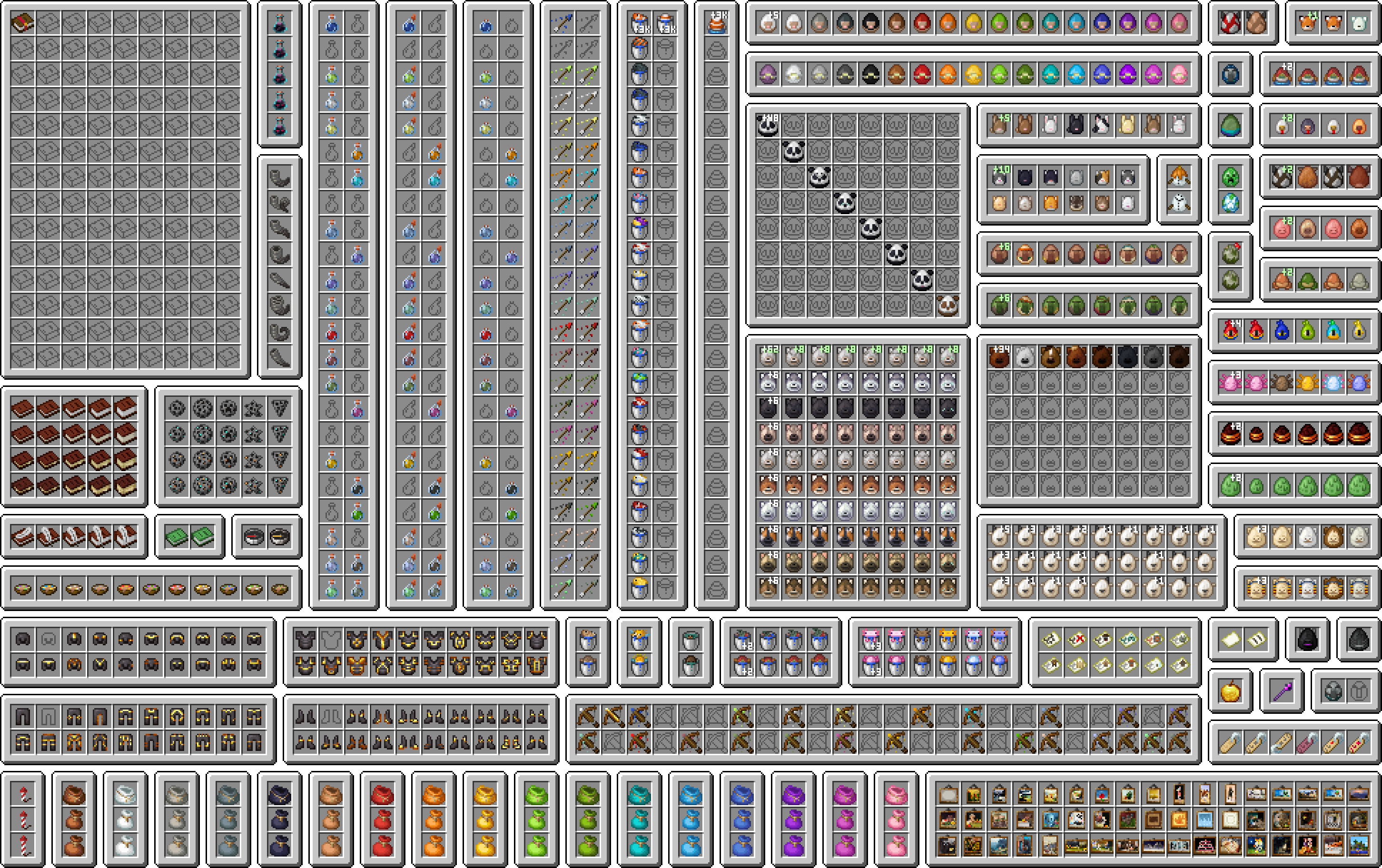
In the cases where something is partially possible (within reason), this pack will complete it to the best of its ability.
Please see the Changelog and the Gallery for an idea of what this resource pack changes.

How do I get it to work?
Click for answer
This resource pack requires Minecraft 1.21.5+ for the item edits, as it uses the new item model definitions.
Visual: Armor Trims and Visual: Paintings do have support for older versions, but require mods. See their respective pages for compatibility.

Links
If this pack interests you, come and join the Discord server!
Be sure to check out my other cool projects!
- Visuals (you are here)
- Visual: Armor Trims
- Visual: Paintings
- Pixel Consistency
- Festive Chests
If you have found a broken texture in this pack, or would like to request a feature, please raise an issue on the issues page.
This pack does not have a CurseForge page.
Credit
Huge thank you to the following people on Discord:
Click for credits
@un_pogaz - build scripts and project organization contributions
@malimiau - discovering data component predicates, and how to use them
@feycional - discovering that NBT can actually be matched as a string, suggesting the inclusion of context_entity bow arrows for strays/bogged/wither_skeletons, and Turkish translation
@its_markis - figuring out that visual crossbows are actually possible
@pineapple7462 - the idea of giving special maps unique textures
@pikuler - lolcat translation
@ramder007red - generic spawn egg variant number idea
@sharkinglot - empty writable book texture idea
@darkfire_ninja - firework/firework star fade texture ideas
The visual tropical fish bucket textures are somewhat inspired by Visual Fish Buckets by SixFootBlue. No assets from that resource pack are used.
If you are a resource pack developer and enjoy my work, I would love if you included any of my textures or models from this pack in yours. Be sure to credit me though!
If you would like to upload a video showcasing this resource pack to a third party platform like YouTube, credit would be highly appreciated, and be sure to let me know, I might include it here!
Support Me
The best way to support me at the moment is by downloading and following my resource packs!
If you would like to:
- Ask a question about this pack, or something related
- Request a commission, or
- Donate, to me directly
please either join the Discord or raise an issue on the Github page.
Jak zainstalować Visuals
With Millida Launcher
Install Millida Launcher
The launcher is free: download it at millida.net/launcher and sign in with any nickname.
Click “Install” on this page
The launcher opens and installs the resource pack for Minecraft 1.21.5–26.1.2 automatically.
Launch the game
A profile with it appears in the launcher: click “Play”.
Manually
Download the archive
Pick the file visuals-2.0.2.zip (4.8 MB) for your game version. No need to unpack it.
Put it in the resourcepacks folder
The easiest way: “Options”, then “Resource Packs”, then “Open Pack Folder”, and drag the archive there.
Enable the pack
In the same window, move the pack to the right-hand “Selected” column and click “Done”.
Wersje
Z zależnościami
| Minecraft | Loader | Plik | Data | Akcje |
|---|---|---|---|---|
| 26.1.2 | — | 26.1.24.8 MB 5 | ||
| 1.21.10 | — | 1.21.104.6 MB | ||
| 1.21.8 | — | 1.21.83.6 MB | ||
| 1.21.5 | — | 1.21.52.7 MB |
Co jest potrzebne do działania
- Dependencyjuż w środku
- Polytoneopcjonalne
- Visual: Armor Trimsjuż w środku
Opinie
Oceń Visuals jako pierwszy



