
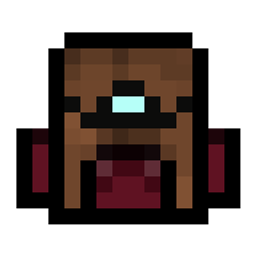
O pakiecie zasobów Upgradable Backpack
I made the backpack, which is
- Dyeable through the crafting table.
- Easily renamable using an anvil.
- Wearable in your chest slot.
- Upgradable to get more slots (9 -> 18 -> 26 slots)
How to Use Backpacks
- To store or retrieve items, simply drop the backpack on the ground. It will transform into a barrel, allowing you to manage your items. Click the "Exit" button slot to revert it to a backpack item.
Crafting Recipes
Craft a Small Backpack:
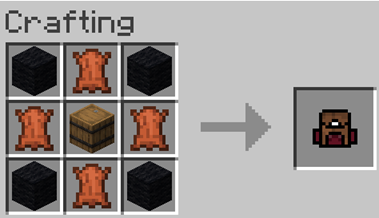
Craft a Backpack Upgrader:
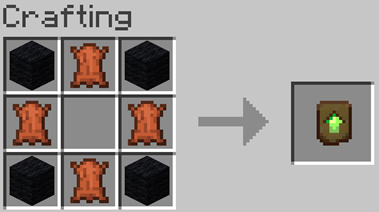
Upgrading to a 26-Slot Backpack: Place the upgrader into your backpack block.
Demo Video
Coming soon...
Jak zainstalować Upgradable Backpack
With Millida Launcher
Install Millida Launcher
The launcher is free: download it at millida.net/launcher and sign in with any nickname.
Click “Install” on this page
The launcher opens and installs the resource pack for Minecraft 1.21.4–1.21.10 automatically.
Launch the game
A profile with it appears in the launcher: click “Play”.
Manually
Download the archive
Pick the file Upgradable Backpack v11.1.zip (98 KB) for your game version. No need to unpack it.
Put it in the resourcepacks folder
The easiest way: “Options”, then “Resource Packs”, then “Open Pack Folder”, and drag the archive there.
Enable the pack
In the same window, move the pack to the right-hand “Selected” column and click “Done”.
Wersje
Z zależnościami
| Minecraft | Loader | Plik | Data | Akcje |
|---|---|---|---|---|
| 1.21.5 | — | Upgradable Backpack v11.1.zip98.3 KB 1 |
Opinie
Oceń Upgradable Backpack jako pierwszy



