

fun while it lasted. versions 26.12+ no longer support packs like this. ore ui is the death of all packs.
use flarial client to make this work again. turn on "Force Close OreUI"
I've seen packs like this before, but they have so many other features too. They're not centered around changing your FOV, and more just focused on getting to "important" settings fast. One pack that claims to have "better" settings cares about changing split controls faster. This is NOT a setting that needs to be done in any urgency. Since there are all these settings in these packs, this always makes it less quick to change your FOV. This pack is simple. Adds a tab to settings labeled "Quick FOV". Can you guess what happens when you click it? A slider appears and it changes your field of view. It's so much faster in a server or world with this pack.
Just a reminder that this is one of the first and fastest FOV changer packs for Minecraft Bedrock (without a 3rd party client, duh).
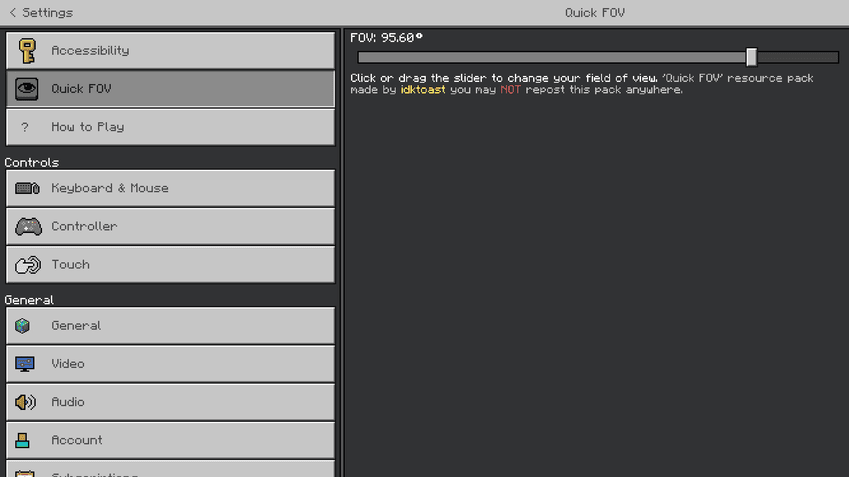
What the resource pack looks like in the settings. Possible updates in the future, with more settings. Except it won't be cluttered like the other packs and FOV will remain at the top.
Known Issues
The contents of the Quick FOV settings tab appears at the bottom of every settings tab (status: unfixable - thanks bedrock :/)
Impossibilities
It is NOT possible to add these features. Not because I don't want to, but because bedrock is very strict and limits a lot of things compared to java edition packs like this one:
- wider FOV range (example: 30-200 FOV)
- open the menu by presssing a key (example: press j to open the fov slider)
what you can do
✅you CAN edit this pack for PERSONAL USE
✅you CAN credit me if used in a showcase for other projects
✅you CAN download :)
what you cant do
❌you CANT post this on other websites even as to putting me on other websites
❌you CANT edit this pack for PUBLIC use
❌you CANT use it in a showcase for another project and not credit me correctly (original project link)
Jak zainstalować Quick FOV
With Millida Launcher
Install Millida Launcher
The launcher is free: download it at millida.net/launcher and sign in with any nickname.
Click “Install” on this page
The launcher opens and installs the resource pack for Minecraft 1.21.123–1.21.130 automatically.
Launch the game
A profile with it appears in the launcher: click “Play”.
Manually
Download the archive
Pick the file quick fov by idktoast.mcpack (20 KB) for your game version. No need to unpack it.
Put it in the resourcepacks folder
The easiest way: “Options”, then “Resource Packs”, then “Open Pack Folder”, and drag the archive there.
Enable the pack
In the same window, move the pack to the right-hand “Selected” column and click “Done”.
Wersje
Z zależnościami
| Minecraft | Loader | Plik | Data | Akcje |
|---|---|---|---|---|
| 1.21.123 | — | quick fov.mcpack19.7 KB 1 |
FAQ
Which Minecraft versions does Quick FOV work on?
There are files for 1.21.130, 1.21.124, 1.21.123. The newest is 1.21.130.
Where can I download Quick FOV safely?
On this page: the file quick fov by idktoast.mcpack (20 KB) is stored on Millida’s server, with no link shorteners. SHA-1 checksum: bbd1f1dca869b9bcc61c4ce676b89b55e9514d8e.
Opinie
Oceń Quick FOV jako pierwszy


