
Enchanted Outline Paczka zasobów do Minecraft 26.50
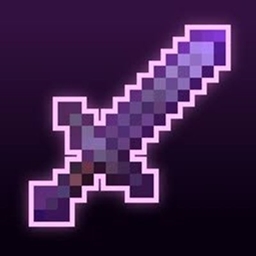
Nigdy więcej nie trać swojego najlepszego ekwipunku! ✨ Enchanted Outline dodaje świecące obrysy do zaklętych mieczy i kilofów ⚔️⛏️ — pełna personalizacja kolorów i efekty tęczy na kilofach, więcej funkcji mieczy już wkrótce. Lekki i przyjazny wanilii.
✨ Enchanted Outline ✨
Ever lost your best sword or pickaxe in a chest full of junk? Yeah, we fixed that.
Enchanted Outline gives your enchanted gear a clean, glowing outline so it actually stands out - no more squinting through a messy inventory or guessing which item is the good one mid-fight. It still feels 100% vanilla, just... better. 🎯
⛏️ Pickaxe - Full Customization
The pickaxe is where this pack really shows off. Every visual element is independently adjustable:
🎨 Separate Glint & Outline Colors** - mix and match freely, they don't need to be the same color
📏 Adjustable Outline Size** - control outline thickness independently of the glint
📐 Independent Sizing** - fine-tune how the whole effect scales on the item
🌈 3 Rainbow Mode - choose your vibe:
0 - Off - static colors, no animation
1 - Outline Rainbow - outline color cycles automatically every 2 seconds
2 - Full Rainbow\ - both glint and outline cycle together for a fully animated look
⚔️ Sword - Core Features
The sword keeps things simple for now, with more advanced options planned for a future update:
📏 4 Sword Size Options** - go small and subtle or big and bold
📏 Adjustable Outline Size** - control how thick or thin the glow looks
🎨 Glint & Outline Color** - currently matched (independent colors coming soon 🔜)
🧩 Setup
No config files, no complicated steps:
1️⃣ Download the pack
2️⃣ Drag Enchanted Outline to the top of your active resource pack list
3️⃣ That's it - you're done! 👍
Works alongside your other packs - just make sure it's loaded above them.
⚡ Why You'll Like It
🍃 Zero gameplay changes - 100% visual, nothing sneaky
⚡ Super lightweight - won't touch your FPS
✅ 100% vanilla-friendly - feels like it belongs in the base game
🔄 Actively updated - new features rolling out regularly
🗺️ Roadmap
🔜 Independent glint/outline colors for swords
🔜 Rainbow modes for swords
🔜 More enchanted item types beyond swords & pickaxes
📜 Copyright
(c) 2026 Agent2009. All Rights Reserved.
Redistribution, modification, or reuploading of this resource pack or its assets is not permitted without prior permission from the author. If permission is granted to use any part of this resource pack, proper credit must be given.
Jak zainstalować Enchanted Outline
With Millida Launcher
Install Millida Launcher
The launcher is free: download it at millida.net/launcher and sign in with any nickname.
Click “Install” on this page
The launcher opens and installs the resource pack for Minecraft 26.10–26.50 automatically.
Launch the game
A profile with it appears in the launcher: click “Play”.
Manually
Download the archive
Pick the file Enchanted Outline v1.4.mcpack (405 KB) for your game version. No need to unpack it.
Put it in the resourcepacks folder
The easiest way: “Options”, then “Resource Packs”, then “Open Pack Folder”, and drag the archive there.
Enable the pack
In the same window, move the pack to the right-hand “Selected” column and click “Done”.
Wersje
Z zależnościami
| Minecraft | Loader | Plik | Data | Akcje |
|---|---|---|---|---|
| 26.10 | — | Enchanted Outline v1.4405 KB 1 |
Opinie
Oceń Enchanted Outline jako pierwszy


