

Classic Sky Shadery do Minecraft 1.21.7
Usuwa nowe chmury i mgłę dodane w 1.21.6
- wyświetleń
- 16 wyświetleń
- Zaktualizowano
- Zaktualizowano 29.09.2026
- 1.21.6 — 1.21.7
 vanilla
- Klient
Classic Sky – Resource Pack
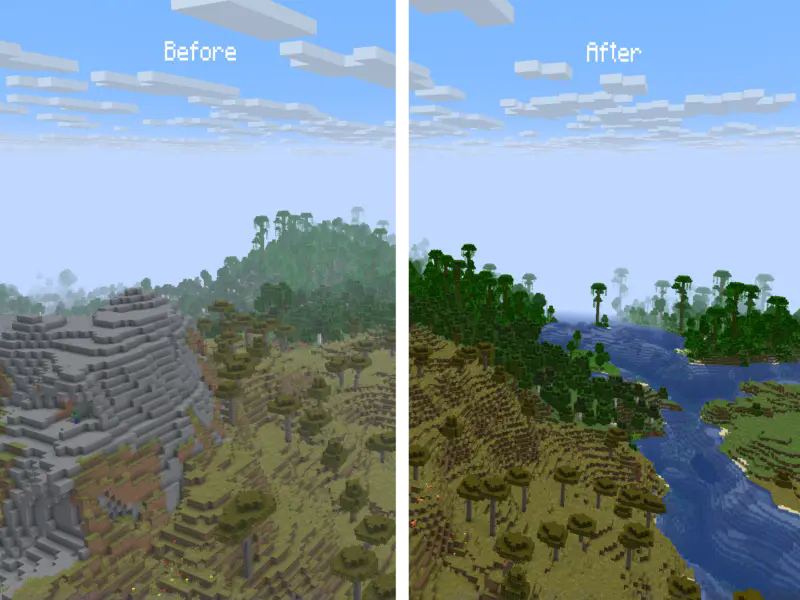
This resource pack reverts the clouds and fog that normally appears in the sky in th newer versions of Minecraft, giving you a clearer and more immersive view of landscapes, skies, and builds.
Features:
- Completely removes the newly added sky fog in 1.21.6 from the overworld.
- Reverts the new clouds from 1.21.6+ to the old clouds from 1.21.5 and before.
- Enhances visibility of far-off terrain, structures, and skies.
- Keeps all other fog types (such as water fog or blindness effects) untouched.
Visual Improvements:
- Makes the sky feel more open and realistic by eliminating the distant haze.
- Improves the experience for players who build tall structures, large bases, or scenic vistas.
- Makes the world seem more vibrant
Compatibility:
- Works with most modern Minecraft versions (check supported versions).
- Fully client-side – no server installation needed.
Note: This resource pack is not compatible with most shaders (such as OptiFine, Iris, or Sodium) because these shaders use custom rendering engines that bypass Minecraft’s built-in fog settings. Most shaders also include their own fog controls, which override resource pack behavior.
Preview
Jak zainstalować Classic Sky
With Millida Launcher
Install Millida Launcher
The launcher is free: download it at millida.net/launcher and sign in with any nickname.
Click “Install” on this page
The launcher opens and installs the shaders for Minecraft 1.21.6–1.21.7 automatically.
Launch the game
A profile with it appears in the launcher: click “Play”.
Manually
Install Iris or OptiFine
Without a shader mod the game cannot see shaders. Install it for the same Minecraft version.
Download the shader archive
Pick the file ClassicSky.zip (95 KB) and do not unpack it.
Put it in the shaderpacks folder
“Options”, then “Video Settings”, then “Shader Packs”, then “Open Shader Pack Folder”, and drag the archive there.
Select the shaders
In the same window, click the pack name and “Apply”.
Wersje
Z zależnościami
| Minecraft | Loader | Plik | Data | Akcje |
|---|---|---|---|---|
| 1.21.7 | Vanilla | 1.21.795.3 KB |
FAQ
Which Minecraft versions does Classic Sky work on?
There are files for 1.21.7, 1.21.6. The newest is 1.21.7.
Where can I download Classic Sky safely?
On this page: the file ClassicSky.zip (95 KB) is stored on Millida’s server, with no link shorteners. SHA-1 checksum: 23843ef41e288bcffb99bd8d2b3145d039b4ee54.
Opinie
Oceń Classic Sky jako pierwszy


