

O pluginie Warptastic
Description: We had a recurring issue with using various warp plugins, which left many of our players trapped in the ground below the warp location. So I developed warptastic to resolve the issue, have since expanded upon it, and decided to share. Warptastic has an editable warp effect duration, which will hold the player just above the warp location for the configured number of seconds before dropping them safely. This allows the chunk around the player to load before safely completing the warp process. Warptastic allows server owners to create public server-warps, each user to create a configurable number of public and private warps, warps accessible via warp signs, and permits admin to create warps on behalf of others, which exceed that users limits. Warptastic also keeps track of how often users use different warps, and can use this information to list the warps by popularity. Of course, there are other features; and you can configure it's precise behaviour using the config options and relevant permissions. If you're using CommandBook,Essentials, MyWarp or xWarp and wish to import your warps you can do so by copying either your warps.csv(Commandbook), your warps folder(Essentials), or your warps.db(MyWarp/xWarp) into warptastic's plugin directory, and running the relevant /fixwarps import command. /fixwarps -cmdbook or /fixwarps -essentials or /fixwarps -mywarp or /fixwarps -xWarp
Updating from a version earlier than 0.3?
In version 0.3 data storage was changed from YAML to SQLite. if you're updating from Warptastic 0.2 or earlier, remember to type '/fixwarps -update' to upgrade your user records from the old YAML to the new SQLite data storage. You only need to run this once.
Importing warp records: To import warp records from either CommandBook, Essentials, MyWarp or xWarp copy your warps.csv(Commandbook), your warps folder(Essentials), or your warps.db(MyWarp/xWarp) into warptastic's plugin directory and run the relevant /fixwarps import command. (warps.db for MyWarp/xWarp will require renaming before proceeding, see /fixwarps menu for details.) /fixwarps -cmdbook or /fixwarps -essentials or /fixwarps -mywarp or /fixwarps -xwarp
Editable Group Warp Limits: You can now specify a different number of maxwarps for different groups. Simply create the permission nodes in the config.yml and apply the corresponding permission (warptastic.limit.#) to the desired group. If groups are inheriting permissions from other groups, be sure to disable the inherited warptastic.limit.# permission before applying a new limit permission. For more information see Here
Warp Signs Place the phrase [Warp] (Phrase is configurable in config.yml) on the first line of a sign, and the warp name on a following line. (You can include a description of the warp if you like, just as long as it occurs on any line after the warp name) You can use any warp on a sign, however if you'd like the warp to be only accessible by using the sign you can make the warp a sign-only warp with /setwarp -sign <warpname>
Installation:
- Download the .jar
- Place the .jar in your plugins directory
- Restart the server Configuration:
MaxWarps.LimitNodes - Define your warptastic.limit.# permission nodes here. WarpSignTitle - What title a sign should have to make it a WarpSign. WarpEffect - Toggle the warp effect (Nausea) when warping WarpEffectDuration - Time for the warp to finish (IN SECONDS) (wait for chunk to load)
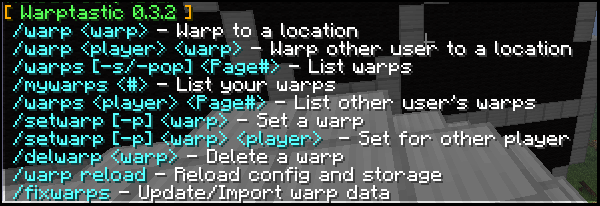
Commands: • /warp - Main Menu • /warp reload - Reload config and data storage • /warp <warp> - Warp to a location • /warp <warp> <player> - Warp player to a location • /warps <page#>- List all warps • /warps -pop <page#>- List all warps by popularity • /warps -s <page#>- List all Server-warps • /warps <player> <page#> - List a player's warps • /mywarps <page#> - List your warps only • /warpinfo <warp> - List warp details • /setwarp <warp> - Create a new Public warp • /setwarp -p <warp> - Create a new/Toggle Private warp • /setwarp -s <warp> - Create a new Server warp • /setwarp -sign <warp> - Create a new/Toggle Sign warp • /setwarp [-p/-sign] <warp> <player> - Create a warp for another user • /fixwarps - Update your warp records • /delwarp <warp> - Delete a warp • /clearwarps <player> - Clear all of a players warps Permissions: warptastic.warp - Use warps warptastic.warp.other - Warp other player to a location • warptastic.warp.otherworld - Allow player to warp between worlds warptastic.setwarp.public - Set Public warps warptastic.setwarp.private - Set Private warps warptastic.setwarp.other - Set warps for other users (ignore limits) warptastic.limit.# - Editable warp limits as defined in config.yml warptastic.limit.unlimited - Ability to set an Unlimited # of warps (included in warptastic.admin) warptastic.list - View list of warps warptastic.list.pop - View list of warps by popularity warptastic.list.other - View list of player's warps warptastic.makesign - Ability to make warp signs warptastic.breaksign - Ability to break other people's warpsigns (included in warptastic.admin) warptastic.signonly.bypass - Ability to bypass using a sign for signonly warps warptastic.info - Return information about a warp warptastic.admin - Manage warps and ignore limits warptastic.warp.<warpname> - Allow player to bypass warp privacy warptastic.fix - Update warp records
To Do: • Access list for private warps • Clean up the menu / command help
Thankyou for your support! :D Recent Change-Log:
0.4.3
- Fixed warpsigns exploit [write sign title manually, permission no longer needed]
- Added warptastic.warp.<warpname> permission to allow users/groups to bypass warp privacy and use the specified private warp.
- Added warptastic.warp.otherworld permission to allow users to warp between worlds
0.4.2
- Fixed user restrictions for toggling private/public warps
- Fixed warps list listing other players private warps
- Added warp import for xWarp
- Fixed warp conversion for MyWarp & xWarp on windows systems (requires renaming db file as specified in /fixwarp menu)
0.4.1
- Fixed setwarp for other player saying the player's name instead of owner's name
- Updated warpdata conversion to new DB format
0.4
- Added check on /warp to ensure target world is loaded
- Added /clearwarps (warptastic.admin / warps owner)
- Added /warpinfo (warptastic.info/warptastic.admin/warp owner)
- Added signonly option for warps. Sign-only warps can only be used via a sign.
- New Permission warptastic.signonly.bypass (use sign-only warps without a sign)
- Fixed bug when warping another user to non-existant warp, no notification that warp does not exist.

Jak zainstalować Warptastic
A server on Paper or Spigot
The plugin runs on the server core; players do not need to install anything.
File goes into the plugins folder
Download the file Warptastic.jar (50 KB) and put it into the server’s plugins folder.
Restart the server
On startup the plugin creates its own settings folder in plugins.
Or use the “To hosting” button
On Millida Hosting, the button at the top of the page uploads the file to your server and restarts it for you.
Wersje
Z zależnościami
| Minecraft | Loader | Plik | Data | Akcje |
|---|---|---|---|---|
| — | — | Warptastic-0.4.349.8 KB |
FAQ
Do players need to install Warptastic?
No, the plugin goes only on the server, into the plugins folder: players do not need to download anything.
Where can I download Warptastic safely?
On this page: the file Warptastic.jar (50 KB) is stored on Millida’s server, with no link shorteners. SHA-1 checksum: 2b10a29866a50a745662c5f2ff9e0446c0009609.
Opinie
Oceń Warptastic jako pierwszy


