

O pluginie Undine Mailer

Release page for Japanese is here.
http://forum.minecraftuser.jp/viewtopic.php?f=38&t=24681
Features
- This plugin UndineMailer provides a mail sending and receiving system to your server!
- You can exchange mails with online/offline players.
- Clickable Chat Component GUIs. Easy to make mails!
- You can attach items to your mails!
- You can set "C.O.D. item" or "C.O.D. money" to open attachment item box.
- Mail list group management systems.
- Sender and recipients are managed with UUID. You can change Minecraft ID, but you can see your mail history!
Screen shots
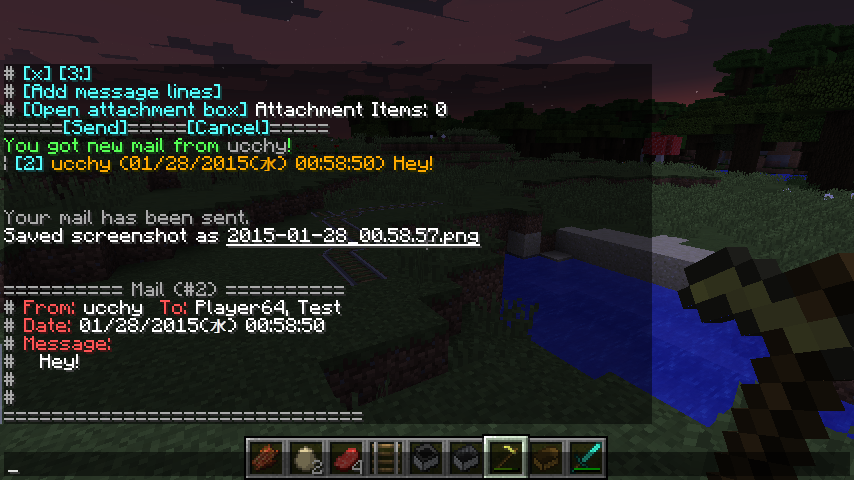
Mail Detail View
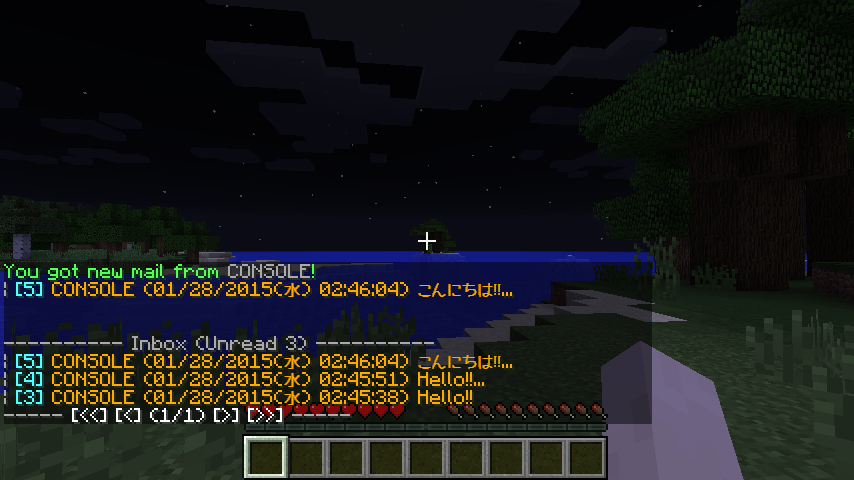
Inbox GUI
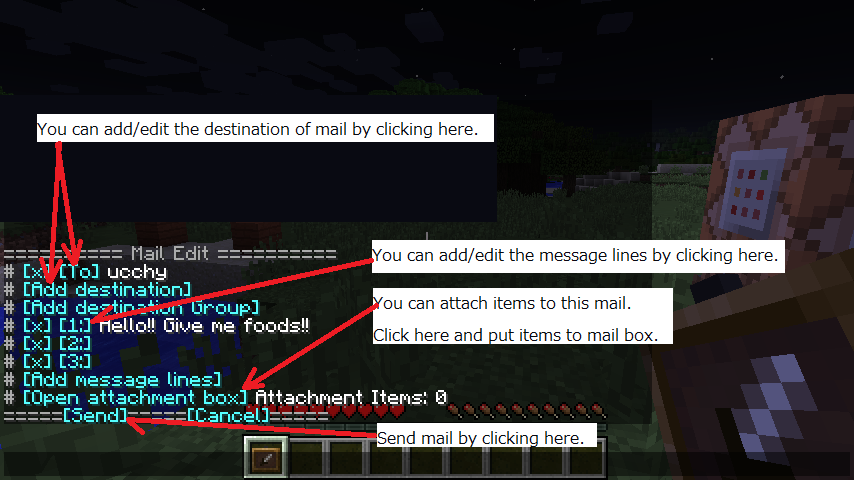
Mail Edit GUI
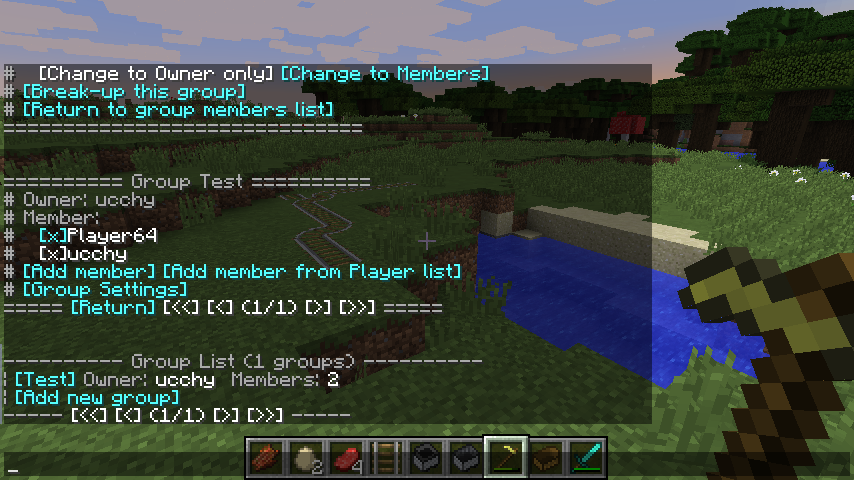
Group Management
How to use
Please use CraftBukkit 1.7.2-R0.3 or later version!
Put "UndineMailer.jar" in plugins folder.
You can enter the mail edit mode by "/mail write" command. You can see mail editor GUI in your chat window. You can reopen GUI by "/mail write" command, even if you close your client.
Regarding C.O.D. feature
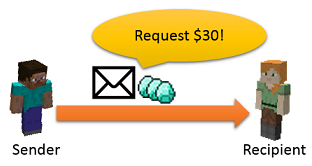
You can use C.O.D. (Cash on delivery) feature as trading items between players.
Sender can request money or item as C.O.D. (If you want to use C.O.D. money feature, you need Vault and any economy plugin.)
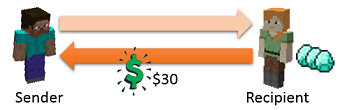
If recipient opens mail item box, $30 is sent to sender.
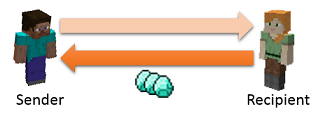
If recipient refuses mail item box, item box is sent back to sender.
Regarding PermissionsEx co-operation feature
This plugin can use PermissionsEx's groups as mail list group.
Please add "receive-mail: true" flag to PermissionsEx groups. ex)
groups: default: options: default: true permissions: - modifyworld.* test: options: receive-mail: true send-mode: op
NOTE: "send-mode" is optional. You can set it from "op", "member", "everyone". If you not add "send-mode", "specialGroupPexSendMode" config value will be used.
Commands
Command is "/umail". Aliase is "/mail".
- /mail - Display your inbox mail list.
- /mail outbox - Display your outbox mail list.
- /mail trash - Check your deleted mails.
- /mail text <to> <message> - Send simple text message to the specified player.
- /mail write - Enter to mail creation mode.
- /mail item - Show the detailed information of item in your hand.
- /mail trash all - Move all your readed received/sent mails to trash box.
- /mail trash restoreAll - Restore all your trash box mails from trash box.
- /ugroup - Show the group management menu.
- /mail reload - Reload UndineMailer config. Only OP can run this command.
- /mail help - Show the help menu.
Commands for server console
If you want to send mail from server console, please use the following commands also.
- mail write - Enter to mail edit mode.
- mail to <number> <destination player name> - Set the destination of mail.
- mail to delete <number> - Delete the specified number's destination player.
- mail to group <number> <destination group name> - Set the destination group of mail.
- mail to group delete <number> - Delete the specified number's destination group.
- mail message <number> <message> - Set the message of mail.
- mail attach add <item> [amount] - Add an item as attachment. <item> is item description. You can use item name and item ID and data value.
ex) "mail attach add WOOL:11 30" (Adding 30 blue wools.) ex) "mail attach add 35:11 30" (Adding 30 blue wools. Same as above.)
- mail attach clear - Clear all attachment items.
- mail send - Send mail.
Permissions
- undine.<each sub commands>
Permission for each sub commands. Default assigned to Everyone. ex) /mail write -> undine.write
- undine.read-all
Permission to read other's mails. Default assigned to OP.
- undine.attach-infinity
Permission to make the attachment item box infinity. Default assigned to OP.
- undine.attach-sendmail
Permission of opening the attachment box of send mail. Default assigned to Everyone.
- undine.attach-inboxmail
Permission of opening the attachment box of inbox mail. Default assigned to Everyone.
- undine.command-attach
Permission to use "/mail attach add" command and "/mail attach clear" command.
- undine.multiple-attach
Permission of sending item attached mail to multiple destinations.
- undine.group.infinite-create
Permission to make the mail list group infinity. Default assigned to OP.
- undine.group.infinite-add-member
Permission to add members infinity to your group. Default assigned to OP.
- undine.group.modify-all
Permission to modify all of mail groups. Default assingned to OP.
- undine.group.dissolution-all
Permission to break-up all of mail groups. Default assingned to OP.
- undine.group.*
All of group management permissions.
- undine.*
All of UndineMailer permissions.
Configs
You can configuration Undine Mailer by editing "plugins/UndineMailer/config.yml".
UndineMailer v1.7.1 # @author ucchy # @license LGPLv3 # @copyright Copyright ucchy 2015 # -------------------- Misc -------------------- # Message locale. lang: en # Enable to send mail to oneself. enableSendSelf: false # Display empty line count before display UI. uiEmptyLines: 2 # Enable to use player list address book. enablePlayerList: false # Limitation number of mail destination. maxDestination: 10 # Limitation number of mail destination group. maxDestinationGroup: 3 # Mail store period. # If you set 30, the system deletes mails that 31 days passed from sending. mailStorageTermDays: 30 # Mail spam protection seconds. # If you set 15, players need 15 seconds, from sending a mail to sending next mail. mailSpamProtectionSeconds: 15 # Mail notification delay seconds on player login. loginNotificationDelaySeconds: 3 # -------------------- Attachment Item Box -------------------- # Enable the attachment item box. enableAttachment: true # Attachment item box line size. Please set 1 - 6. # ex) 1 -> you can attach 9 items per 1 mail. # ex) 6 -> you can attach 54 items per 1 mail. attachBoxSize: 1 # Max usage count of attachment item box per a player. maxAttachmentBoxCount: 3 # World names that disable to open attachment item box. disableWorldsToOpenAttachBox: [] # Specify the items that cannot be attached to the mail. # For example, the following setting makes that gold apple and quartz block will not be attached. # prohibitItemsToAttach: [GOLDEN_APPLE, QUARTZ_BLOCK] # Possible item name, please see the following URL as a reference. # https://github.com/ucchyocean/UndineMailer/blob/master/src/main/java/org/bitbucket/ucchy/undine/item/TradableMaterial.java#L16-L357 prohibitItemsToAttach: [] # -------------------- C.O.D. Setting -------------------- # Enable C.O.D. money feature by using currency of economy plugin. # If you want to use C.O.D. money feature, you need Vault and any economy plugin. enableCODMoney: true # Enable C.O.D. item feature. enableCODItem: true # When paying cash on delivery fee to the other player, # if the amount of post-payment does not match, you can set whether an error. # In such Essentials "max-money" setting, if you have set the upper limit of money, # payment will be disappear. So please make this setting to true, for saving payment. # If you are using such as taking a tax on payment in your economy plugin, # so you will not be able to remittances, please make this setting to false. depositErrorOnUnmatch: true # -------------------- Send Fee -------------------- # Enable mail sending fee. enableSendFee: false # Sending fee per a destination. sendFee: 10 # Attaching fee per an item. attachFee: 10 # Attaching fee is needed whether per the item amount, or per the item stack. attachFeePerAmount: false # COD money tax. Please specify parcentage. # If you set "codMoneyTax: 10", and one of player set $300 as COD, # this player need to pay the additional sending fee $30 (= $300 * 10%). codMoneyTax: 0 # COD item tax. Please specify price per item amount. # If you set "codItemTax: 10", and one of player set DIAMOND * 8 as COD, # this player need to pay the additional sending fee $80 (= $10 * 8). codItemTax: 0 # -------------------- Mail Group -------------------- # Max group creation num per a player. maxCreateGroup: 5 # Max member num per a group. maxGroupMember: 15 # Default mode of send mail permission. # OP: only OP can send mail to this group. # OWNER: owner and OP can send mail to this group. # MEMBER: group members anyone can send mail to this group. # EVERYONE: everyone can send mail to this group. sendModeDefault: MEMBER # Default mode of members modification. # OP: only OP can add/remove members. # OWNER: owner and OP can add/remove members. # MEMBER: group members anyone can add/remove members. # EVERYONE: everyone can add/remove members. modifyModeDefault: OWNER # Default mode of dissolution. # OP: only OP can break-up group. # OWNER: owner and OP can break-up group. # MEMBER: group members anyone can break-up group. # EVERYONE: everyone can break-up group. dissolutionModeDefault: OWNER # Sending permission mode of special group "All" (all players group). specialGroupAllSendMode: OP # Default of sending permission mode of special group "PEX" (PermissionsEx group). # You can arrange this permission each groups by setting "send-mode" option value. specialGroupPexSendMode: OP # Sending permission mode of special group "AllConnected" (all connected players without newcomers). specialGroupAllConnectedSendMode: OP # Sending permission mode of special group "AllLogin" (all connecting players). specialGroupAllLoginSendMode: OP # -------------------- Welcome Mail -------------------- # Welcome email is a mail sent to the player that was first connected to the server. # You can change the message of welcome mail, by changing WelcomeMailBody of messages_en.yml file. # Enable welcome mail. useWelcomeMail: true # Delay seconds to send welcome mail. welcomeMailDelaySeconds: 30 # Attachment item
Source Code
Source codes managed in Github. https://github.com/ucchyocean/UndineMailer
These codes licensed under LGPLv3.
Jak zainstalować Undine Mailer
A server on Paper or Spigot
The plugin runs on the server core for Minecraft 1.13–1.15; players do not need to install anything.
File goes into the plugins folder
Download the file UndineMailer.jar (459 KB) and put it into the server’s plugins folder.
Restart the server
On startup the plugin creates its own settings folder in plugins.
Or use the “To hosting” button
On Millida Hosting, the button at the top of the page uploads the file to your server and restarts it for you.
Minecraft 1.15 runs on Java 8: with a different Java version the game may close right after launch.
Wersje
Z zależnościami
| Minecraft | Loader | Plik | Data | Akcje |
|---|---|---|---|---|
| 1.14 | — | 1.10.3459 KB |
FAQ
Which Minecraft versions does Undine Mailer work on?
There are files for 1.15, 1.14, 1.13. The newest is 1.15.
Where can I download Undine Mailer safely?
On this page: the file UndineMailer.jar (459 KB) is stored on Millida’s server, with no link shorteners. SHA-1 checksum: f9e6579f3bb828a737eb17e585687845c8b667dc.
Opinie
Oceń Undine Mailer jako pierwszy


