
O pluginie Mario WorldCraft
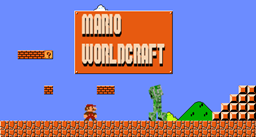
When you first saw Minecraft's pixelated graphics, did it remind you of early Mario games? If not, it probably does now. With this mod, you are able to mix the two and create your own Mario world with blocks which get powered when you smack your forehead into it.
The Mario sound effect tunes are not of my own creation, they are instead made by the lovely folks at The Mushroom Kingdom
NOTE: If you want the HUD and sound effects then you need to have Spout running. Otherwise, you do not need Spout anymore (in version 2.4+).
Features:
- Powers the block above the desired Question Mark block which can power a dispenser (or anything else).
- A reset command which sets all the Question Mark blocks but to their original form.
- Become "big" or "small" by eating mushrooms or by being damaged by monsters.
- Gain the power to fling fireballs eggs by acquiring a red rose.
- Become invincible for a short period by acquiring a cookie.
- Bricks get destroyed with your head if you're "big".
- Able to only effect the desired worlds.
- Toggle Mario style damage.
- HUD which displays the players current statistics (with Spout).
- Life and coins systems.
- Custom default number of lives.
- Different languages (English, Spanish, Australian, Romanian, German, Dutch).
- Supports warp blocks so you can simulate warp pipes.
Language requests
- If you would like to have your preferred language featured in this plugin, send me a PM and/or fill out the template in this thread.
'How to' page
By default when a server is started up, the mario style damage is off. So whenever there is a restart you just need to type "/mariodamage". If you believe it should default to on, please comment in the forums.
Special thanks:
- I would like to thank WingedSpear for some very valuable feedback, suggestions as well as providing the Spanish translations.
Check out the main site here.
Jak zainstalować Mario WorldCraft
A server on Paper or Spigot
The plugin runs on the server core; players do not need to install anything.
File goes into the plugins folder
Download the file marioWorldCraft.jar (45 KB) and put it into the server’s plugins folder.
Restart the server
On startup the plugin creates its own settings folder in plugins.
Use the “To server” button
On Millida Hosting, the button at the top of the page uploads the file to your server and restarts it for you.
Wersje
Z zależnościami
| Minecraft | Loader | Plik | Data | Akcje |
|---|---|---|---|---|
| — | — | v4.645.4 KB | ||
| — | — | v1.432.4 KB |
FAQ
Do players need to install Mario WorldCraft?
No, the plugin goes only on the server, into the plugins folder: players do not need to download anything.
Where can I download Mario WorldCraft safely?
On this page: the file marioWorldCraft.jar (45 KB) is stored on Millida’s server, with no link shorteners. SHA-1 checksum: aaebd145d151c5750902c43ad652d902a601871e.
Opinie
Oceń Mario WorldCraft jako pierwszy


