

Forever Factory Modpack do Minecraft 1.19.2
Buduj ogromne fabryki, automatyzuj wszystko, wzbogać się, powtórz
- pobrań
- 2 pobrań
- wyświetleń
- 17 wyświetleń
- Zaktualizowano
- Zaktualizowano 18.10.2026
- 1.19.2
 Forge
Forge
O modpacku Forever Factory
Want to support modpack development: click here to get 50% off your first month at scalacube hosting.
Join our Discord! https://discord.gg/hEaS5EVCH7
Note: this modpack works best with 6GB RAM or more. Please change that from the default 4gb!
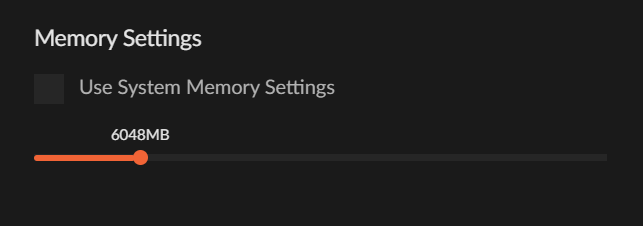
Note2: if you try to create a Skyblock world on singleplayer, it may crash on the first time you join (when you create the world). Just relaunch the game and join the world, it'll have generated correctly.
Forever Factory is the long-anticipated sequel to Mechanical Mastery, an automation-focused modpack. Make no mistake though, Forever Factory is designed to be played on a naturally-generated world (with an optional skyblock mode when creating a new world), with one big twist: there's absolutely no ore generation!
How do you obtain resources, you ask? This modpack centers around the mod AdminShop as a means to buy and sell resources. You access the Shop to buy raw minerals, automate them into valuable goodies, and sell them for big profit! There's many customized recipes and assembly lines, each one more complex than the last, but those big numbers behind their price makes them more than worth it!
Moreover, AdminShop was made with Co-Op support in mind, allowing you to create shared bank accounts with other players, so that you both can have your share of those juicy profits!
Forever Factory adopts the mentality of "the factory must grow" and takes it further beyond, quests and progression are scaled in a way that each new chapter unlocks you even more powerful mods and items, such that you're able to keep expanding your base and increasing resource production exponentially. You'll need crazy production scaling to get your account balance up to trillions!
The modpack features a unique balance between the Tech mods everyone loves to automate, and also introduces some newer challenges by requiring you to automate different Magic mods, something that many players may not be quite used to yet! Which better time to learn than now?
Hundreds of recipes have been modified or completely changed in order to gatekeep some of the more powerful mods to later stages of the game. Applied Energistics is on the pack, but getting there will be a challenge!
We also offer certain optional challenges that may require more effort to complete the pack when accepting them, they are all viewable from the Quest Book.
Forever Factory has been in the works for over a year now. Not only does it have orders of magnitude more content than Mechanical Mastery, certain mods like AdminShop and SoulOverclockers were developed specifically to feature on this modpack!
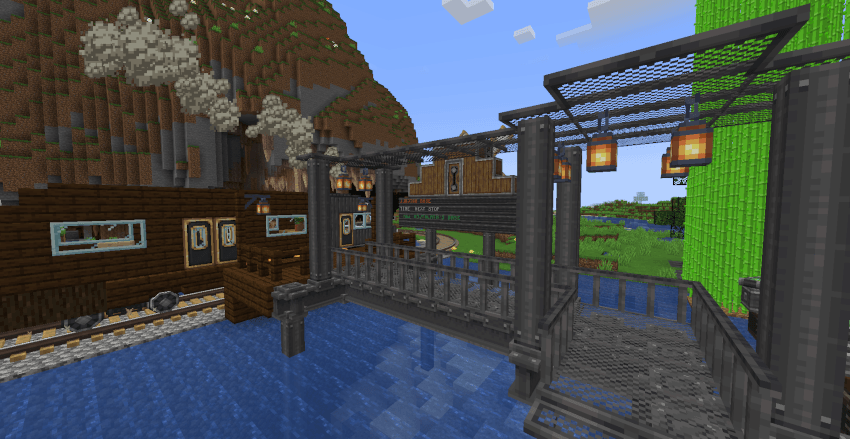
Finally, enjoy some screenshots from the private beta-testing server, many thanks to the following Helpers on Discord that helped beta test and report bugs/issues:
Anqromeda, a1qs, choekstr GittuBaba, juh9870, Nekosity, Novtalath
Jak zainstalować Forever Factory
With Millida Launcher
Install Millida Launcher
The launcher is free: download it at millida.net/launcher and sign in with any nickname.
Click “Install” on this page
The launcher opens and installs the modpack for Minecraft 1.19.2 on Forge automatically.
Launch the game
A profile with it appears in the launcher: click “Play”.
Manually
Download the modpack archive
In the version list above, pick the file Forever Factory-2.0.3.zip (3.2 MB).
Import it into a launcher
A launcher that supports modpacks (Millida Launcher, Prism) takes the archive via “Add modpack”, then “From file”. No need to unpack it yourself.
Allocate memory
Modpacks need more memory than the plain game: set 4–6 GB in the profile settings.
On a server
Use the “To server” button
On Millida Hosting, the button at the top of the page uploads the file to your server and restarts it for you.
Invite friends: they install the same modpack
To join the server, every player needs the same modpack version.
Minecraft 1.19.2 runs on Java 17: with a different Java version the game may close right after launch.
Wersje
Z zależnościami
| Minecraft | Loader | Plik | Data | Akcje |
|---|---|---|---|---|
| 1.19.2 | Forge | Forever Factory-2.0.3.zip3.2 MB 2 |
FAQ
Which Minecraft versions does Forever Factory work on?
Only Minecraft 1.19.2: there are no files for other versions.
Is Forever Factory for Forge or Fabric?
Only for Forge: 1.19.2.
Which Java does Forever Factory need?
Minecraft 1.19.2 runs on Java 17. If the game closes right after launch, the usual cause is the wrong Java version in the profile settings.
Where can I download Forever Factory safely?
On this page: the file Forever Factory-2.0.3.zip (3.2 MB) is stored on Millida’s server, with no link shorteners. SHA-1 checksum: d8dd3be8af2fc388adf8285d1460f5e8ab7b464e.
Opinie
Oceń Forever Factory jako pierwszy


