

RANDOM DROPS Paczka danych do Minecraft 1.20.1, 1.21.1
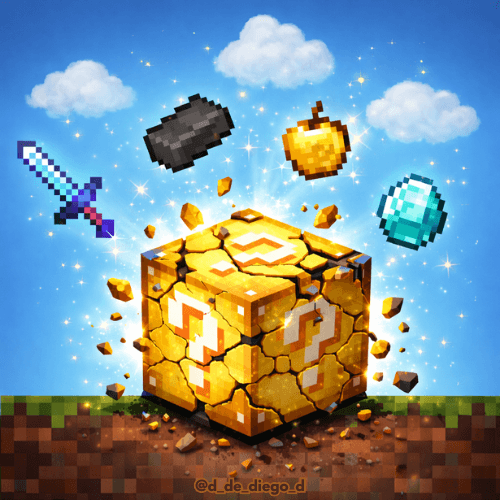
Każdy blok i mob upuszczają całkowicie losowe przedmioty. Żadne dwa wypady nie są takie same. Ukończ Minecrafta, zdając się tylko na szczęście.
O pakiecie danych RANDOM DROPS

RANDOM DROPS
ENGLISH
🎲 Random Drops Datapack turns Minecraft into a completely unpredictable challenge. Every broken block and every defeated mob drops a random item, making no two drops the same. You'll have to adapt, improvise, and use luck to complete the game.
✨ Features:
- Every game is unique and different.
- 100% random drops
- Ideal for challenges, speedruns, and content creators.
- Challenge your creativity to beat Minecraft
Can you complete the game when chance decides everything? Test your luck with Random Drops 🍀🔥
By @d_de_diego_d
ESPAÑOL
🎲 Random Drops Datapack convierte Minecraft en un desafío totalmente impredecible. Cada bloque roto y cada mob derrotado suelta un ítem aleatorio, haciendo que ningún drop sea igual. Tendrás que adaptarte, improvisar y usar la suerte para completar el juego.
✨ Características:
- Cada partida es única y diferente
- Drops 100% aleatorios
- Ideal para challenges, speedruns y creadores de contenido
- Reta tu creatividad para pasarte Minecraft
¿Podrás completar el juego cuando el azar lo decide todo? Pon a prueba tu suerte con Random Drops 🍀🔥
By @d_de_diego_d
❤️ Support Me ❤️




⭐ Our Projects⭐




(c) TRIDEX 2025 - All Rights Reserved
Jak zainstalować RANDOM DROPS
With Millida Launcher
Install Millida Launcher
The launcher is free: download it at millida.net/launcher and sign in with any nickname.
Click “Install” on this page
The launcher opens and installs the data pack for Minecraft 1.8–26.1.2 automatically.
Launch the game
A profile with it appears in the launcher: click “Play”.
Manually
Download the archive
Pick the file RandomDrops.zip (430 KB) for your game version.
New world: “Data Packs”
When creating a world, click “Data Packs”, drag the archive into the window, then move it to “Selected”.
Existing world: the datapacks folder
Put the archive into saves/<world>/datapacks and type /reload in game.
On a server
Archive goes into the server world’s datapacks
The world/datapacks folder on the server; players do not need to install anything.
Reload the data
Type /reload in the server console or restart the server.
Or use the “To hosting” button
On Millida Hosting, the button at the top of the page uploads the file to your server and restarts it for you.
Wersje
Z zależnościami
| Minecraft | Loader | Plik | Data | Akcje |
|---|---|---|---|---|
| 1.16.3 | — | RandomDrops430 KB 12 |
FAQ
Which Minecraft versions does RANDOM DROPS work on?
There are files for 1.8–26.1.2, 73 versions in total. The newest is 26.1.2.
Does RANDOM DROPS work on a server?
Yes: the data pack goes into the datapacks folder of the server world, and players do not need to install anything.
Where can I download RANDOM DROPS safely?
On this page: the file RandomDrops.zip (430 KB) is stored on Millida’s server, with no link shorteners. SHA-1 checksum: 7f268ce1a8468eb3befb413a18bbacb87fd728fa.
Opinie
Oceń RANDOM DROPS jako pierwszy


