

Desert Scourge Paczka danych do Minecraft 1.21.1, 1.21
Dodaje nowego unikalnego bossa na pustyni, opartego na Calamity Mod
- wyświetleń
- 52 wyświetleń
- Zaktualizowano
- Zaktualizowano 07.09.2024
- 1.21 — 1.21.1
 Paczka danych
- Klient i serwer
❔ About
This datapack adds a new unique worm boss, based on the boss of the same name from Calamity Mod.

💿 Installation
This datapack is installed like any other.
- Don’t forget to install and enable the resource pack.
- Datapack requires enabled “Bundles” in Experiments. (not relevant since v1.2)

🏜️ Content
💰 Bundle
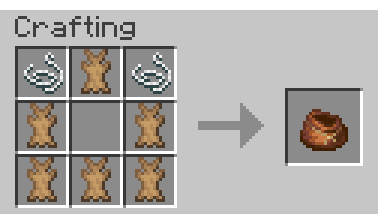
- Bundle now has a craft.
🌪️ Sand Tornado
- Sand Tornado spawns in the desert and chases the nearest player, throwing them into the sky. The spawn chance is much higher in rainy weather.
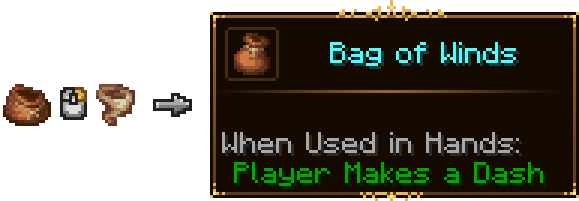

- Mod used - Legendary Tooltips
🪱 Desert Scourge
- Desert Scourge is a unique boss worm that can be summoned using the Suspicious Horn in the desert.
- Has 250 HP. It attacks both directly, attacking the player from underground, and indirectly, summoning its mini-worm minions, which jump out from underground and attack random players.
- Аfter its death, it drops a new item on place of his head - the Barinade.
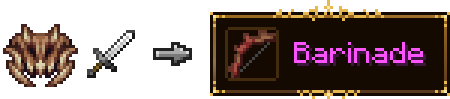
- Barinade is a bow whose arrows have no gravity and have great speed.
- Arrows that hit the block disappear.
🎬 Showcase
🛠️ Compatibility
❗This datapack will not work correctly on servers with Spigot/Paper. (not relevant since v1.1) ❗This datapack may have problems with other datapacks/mods that somehow change pigs.
💿 Optimization
❗The optimization here isn't the best and I strongly don't recommend spawning more than 1 worm.
👨💻 Authors
- Bimba - Code, Sound design
- DotVi - Art (Tapy.me)
📨 Feedback
If you have ideas for improving the datapack (both from the content and from the technical side), please open issue on github or message me in Discord. Discord - @bimbusick
Jak zainstalować Desert Scourge
With Millida Launcher
Install Millida Launcher
The launcher is free: download it at millida.net/launcher and sign in with any nickname.
Click “Install” on this page
The launcher opens and installs the data pack for Minecraft 1.21–1.21.1 automatically.
Launch the game
A profile with it appears in the launcher: click “Play”.
Manually
Download the archive
Pick the file Desert Scourge (Datapack).zip (309 KB) for your game version.
New world: “Data Packs”
When creating a world, click “Data Packs”, drag the archive into the window, then move it to “Selected”.
Existing world: the datapacks folder
Put the archive into saves/<world>/datapacks and type /reload in game.
On a server
Archive goes into the server world’s datapacks
The world/datapacks folder on the server; players do not need to install anything.
Reload the data
Type /reload in the server console or restart the server.
Use the “To server” button
On Millida Hosting, the button at the top of the page uploads the file to your server and restarts it for you.
Wersje
Z zależnościami
| Minecraft | Loader | Plik | Data | Akcje |
|---|---|---|---|---|
| 1.21 | Paczka danych | 1.21309 KB |
Opinie
Oceń Desert Scourge jako pierwszy


