

Copper Rails Paczka danych do Minecraft 1.20.1, 1.19.2
Zmienia wszystkie przepisy Rails, aby zawierały Copper!
- wyświetleń
- 22 wyświetleń
- Zaktualizowano
- Zaktualizowano 24.07.2025
- 1.17 — 1.20.6
 Paczka danych
- Klient i serwer

RESOURCE PACK REQUIRED TO CORRECTLY VIEW ITEMS IN-GAME
Copper Rails is a small Data Pack that replaces the base ingredients in Crafting recipes of Rails with Copper.
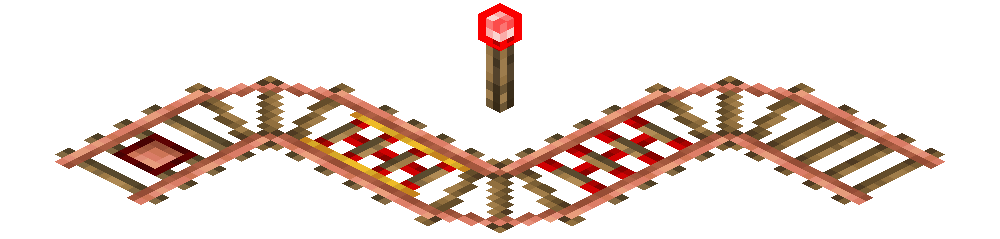
Specifically, Copper Rails' objective is to fill a gap by making Copper more useful.
Take a look at this project's images for the specific Crafting recipes.

Installation and Compatibility
Copper Rails is fully compatible with MC 1.17 and all its later versions, including the latest 1.21.8.
To properly install Copper Rails, both the Data Pack and the Resource Pack must be installed.
To manually install the Data Pack, simply drop the corresponding .zip file in the 'datapack' folder inside your world folder. To manually install the required Resource Pack, drop the corresponding .zip file in the 'resourcepacks' folder inside your main MC directory.
Copper Rails is extremely lightweight and is compatible with Multiplayer, as long as the Resource Pack is correctly loaded.

Support
If you like my Data Packs, Resource Packs or textures, consider donating, it would really mean a lot to me. If you are interested in commissioning any content, contact me on any available platform, I'll try to reach out to you as fast as I can.
Suggestions for future Minecraft content are also well received. Thank you for taking a look at my content. :)
Jak zainstalować Copper Rails
With Millida Launcher
Install Millida Launcher
The launcher is free: download it at millida.net/launcher and sign in with any nickname.
Click “Install” on this page
The launcher opens and installs the data pack for Minecraft 1.17–1.20.6 automatically.
Launch the game
A profile with it appears in the launcher: click “Play”.
Manually
Download the archive
Pick the file Copper Rails DP 1.17 - 1.20.6 v1.0.zip (3 KB) for your game version.
New world: “Data Packs”
When creating a world, click “Data Packs”, drag the archive into the window, then move it to “Selected”.
Existing world: the datapacks folder
Put the archive into saves/<world>/datapacks and type /reload in game.
On a server
Archive goes into the server world’s datapacks
The world/datapacks folder on the server; players do not need to install anything.
Reload the data
Type /reload in the server console or restart the server.
Use the “To server” button
On Millida Hosting, the button at the top of the page uploads the file to your server and restarts it for you.
Wersje
Z zależnościami
| Minecraft | Loader | Plik | Data | Akcje |
|---|---|---|---|---|
| 1.17.1 | Paczka danych | 1.17.13 KB |
FAQ
Which Minecraft versions does Copper Rails work on?
There are files for 1.17–1.20.6, 17 versions in total. The newest is 1.20.6.
Does Copper Rails work on a server?
Yes: the data pack goes into the datapacks folder of the server world, and players do not need to install anything.
Where can I download Copper Rails safely?
On this page: the file Copper Rails DP 1.17 - 1.20.6 v1.0.zip (3 KB) is stored on Millida’s server, with no link shorteners. SHA-1 checksum: b00ab64e2c6c6d7f201a1a2a6560729efd52a43e.
Opinie
Oceń Copper Rails jako pierwszy


