
Bone Items: Tools and Armor Paczka danych do Minecraft 1.21.11
Datapack dla 1.21.5+ dodający do gry Kościane Narzędzia i Zbroję
O pakiecie danych Bone Items: Tools and Armor
This Datapack adds Bone Tools and Armor, that are stronger than iron and weaker than diamond.
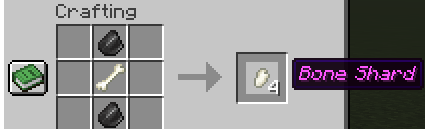
To Craft Tools, you need Bone Shards, that you can craft like this:
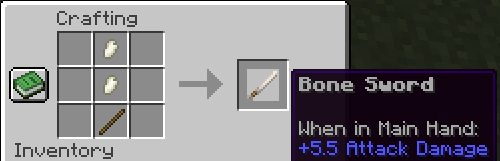
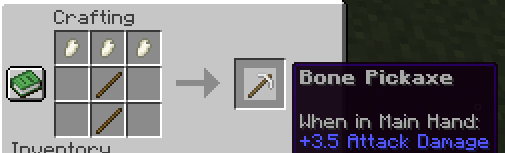
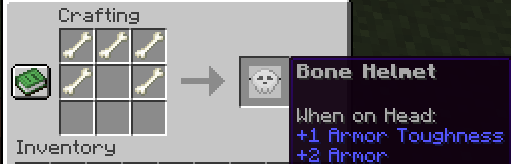
To Craft Armor, you need to use normal bones:
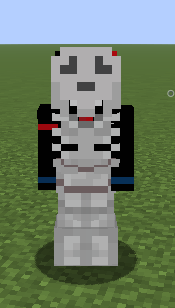
How Bone Armor Appears on a player:
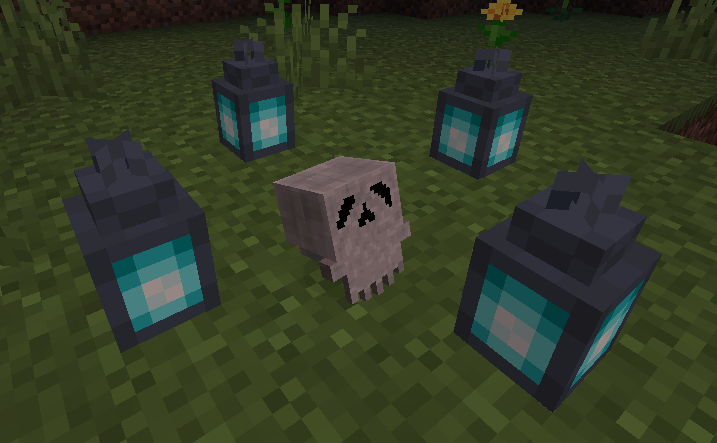
Zombie Villagers also have a slight chance to drop a human skull, which gives the same protection as a netherite helmet and affects all nearby players with regeneration:
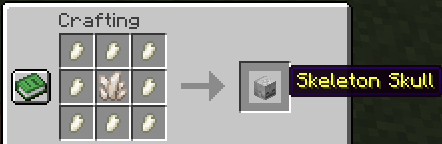
With Bone Shards you can also craft skulls!
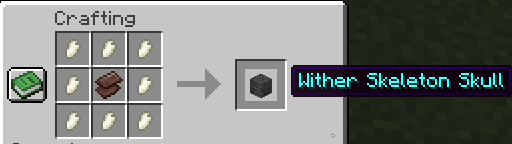
Feel free to leave a comment if you any suggestions!
!While playing make sure the datapack is installed correctly with the related texture pack in the files page!
TWISTED MIND: INSANITY HORROR MAP AVAILABLE NOW ON MY PROFILE!
Jak zainstalować Bone Items: Tools and Armor
With Millida Launcher
Install Millida Launcher
The launcher is free: download it at millida.net/launcher and sign in with any nickname.
Click “Install” on this page
The launcher opens and installs the data pack for Minecraft 1.21.11 automatically.
Launch the game
A profile with it appears in the launcher: click “Play”.
Manually
Download the archive
Pick the file BoneItemsDatapack_1.21.11.zip (12 KB) for your game version.
New world: “Data Packs”
When creating a world, click “Data Packs”, drag the archive into the window, then move it to “Selected”.
Existing world: the datapacks folder
Put the archive into saves/<world>/datapacks and type /reload in game.
On a server
Archive goes into the server world’s datapacks
The world/datapacks folder on the server; players do not need to install anything.
Reload the data
Type /reload in the server console or restart the server.
Use the “To server” button
On Millida Hosting, the button at the top of the page uploads the file to your server and restarts it for you.
Wersje
Z zależnościami
| Minecraft | Loader | Plik | Data | Akcje |
|---|---|---|---|---|
| 1.21.11 | — | BoneItemsDatapack 1.21.1111.6 KB |
FAQ
Which Minecraft versions does Bone Items: Tools and Armor work on?
Only Minecraft 1.21.11: there are no files for other versions.
Does Bone Items: Tools and Armor work on a server?
Yes: the data pack goes into the datapacks folder of the server world, and players do not need to install anything.
Where can I download Bone Items: Tools and Armor safely?
On this page: the file BoneItemsDatapack_1.21.11.zip (12 KB) is stored on Millida’s server, with no link shorteners. SHA-1 checksum: c5ed5e0e3053dde56392135c6ee3c61980c41cd3.
Opinie
Oceń Bone Items: Tools and Armor jako pierwszy


