

Banner Text Paczka danych do Minecraft 1.21.1, 1.21
Dodaje litery, cyfry i symbole jako wzory na banery.
- wyświetleń
- 41 wyświetleń
- Zaktualizowano
- Zaktualizowano 27.02.2026
- 1.20.5 — 1.21.11
 Paczka danych
- Klient i serwer
Banner Text
This datapack adds letters, numbers and symbols as banner patterns. The galactic alphabet and Illageralt characters can be obtained with a thing banner pattern.
⚠️ Will only work for 1.20.5 (24w10a) and newer, resource pack is required. ⚠️ If you are updating the datapack/mod, please make a backup of the world first.
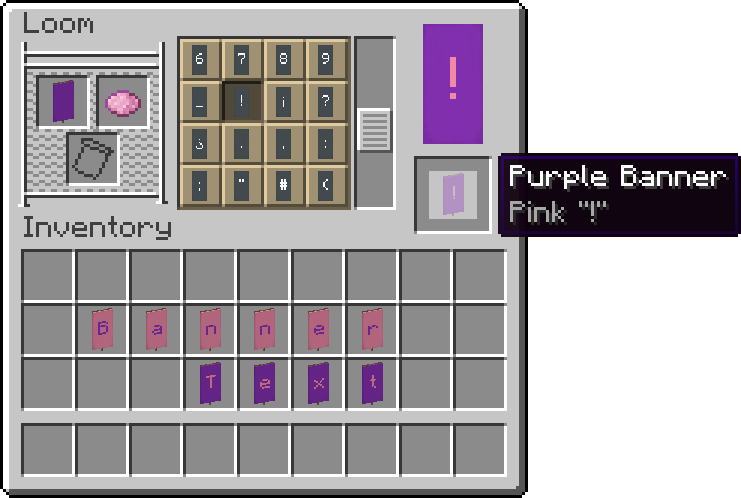
Supported Characters
abcdefghijklmnopqrstuvwxyz ABCDEFGHIJKLMNOPQRSTUVWXYZ 0123456789 _!¡?¿.,:;…"'“”‘’(){}[]#%&@$~*^+-×÷=/\|®©™° ßáâäåæçèéêëíîïijñóôöøùúûüÿąćęłńœśźż ẞÁÂÄÅÆÇÈÉÊËÍÎÏIJÑÓÔÖØÙÚÛÜŸĄĆĘŁŃŒŚŹŻ Standard Galactic Alphabet, Illageralt
A version with Cyrillic characters has been made by SMSka

Help
If you are using this on a server, paste the resource pack download link after resource-pack= in the server.properties file.

Credits
- Thanks to goldstargloww for creating uscur galactic.
- Thanks to StellarWind22 for adding the respective shield patterns to this pack.
Requests
Please request features on the Github Issues Page or Planet Minecraft.
Jak zainstalować Banner Text
With Millida Launcher
Install Millida Launcher
The launcher is free: download it at millida.net/launcher and sign in with any nickname.
Click “Install” on this page
The launcher opens and installs the data pack for Minecraft 1.20.5–1.21.11 automatically.
Launch the game
A profile with it appears in the launcher: click “Play”.
Manually
Download the archive
Pick the file Banner_TextDP-v1.4.2.zip (75 KB) for your game version.
New world: “Data Packs”
When creating a world, click “Data Packs”, drag the archive into the window, then move it to “Selected”.
Existing world: the datapacks folder
Put the archive into saves/<world>/datapacks and type /reload in game.
On a server
Archive goes into the server world’s datapacks
The world/datapacks folder on the server; players do not need to install anything.
Reload the data
Type /reload in the server console or restart the server.
Use the “To server” button
On Millida Hosting, the button at the top of the page uploads the file to your server and restarts it for you.
Wersje
Z zależnościami
| Minecraft | Loader | Plik | Data | Akcje |
|---|---|---|---|---|
| 1.21.11 | Paczka danych | 1.21.1175.4 KB | ||
| 1.21 | Paczka danych | 1.2175.4 KB |
Opinie
Oceń Banner Text jako pierwszy


