

 NeoForge
 Fabric
 Forge
Trimmable Tools
Trimmable Tools is a mod (and soon datapack) that allows you to trim your tools!

Description
Using the existing smithing templates, you can apply fancy trims onto your tools. In version 2, each template gives a unique set of patterns, so there's 18 possible patterns per tool!
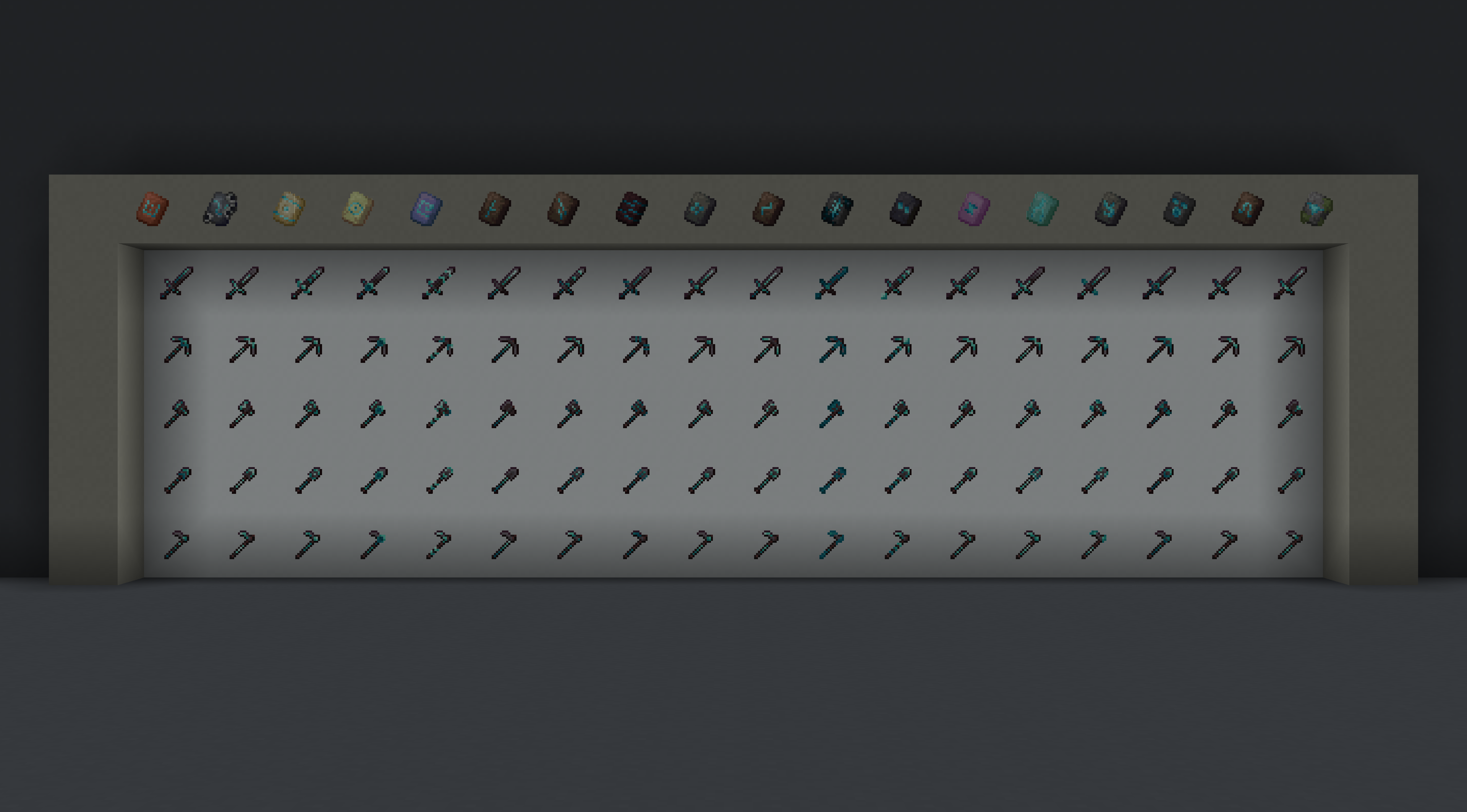
In total there are 5400 combinations of tools, trim patterns, and trim materials! Resource packs that modify the tool textures will work with them as well.

Datapack v2
The datapack version of v2 is still in progress and will be released once it is ready.
Trimmable Tools 설치 방법
With Millida Launcher
Install Millida Launcher
The launcher is free: download it at millida.net/launcher and sign in with any nickname.
Click “Install” on this page
The launcher opens and installs the mod for Minecraft 1.20.1–26.2 on Fabric, Forge or NeoForge automatically.
Launch the game
A profile with it appears in the launcher: click “Play”.
Manually
Install Fabric, Forge or NeoForge
The loader must match the game version of the mod file, for example Minecraft 26.2. After installing it, a separate profile appears in your launcher.
Download the file for your version
In the version list above, pick the file trimmable-tools-2.1.1-neoforge-26.2.jar (264 KB) for your game version and loader.
Put it in the mods folder
The folder is inside .minecraft (Windows: %appdata%\.minecraft\mods). If it does not exist, create it.
Launch the loader profile
Open “Mods” in the main menu: Trimmable Tools should be in the list.
버전
의존성 포함
| Minecraft | 로더 | 파일 | 날짜 | 작업 |
|---|---|---|---|---|
| 26.2 | NeoForge | v2.1.1 ~ Neoforge 26.2264 KB 1 | ||
| 26.2 | Fabric | v2.1.1 ~ Fabric 26.2266 KB | ||
| 1.20.1 | Forge | v2.0.5 ~ Forge 1.20333 KB |
리뷰
Trimmable Tools의 첫 평가를 남겨 보세요


