
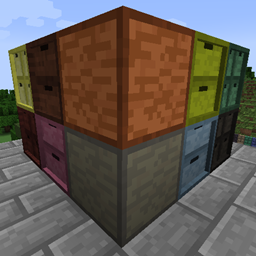
Storage Drawers: Forestry Pack 모드 정보
이것은 Storage Drawers 모드용 애드온 팩입니다. Forestry 모드에서 사용할 수 있는 판자 블록을 사용하는 새로운 목재 서랍 스타일과 제작법을 추가합니다. 이 애드온 팩의 콘텐츠를 사용하려면 Storage Drawers와 Forestry 모드가 설치되어 있어야 합니다.

Storage Drawers: 가장 자주 사용하는 아이템을 편리하게 손이 닿는 곳에 두세요. Storage Drawers는 Jabba와 Bibliocraft에서 아이디어를 빌려와, 해당 모드들을 대체하기보다는 보완하는 것을 목표로 한 매우 실용적이고 compact하며 미적인 저장 솔루션을 만들어냅니다.
더 많은 정보를 보려면 Storage Drawers 프로젝트를 방문하세요.

Storage Drawers: Forestry Pack 설치 방법
With Millida Launcher
Install Millida Launcher
The launcher is free: download it at millida.net/launcher and sign in with any nickname.
Click “Install” on this page
The launcher opens and installs the mod for Minecraft 1.7.10 automatically.
Launch the game
A profile with it appears in the launcher: click “Play”.
Manually
Download the file for your version
In the version list above, pick the file StorageDrawers-Forestry-1.7.10-1.1.2.jar (189 KB) for your game version.
Put it in the mods folder
The folder is inside .minecraft (Windows: %appdata%\.minecraft\mods). If it does not exist, create it.
Launch the loader profile
Open “Mods” in the main menu: Storage Drawers: Forestry Pack should be in the list.
Minecraft 1.7.10 runs on Java 8: with a different Java version the game may close right after launch.
버전
의존성 포함
| Minecraft | 로더 | 파일 | 날짜 | 작업 |
|---|---|---|---|---|
| 1.7.10 | — | StorageDrawers-Forestry-1.7.10-1.1.2.jar189 KB |
FAQ
Which Minecraft versions does Storage Drawers: Forestry Pack work on?
Only Minecraft 1.7.10: there are no files for other versions.
Which Java does Storage Drawers: Forestry Pack need?
Minecraft 1.7.10 runs on Java 8. If the game closes right after launch, the usual cause is the wrong Java version in the profile settings.
Where can I download Storage Drawers: Forestry Pack safely?
On this page: the file StorageDrawers-Forestry-1.7.10-1.1.2.jar (189 KB) is stored on Millida’s server, with no link shorteners. SHA-1 checksum: 2d0407b0abd3ef2d0f721c55ea26cb78ba74f5bb.
리뷰
Storage Drawers: Forestry Pack의 첫 평가를 남겨 보세요


