
 Fabric
 NeoForge
 Forge
Spooky Paintings 모드 정보
This Mod adds 27 new paintings to the game, all the paintings have a spooky and dark theme.
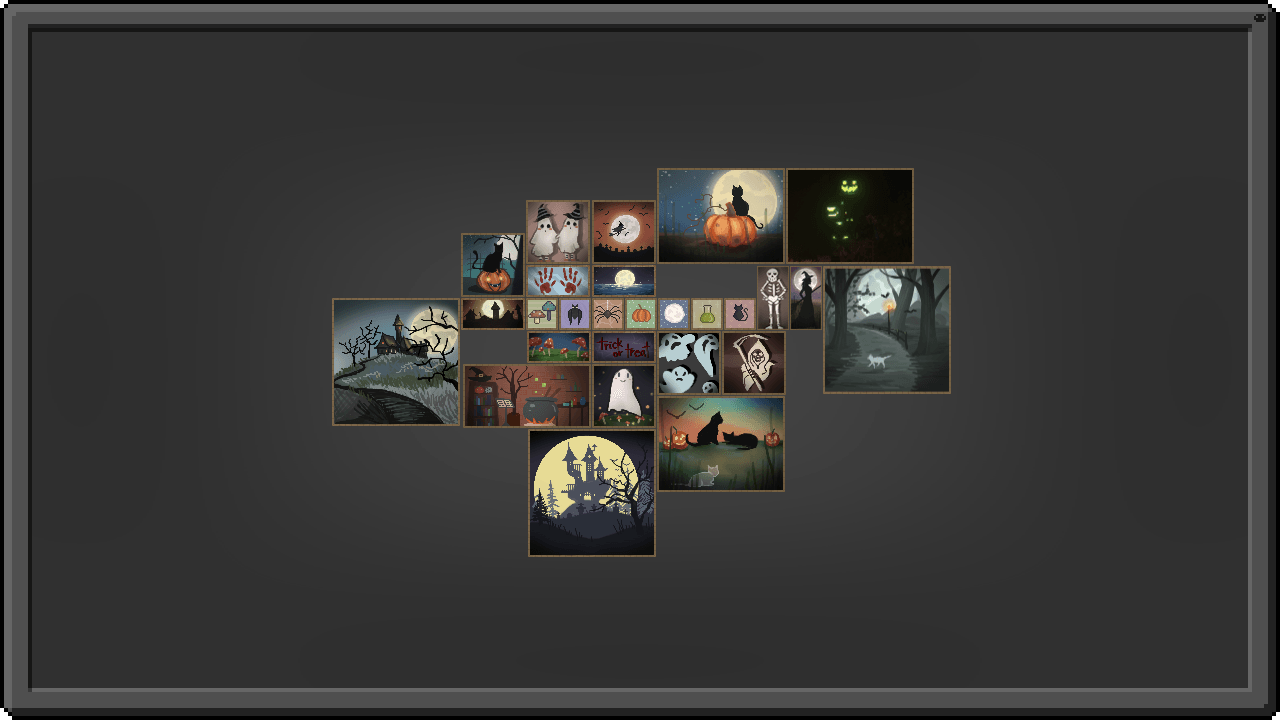
- You can obtain the 27 new paintings in the same way as the regular vanilla paintings.
- This mod does not replace any existing paintings and is compatible with any other paintings mod.
- Built-in compatibility with painting cycle mods.
One Painting, named ''Cave Horror'' is a special thanks to Erik, try out his amazing modpack Cave Horror Project.

You are free to include this mod in your modpacks

Spooky Paintings 설치 방법
Install Millida Launcher
The launcher is free: download it at millida.net/launcher and sign in with any nickname.
Click “Install” on this page
The launcher opens and installs the mod for Minecraft 1.20.1–26.3 on Fabric, Forge or NeoForge automatically.
Launch the game
A profile with it appears in the launcher: click “Play”.
버전
의존성 포함
| Minecraft | 로더 | 파일 | 날짜 | 작업 |
|---|---|---|---|---|
| 26.3 | Fabric | spookypaintingsleonnf-1.0.0 Fabric 26.3.jar289 KB | ||
| 26.2 | NeoForge | spookypaintingsleon 1.0.0 Neoforge 26.2.jar289 KB | ||
| 1.20.1 | Forge | ls_spooky_paintings-2.1.1-forge-1.20.1.jar570 KB |
FAQ
Which Minecraft versions does Spooky Paintings work on?
There are files for 26.3, 26.2, 1.20.1. The newest is 26.3.
Is Spooky Paintings for Forge or Fabric?
There are files for Fabric: 26.3, for Forge: 1.20.1 and for NeoForge: 26.2.
Does Spooky Paintings need other mods?
The author lists no required dependencies: the Fabric, Forge or NeoForge loader is enough.
How do I download Spooky Paintings?
With Millida Launcher: it installs Spooky Paintings into a modpack by itself, for the right game version and loader. The launcher is free.
리뷰
Spooky Paintings의 첫 평가를 남겨 보세요


