

 Forge
Epic Fight - Indestructible 모드 정보
대부분의 사람들이 이미 EFM 최신 버전인 16.6.5를 사용하고 있기 때문에, 18.3.8과 이전 버전은 더 이상 지원되지 않습니다.
이 모드를 그냥 설치하기만 하면 작동하지 않습니다. 커스텀 엔티티 데이터팩을 작성해야 합니다.
튜토리얼(1.18/1.19/1.20)
최신 버전(18.5.3+/20.6.1+/19.xxx.xxx+)의 경우, 데이터팩 경로가 변경되었습니다.
예: customname:data/"modid"/advancedmobpatch/"entityname".json
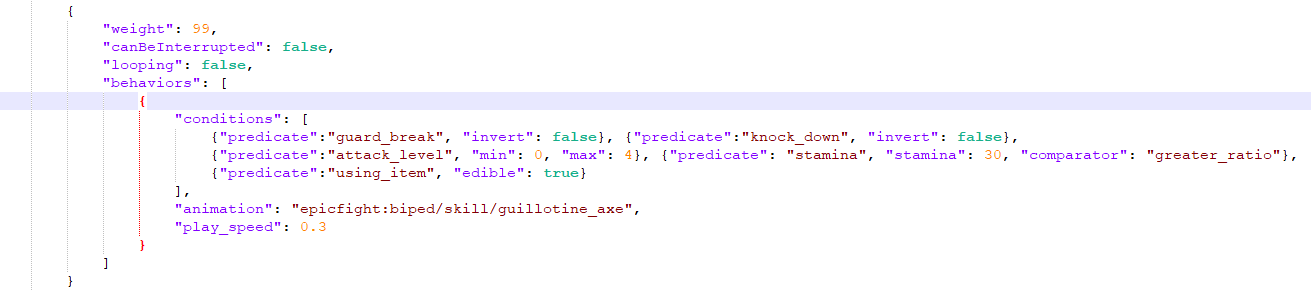
참고용 예시입니다.
보스에게만 사용하는 것을 권장합니다
기능:
1.커스텀 엔티티에 더 풍부한 행동 옵션을 제공합니다: 방어, 배회 및 커스터마이징 가능한 애니메이션 동작
2.더 많은 속성 옵션: 스태미나 메커니즘, 스턴 실드 메커니즘 및 스턴 메커니즘
3.더 발전된 행동 감지 시스템
사용 가능한 가드 애니메이션:
- longsword: "indestructible:guard/guardlongsword"
- sword:"indestructible:guard/guardsword"
- greatsword: "indestructible:guard/guardgreatsword"
- katana: "indestructible:guard/guardkatana"/ "indestructible:guard/guarduchigatana"
- spear: "indestructible:guard/guardspear"
- dual wield sword: "indestructible:guard/guarddualsword"
- yamato: "indestructible:guard/guardyamato" // yamatomoveset을 설치한 경우
몇 가지 새로운 행동 조건자:
- "guardbreak": // {"predicate":"guardbreak", "invert": false}
대상이 가드 브레이크 상태인지 판단하며, "invert"를 true로 설정하면 대상이 가드 브레이크 상태가 아닐 때만 애니메이션을 재생합니다
- "knockdown": // {"predicate":"knockdown", "invert": false}
대상이 넉다운 상태인지 판단하며, "invert"를 true로 설정하면 대상이 넉다운 상태가 아닐 때만 애니메이션을 재생합니다
- "attacklevel": // {"predicate":"attacklevel", "min": 1, "max": 1}
대상 공격의 단계를 판단합니다. free : 0, preDelay : 1, contact : 2, recovery : 3. 위 예시는 준비 단계를 의미합니다
- "stamina": // {"predicate": "stamina", "stamina": 30, "comparator": "greaterratio"}
체력 조건자와 마찬가지로, 몹의 스태미나를 확인합니다
- "usingitem": // {"predicate":"usingitem", "edible": true}
대상이 아이템을 사용 중인지 확인하며, "edible"을 true로 설정하면 아이템을 음식이나 물약으로 제한합니다
- "phase": // {"predicate":"phase", "min": 1, "max": 1}
행동 모션으로 설정된 커스텀 단계를 확인합니다
크레딧:
praisesuffering(아이디어 제공)
存网盘
Epic Fight - Indestructible 설치 방법
With Millida Launcher
Install Millida Launcher
The launcher is free: download it at millida.net/launcher and sign in with any nickname.
Click “Install” on this page
The launcher opens and installs the mod for Minecraft 1.20.1 on Forge automatically.
Launch the game
A profile with it appears in the launcher: click “Play”.
Manually
Install Forge
The loader must match the game version of the mod file, for example Minecraft 1.20.1. After installing it, a separate profile appears in your launcher.
Download the file for your version
In the version list above, pick the file indestructible-20.12.0.jar (259 KB) for your game version.
Put it in the mods folder
The folder is inside .minecraft (Windows: %appdata%\.minecraft\mods). If it does not exist, create it.
Launch the loader profile
Open “Mods” in the main menu: Epic Fight - Indestructible should be in the list.
Minecraft 1.20.1 runs on Java 17: with a different Java version the game may close right after launch.
버전
의존성 포함
| Minecraft | 로더 | 파일 | 날짜 | 작업 |
|---|---|---|---|---|
| 1.20.1 | Forge | indestructible-20.12.0.jar259 KB 18 | ||
| 1.20.1 | Forge | indestructible-20.9.7-fix4.jar249 KB | ||
| 1.20.1 | Forge | indestructible-20.6.0.jar82 KB |
FAQ
Which Minecraft versions does Epic Fight - Indestructible work on?
Only Minecraft 1.20.1: there are no files for other versions.
Is Epic Fight - Indestructible for Forge or Fabric?
Only for Forge: 1.20.1. There are no files for Fabric or NeoForge: a mod for another loader will not start.
Does Epic Fight - Indestructible need other mods?
The author lists no required dependencies: the Forge loader is enough.
Which Java does Epic Fight - Indestructible need?
Minecraft 1.20.1 runs on Java 17. If the game closes right after launch, the usual cause is the wrong Java version in the profile settings.
Where can I download Epic Fight - Indestructible safely?
On this page: the file indestructible-20.12.0.jar (259 KB) is stored on Millida’s server, with no link shorteners. SHA-1 checksum: 40e835d0e9d82bf81bac88073a5ad2c4e59ef25e.
리뷰
Epic Fight - Indestructible의 첫 평가를 남겨 보세요


