

 NeoForge
 Forge
 Fabric
Antique Atlas 모드 정보
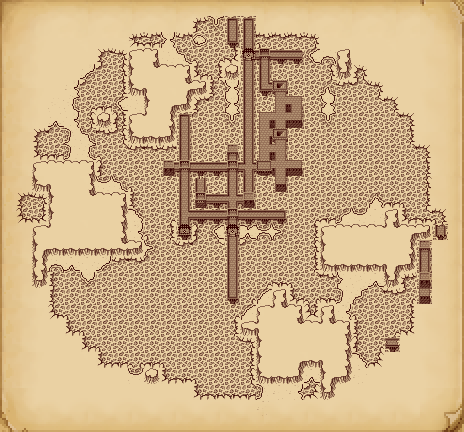
Antique Atlas는 제작 가능한 아이템으로, 특별한 지도 화면을 열 수 있습니다. 클릭 앤 드래그로 지도를 이동하고, 스크롤 휠로 확대/축소할 수 있습니다. 또한 화면상의 버튼으로 마커를 추가/제거/숨길 수 있고, 지도를 이미지 파일로 내보낼 수 있습니다.
서버와 클라이언트 모두 이 모드가 설치되어 있어야 합니다.

이 모드를 수익화하지 않는 한 모드팩에 자유롭게 포함할 수 있습니다.
알려진 버그: https://github.com/AntiqueAtlasTeam/AntiqueAtlas/labels/type: bug
Discord에 참여하세요: https://discord.gg/N2H3r9y
지도는 16x16 블록의 각 청크를 대표할 단일 생물 군계를 선택하여 플레이어 주변에 생성됩니다. 다른 모드에서 추가한 커스텀 생물 군계는 특성에 따라 자동으로 기본 텍스처 세트에 할당되지만, 커스텀 텍스처가 있는 자체 텍스처 팩을 추가할 수도 있습니다: 텍스처 편집을 참조하세요
아틀라스를 플레이어의 현재 차원을 보여주는 PNG 이미지 파일로 내보낼 수 있습니다.
모더는 Atlas API를 활용할 수 있습니다! API로 개발하려면 여기에서 디오브퓨스케이트된 빌드를 받으세요.
제작 레시피:
Minecraft 지도와 마찬가지로, 빈 Atlas를 우클릭하면 사용 가능한 인스턴스가 생성됩니다:
복제:
빈 Atlas로 Atlas를 제작하면 원본 Atlas의 복제본이 생성됩니다. 지도 내용은 복제본 간에 공유되므로, 언제든 집에 복사본을 두고 Atlas를 잃을 걱정 없이 모험을 떠날 수 있습니다.
결합:
1 + 2 = 3 서로 다른 두 Atlas를 함께 제작하여 두 Atlas의 내용을 새 Atlas 하나로 병합할 수 있습니다.
Atlas를 들고 우클릭하면 열 수 있습니다.
크레딧: 모드에 기여해 주신 모든 분들께 큰 감사를 드립니다!
모드와 원본 텍스처를 제작한 Hunternif님께,
수년간 모드를 업데이트하고 유지 관리한 Kenkron님께
원래 아이디어에 영감을 준 Quest 팀의 voythas님과 다른 분들께
ZSS 통합, 네트워크 코드 재작성, 그리고 많은 도움을 제공한 coolAlias님께
텍스트 번역을 담당한 crafteverywhere, CapoFantasma97, Mazdallier, Ruukas님께
커스텀 텍스처 팩 작업을 한 Golrith님께, 그리고 기여해 주신 temdur님과 barrowisp님께
1.21.1로 포팅한 Stereowalker님께
Minecraft Forums 스레드에서 제안을 해주신 모든 분들께. 정말 통찰력 있는 제안이 많았고, 일부 제안된 기능은 구현되었습니다.
Antique Atlas 설치 방법
With Millida Launcher
Install Millida Launcher
The launcher is free: download it at millida.net/launcher and sign in with any nickname.
Click “Install” on this page
The launcher opens and installs the mod for Minecraft 1.12.2–1.21.1 on Fabric, Forge or NeoForge automatically.
Launch the game
A profile with it appears in the launcher: click “Play”.
Manually
Install Fabric, Forge or NeoForge
The loader must match the game version of the mod file, for example Minecraft 1.21.1. After installing it, a separate profile appears in your launcher.
Download the file for your version
In the version list above, pick the file Antique Atlas-1.21.1-8.0.1-NeoForge.jar (1.4 MB) for your game version and loader.
Put it in the mods folder
The folder is inside .minecraft (Windows: %appdata%\.minecraft\mods). If it does not exist, create it.
Launch the loader profile
Open “Mods” in the main menu: Antique Atlas should be in the list.
Minecraft 1.21.1 runs on Java 21: with a different Java version the game may close right after launch.
버전
의존성 포함
| Minecraft | 로더 | 파일 | 날짜 | 작업 |
|---|---|---|---|---|
| 1.21.1 | NeoForge | Antique Atlas-1.21.1-8.0.1-NeoForge.jar1.4 MB 40 | ||
| 1.21.1 | Forge | Antique Atlas-1.21.1-8.0.1-Forge.jar1.4 MB 8 | ||
| 1.21.1 | Fabric | Antique Atlas-1.21.1-8.0.1-Fabric.jar1.4 MB 19 | ||
| 1.18.2 | Forge | antiqueatlas-7.0.0-forge-mc1.18.2.jar1.3 MB 1 | ||
| 1.18.2 | Fabric | antiqueatlas-7.0.0-fabric-mc1.18.2.jar1.3 MB | ||
| 1.14.3 | — | antiqueatlas-5.0.7-fabric.jar1.2 MB 1 | ||
| 1.12.2 | — | antiqueatlas-1.12.2-4.5.1.jar1.2 MB | ||
| 1.12.2 | — | antiqueatlas-1.12.2-4.4.7.jar1.2 MB |
FAQ
Which Minecraft versions does Antique Atlas work on?
There are files for 1.21.1, 1.18.2, 1.14.3, 1.12.2. The newest is 1.21.1.
Is Antique Atlas for Forge or Fabric?
There are files for Fabric: 1.18.2–1.21.1, for Forge: 1.18.2–1.21.1 and for NeoForge: 1.21.1.
Does Antique Atlas need other mods?
The author lists no required dependencies: the Fabric, Forge or NeoForge loader is enough.
Which Java does Antique Atlas need?
Minecraft 1.21.1 runs on Java 21. If the game closes right after launch, the usual cause is the wrong Java version in the profile settings.
Where can I download Antique Atlas safely?
On this page: the file Antique Atlas-1.21.1-8.0.1-NeoForge.jar (1.4 MB) is stored on Millida’s server, with no link shorteners. SHA-1 checksum: 61fdc2384975445faacc548076f597e40315b773.
리뷰
Antique Atlas의 첫 평가를 남겨 보세요


