


WHAT IS SIMPLIFIED SHIELD?
Simplified Shield is a minimalist shield Resource Pack for Minecraft Bedrock Edition. It replaces the default shield model with a more compact and clean design, while providing multiple shield shapes and outline effect options.

LATEST UPDATE CHANGELOG :
- Added 4 new shield models: Rectangle, Rounded, Wakel, and Kite
- Added 5 outline effects: White, Cyan, Yellow, Magenta, and Rose
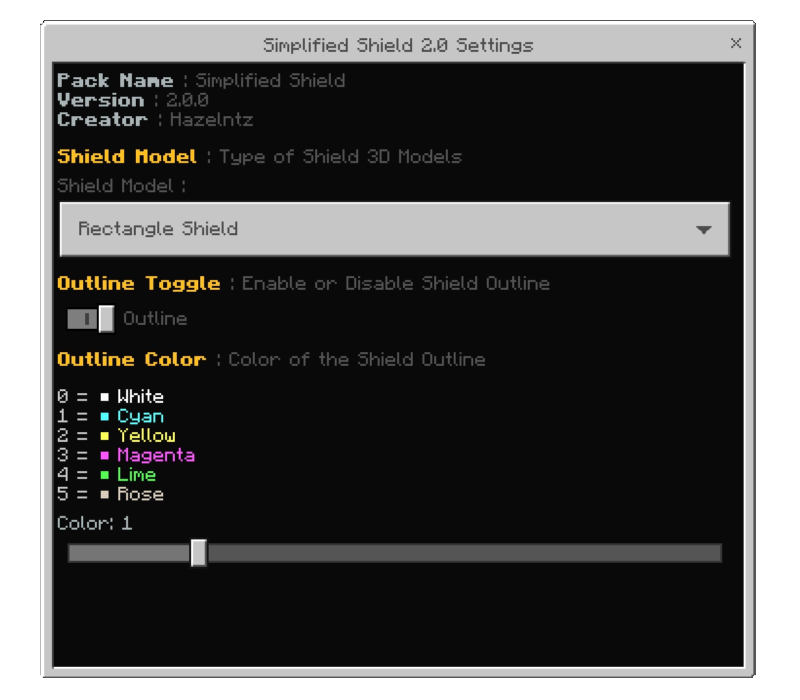
- Shield Model, Outline, and Outline Color can be changed through Pack Settings
FEATURES :
- Compact and minimalist shield models
- Can be combined with other texture packs. Simply place Simplified Shield above your favorite texture pack in the Resource Pack list
- Compatible with Actions & Stuff animations
- Multiple shield models and outline customization options
Below here are a few examples using texture packs I personally use. And yes - it also works with other texture packs you have! : (Check on "Gallery" tab if you're on Curseforge)

FOLLOW US :
- Join Discord : https://discord.gg/7QM47sgdHV
- Youtube 1 : https://youtube.com/@iamhazel_?si=42vKN2vEMl-Ho3C9
- Youtube 2 : https://youtube.com/@hazelismproduction?si=eS1zV-cTQV7q4Tia
SIMPLIFIED SHIELDのインストール方法
With Millida Launcher
Install Millida Launcher
The launcher is free: download it at millida.net/launcher and sign in with any nickname.
Click “Install” on this page
The launcher opens and installs the resource pack for Minecraft 1.21.131–1.21.132 automatically.
Launch the game
A profile with it appears in the launcher: click “Play”.
Manually
Download the archive
Pick the file Hazel Simplified Shield.mcpack (276 KB) for your game version. No need to unpack it.
Put it in the resourcepacks folder
The easiest way: “Options”, then “Resource Packs”, then “Open Pack Folder”, and drag the archive there.
Enable the pack
In the same window, move the pack to the right-hand “Selected” column and click “Done”.
バージョン
依存関係あり
| Minecraft | ローダー | ファイル | 日付 | 操作 |
|---|---|---|---|---|
| 1.21.131 | — | Hazel Simplified Shield.mcpack276 KB |
レビュー
SIMPLIFIED SHIELDの最初の評価を書きませんか


