

 Forge
 Fabric
 NeoForge
InventoryHUD+ MODについて
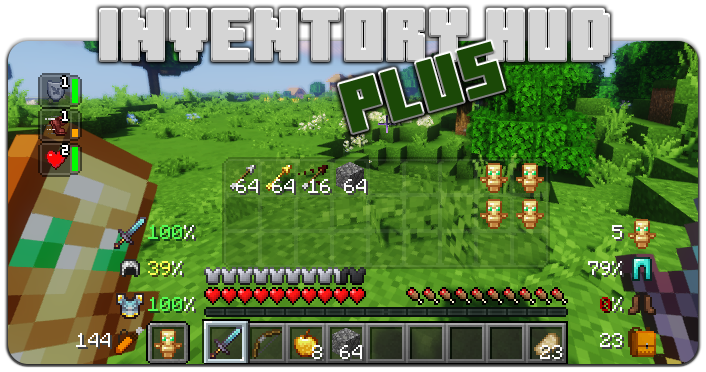
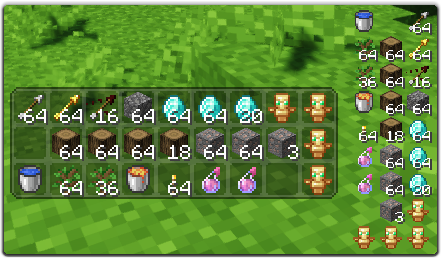
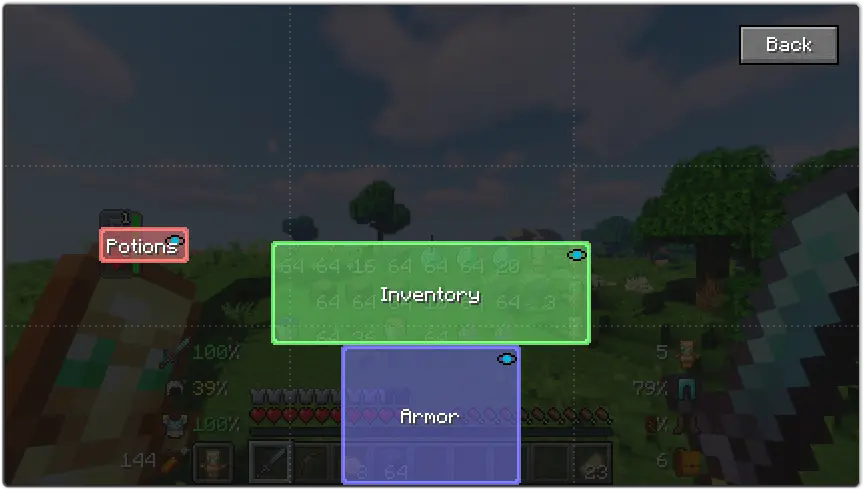
このMODにはいくつかの機能があります。まず最初はInventory HUDで、プレイ中にインベントリを表示します。モード(ミニ/ノーマル、水平/垂直)を切り替えられ、背景の透明度を変更したり、アニメーションのオン/オフを切り替えたりできます。
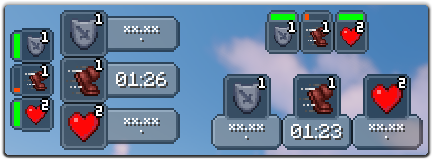
次の機能はPotionHUDで、ポーション効果をタイマー付きで、またはミニモードを使用している場合は持続時間バーで表示します。設定で効果間の間隔と背景の透明度を変更でき、水平モードも有効にできます。
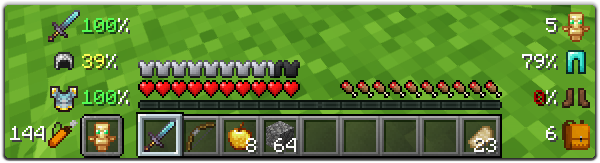
そして最後の重要な機能はArmorHUDで、防具と装備の耐久度を表示し、インベントリの空きスロット数と矢の所持数も表示します。このHUDは完全にカスタマイズ可能で、スケール、ダメージインジケーターの種類を変更したり、装備の各部分のオン/オフを切り替えたりできます。
設定で多くのオプションを変更できます(メインメニューの「Mod」ボタン、次に「Config」)。また、各HUDをドラッグアンドドロップするだけで位置を変更できます。ゲーム内設定画面を開くにはキーバインド(デフォルトでは「O」)を使用できます。
このMODをより良くするために協力したい場合は、あなたの言語に翻訳してjsonファイルを私に送ることができます。
オリジナルの言語ファイルはこちらにあります: enus.json
対応言語
- 中国語簡体字(中国本土)(zhcn)(Satxm氏に感謝)
- 中国語繁体字(台湾)(zhtw)(yichifauzi氏に感謝)
- チェコ語 (cscz)(Janys159氏に感謝)
- 英語 (enus)
- フランス語 (frfr)(Peperehobbits01氏に感謝)
- ドイツ語 (dede)(arrowlevel氏に感謝)
- ハンガリー語 (huhu)(Kalmix88氏に感謝)
- イタリア語 (itit)(cranos96氏に感謝)
- 日本語 (jajp)(co91氏に感謝)
- 韓国語 (kokr)(gueso-gato1355氏に感謝)
- ポルトガル語 - ブラジル (ptbr)(VitorLeonardo氏に感謝)
- ロシア語 (ruru)
- スペイン語 (eses)(Zeedif氏に感謝)
- トルコ語 (trtr)(MefeBey氏に感謝)
- ウクライナ語 (ukua)(ElvisDanger氏に感謝)
InventoryHUD+のインストール方法
With Millida Launcher
Install Millida Launcher
The launcher is free: download it at millida.net/launcher and sign in with any nickname.
Click “Install” on this page
The launcher opens and installs the mod for Minecraft 1.8–26.3 on Fabric, Forge or NeoForge automatically.
Launch the game
A profile with it appears in the launcher: click “Play”.
Manually
Install Fabric, Forge or NeoForge
The loader must match the game version of the mod file, for example Minecraft 26.3. After installing it, a separate profile appears in your launcher.
Download the file for your version
In the version list above, pick the file inventoryhud.forge.26.3-3.4.37.jar (231 KB) for your game version and loader.
Put it in the mods folder
The folder is inside .minecraft (Windows: %appdata%\.minecraft\mods). If it does not exist, create it.
Launch the loader profile
Open “Mods” in the main menu: InventoryHUD+ should be in the list.
InventoryHUD+ works on the player’s side only: there is no need to install it on a server.
バージョン
依存関係あり
| Minecraft | ローダー | ファイル | 日付 | 操作 |
|---|---|---|---|---|
| 26.3 | Forge | 26.3231 KB 18 | ||
| 26.3 | Fabric | 26.3235 KB 95 | ||
| 26.3 | NeoForge | 26.3231 KB 2 | ||
| 26.3 | Forge | 26.3231 KB 13 | ||
| 26.3 | Fabric | 26.3235 KB 75 | ||
| 26.3 | NeoForge | 26.3231 KB 10 | ||
| 26.2 | Forge | 26.2231 KB 17 | — | |
| 26.1 | Forge | 26.1227 KB | — |
FAQ
Which Minecraft versions does InventoryHUD+ work on?
There are files for 1.8–26.3, 14 versions in total. The newest is 26.3.
Is InventoryHUD+ for Forge or Fabric?
There are files for Fabric: 1.16.2–26.3, for Forge: 1.8–26.3 and for NeoForge: 26.3.
Does InventoryHUD+ need other mods?
The author lists no required dependencies: the Fabric, Forge or NeoForge loader is enough.
Do I need to install InventoryHUD+ on a server?
No. InventoryHUD+ works on the player’s side only: there is no need to install it on a server.
How do I download InventoryHUD+?
With Millida Launcher: it installs InventoryHUD+ into a modpack by itself, for the right game version and loader. The launcher is free.
レビュー
InventoryHUD+の最初の評価を書きませんか


