
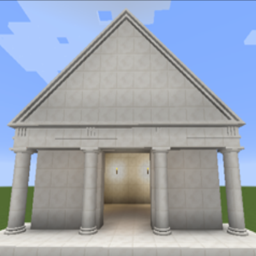
ArchitectureCraft MODについて
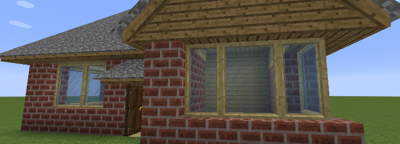
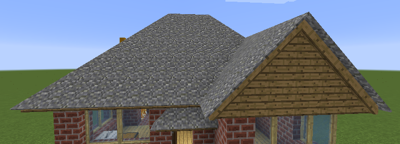
ArchitectureCraftは、勾配屋根、ガラスをはめられる窓枠、アーチやその他の丸みを帯びたブロック、古典的な柱とエンタブラチュア、バルコニーや階段用の手すりなど、見た目の良い建築用の機能を幅広く提供します。ArchitectureCraftのブロックは、ほぼすべてのバニラ素材や、MODによって追加された多くの素材から作ることができます。
ホームページ: http://www.cosc.canterbury.ac.nz/greg.ewing/minecraft/mods/ArchitectureCraft/
Minecraft Forumスレッド: http://www.minecraftforum.net/forums/mapping-and-modding/minecraft-mods/2489461-architecturecraft-1-3-1-for-minecraft-1-8-8-1-8-9
Forge Forumsスレッド: http://www.minecraftforge.net/forum/index.php?topic=32607.0
ArchitectureCraftのインストール方法
With Millida Launcher
Install Millida Launcher
The launcher is free: download it at millida.net/launcher and sign in with any nickname.
Click “Install” on this page
The launcher opens and installs the mod for Minecraft 1.10.2 automatically.
Launch the game
A profile with it appears in the launcher: click “Play”.
Manually
Download the file for your version
In the version list above, pick the file ArchitectureCraft-1.7.3-mc1.10.2.jar (662 KB) for your game version.
Put it in the mods folder
The folder is inside .minecraft (Windows: %appdata%\.minecraft\mods). If it does not exist, create it.
Launch the loader profile
Open “Mods” in the main menu: ArchitectureCraft should be in the list.
Minecraft 1.10.2 runs on Java 8: with a different Java version the game may close right after launch.
バージョン
依存関係あり
| Minecraft | ローダー | ファイル | 日付 | 操作 |
|---|---|---|---|---|
| 1.10.2 | — | ArchitectureCraft-1.7.3-mc1.10.2.jar662 KB 9 |
FAQ
Which Minecraft versions does ArchitectureCraft work on?
Only Minecraft 1.10.2: there are no files for other versions.
Which Java does ArchitectureCraft need?
Minecraft 1.10.2 runs on Java 8. If the game closes right after launch, the usual cause is the wrong Java version in the profile settings.
Where can I download ArchitectureCraft safely?
On this page: the file ArchitectureCraft-1.7.3-mc1.10.2.jar (662 KB) is stored on Millida’s server, with no link shorteners. SHA-1 checksum: f7f80d3b44586129cac7fafe5562a3233c424fe8.
レビュー
ArchitectureCraftの最初の評価を書きませんか


