
 Fabric
 Forge
Alien Evolution is a Palladium-based Ben 10 mod for Minecraft 1.20.1.
Our goal is to respect the vision of the Ben 10 franchise and its community. All aspects of this mod are created to be faithful and accurate, yet balanced and integrated to expand Minecraft's progression system. Expect updates adding new features, aliens, and omnitrices as we continue development on this project.

Join our discord server! Become a part of the community and view teasers, ask questions, and suggest features!
If you would like to support our team and get early access to sneak peaks, development builds, and priority suggestions, feel free to support us on Patreon! https://www.patreon.com/cw/alienevo

Features:
- Craft the Prototype Omnitrix and wield the ability to transform into 11 unique aliens with carefully crafted movesets and abilities!
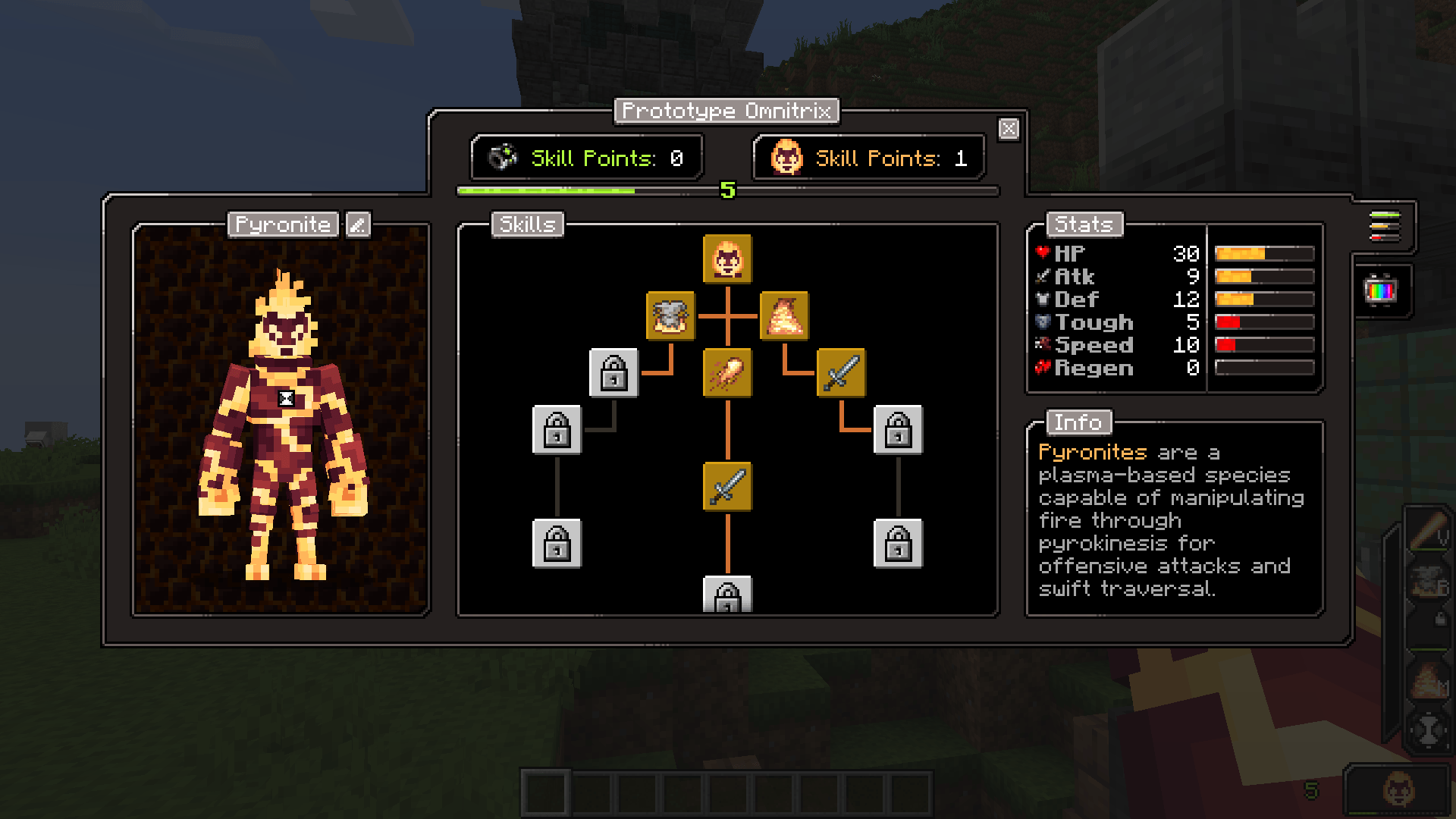
- View the stats and descriptions of your aliens through a special power screen! Track your progress, level up your aliens, and purchase new abilities as you gain experience.
- Upgrade your omnitrix by mastering alien skill trees, unlocking new watch functions like quick change, decouple, and codes!
- Edit every individual color of your aliens with an easy-to-use interface for endless combinations! Or, place your Omnitrix on the Omnitrix Workbench to customize the colors of its individual parts!
- Trade with Galvan villagers for ancient relics that will lead you to rare, dangerous structures containing Code Tablets for Self Destruct and Master Control.
Requirements:
Palladium, Geckolib, KubeJS, Rhino, Architectury API, Pehkui
Commands:
/mastercontrol (player name) /alienautoadd (alien_id) /alienevoplaylist (player name) (playlist #) (slot #) (alien_id) /maxaliens (player name)
Credits: Sounds & Suggestions: Yo Fadda Concept Reference (With Permission): elmike9
Alien Evolutionのインストール方法
With Millida Launcher
Install Millida Launcher
The launcher is free: download it at millida.net/launcher and sign in with any nickname.
Click “Install” on this page
The launcher opens and installs the mod for Minecraft 1.20.1 on Fabric or Forge automatically.
Launch the game
A profile with it appears in the launcher: click “Play”.
Manually
Install Fabric or Forge
The loader must match the game version of the mod file, for example Minecraft 1.20.1. After installing it, a separate profile appears in your launcher.
Download the file for your version
In the version list above, pick the file AlienEvo-1.1.3-fabric.jar (5.4 MB) for your game version and loader.
Put it in the mods folder
The folder is inside .minecraft (Windows: %appdata%\.minecraft\mods). If it does not exist, create it.
Launch the loader profile
Open “Mods” in the main menu: Alien Evolution should be in the list.
Minecraft 1.20.1 runs on Java 17: with a different Java version the game may close right after launch.
バージョン
依存関係あり
| Minecraft | ローダー | ファイル | 日付 | 操作 |
|---|---|---|---|---|
| 1.20.1 | Fabric | AlienEvo-1.1.3-fabric.jar5.4 MB 70 | ||
| 1.20.1 | Forge | AlienEvo-1.1.3-forge.jar6 MB 75 | ||
| 1.20.1 | Fabric, Forge | AlienEvo_Addon_Beta_v1.0.6.jar4 MB |
FAQ
Is Alien Evolution for Forge or Fabric?
There are files for Fabric: 1.20.1 and for Forge: 1.20.1. There are no files for NeoForge: a mod for another loader will not start.
Does Alien Evolution need other mods?
The author lists no required dependencies: the Fabric or Forge loader is enough.
Which Java does Alien Evolution need?
Minecraft 1.20.1 runs on Java 17. If the game closes right after launch, the usual cause is the wrong Java version in the profile settings.
Where can I download Alien Evolution safely?
On this page: the file AlienEvo-1.1.3-fabric.jar (5.4 MB) is stored on Millida’s server, with no link shorteners. SHA-1 checksum: d713258e1ab7097189bad471c999a25a4d971314.
レビュー
Alien Evolutionの最初の評価を書きませんか


