Beginners' Guide To Redstone マップについて
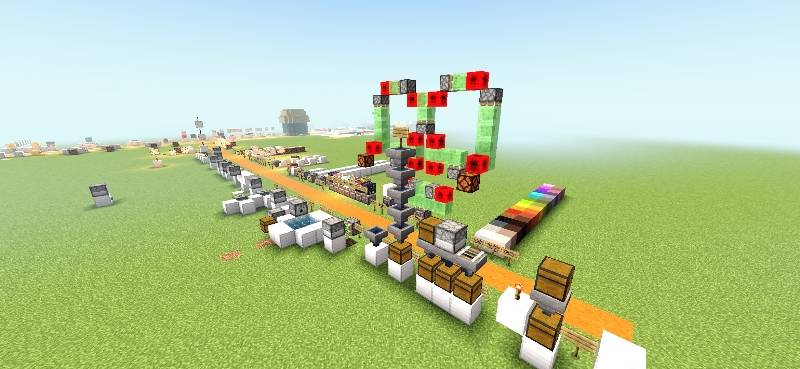
Beginner’s Guide to Redstone is a complete learning map designed for Minecraft Bedrock Edition players who want to understand and master Redstone from the ground up. Whether you are new to Redstone or looking to improve your skills, this map provides a clear, structured, and interactive way to learn.
The map features organized learning areas that explain core Redstone components such as levers, buttons, repeaters, comparators, observers, pistons, and more. Each section includes practical examples so players can see how circuits work in real time and experiment with them.
As you progress, you will unlock advanced builds and automation projects, including doors, traps, farms, elevators, secret entrances, and logic systems. These projects help you apply what you’ve learned in real-world Minecraft situations.
Features:
- Step-by-step Redstone tutorials
- Interactive learning structures
- Working circuit demonstrations
- Beginner to advanced progression
- Practice zones for experimentation
- Useful builds and automation projects
- Clean, organized map layout
This map is perfect for survival players, creators, and technical builders who want to improve their Redstone knowledge in a fun and practical way.




Socials:
Join our discord

Support On Kofi:

✅ Allowed with My Projects
- You can showcase my work in videos/streams if you give proper credit (e.g., link to the official download).
- You can edit file for personal use only
❌ Not Allowed with My Projects
- You cannot distribute through monetized links (AdFly, Linkvertise, etc.).
- You cannot edit and re-share my projects .
Beginners' Guide To Redstoneのインストール方法
With Millida Launcher
Install Millida Launcher
The launcher is free: download it at millida.net/launcher and sign in with any nickname.
Click “Install” on this page
The launcher opens and installs the map for Minecraft 1.21.131–1.21.132 automatically.
Launch the game
A profile with it appears in the launcher: click “Play”.
Manually
Download the map archive
Pick the file Beginner's Guide To Redstone.mcworld (5.3 MB).
Unpack it into the saves folder
The world folder (with level.dat inside) must sit directly in .minecraft/saves.
Open the world
“Singleplayer”: the map will be in your world list.
On a server
Replace the world folder
Stop the server and put the map folder in place of world (or set its name in level-name).
Use the “To server” button
On Millida Hosting, the button at the top of the page uploads the file to your server and restarts it for you.
バージョン
依存関係あり
| Minecraft | ローダー | ファイル | 日付 | 操作 |
|---|---|---|---|---|
| 1.21.131 | — | Beginner's Guide To Redstone.mcworld5.3 MB |
FAQ
Which Minecraft versions does Beginners' Guide To Redstone work on?
There are files for 1.21.132, 1.21.131. The newest is 1.21.132.
Where can I download Beginners' Guide To Redstone safely?
On this page: the file Beginner's Guide To Redstone.mcworld (5.3 MB) is stored on Millida’s server, with no link shorteners. SHA-1 checksum: 6ff7c95df824505e3463792250d1d165c1fd3012.
レビュー
Beginners' Guide To Redstoneの最初の評価を書きませんか