

 データパック
Cobbled Dirt Datapack
Turn cobblestone into a useful resource with the Cobbled Dirt Datapack! This simple tweak allows you to craft dirt using cobblestone, making it easier to gather soil for your projects.
Crafting Recipe:
2 Dirt + 2 Cobblestone = 4 Dirt
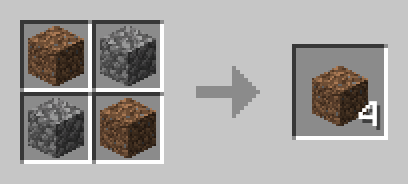
How to Install:
- Download the Cobbled Dirt Datapack.
- Place the downloaded file into the "datapacks" folder inside your Minecraft world save.
- Start crafting and repurpose your cobblestone into valuable dirt!
Compatibility:
- Works seamlessly with other datapacks.
- No additional mods or dependencies required.
Why Use This Datapack?
Gathering dirt can be tedious, but with this datapack, you can use excess cobblestone to create it efficiently. Whether you're expanding farmland or shaping terrain, this recipe helps you get the resources you need without digging up large areas.
Download the Cobbled Dirt Datapack now and make dirt easier to obtain!
Cobbled Dirtのインストール方法
With Millida Launcher
Install Millida Launcher
The launcher is free: download it at millida.net/launcher and sign in with any nickname.
Click “Install” on this page
The launcher opens and installs the data pack for Minecraft 1.13–1.20.6 automatically.
Launch the game
A profile with it appears in the launcher: click “Play”.
Manually
Download the archive
Pick the file Cobbled Dirt.zip (1 KB) for your game version.
New world: “Data Packs”
When creating a world, click “Data Packs”, drag the archive into the window, then move it to “Selected”.
Existing world: the datapacks folder
Put the archive into saves/<world>/datapacks and type /reload in game.
On a server
Archive goes into the server world’s datapacks
The world/datapacks folder on the server; players do not need to install anything.
Reload the data
Type /reload in the server console or restart the server.
Use the “To server” button
On Millida Hosting, the button at the top of the page uploads the file to your server and restarts it for you.
バージョン
依存関係あり
| Minecraft | ローダー | ファイル | 日付 | 操作 |
|---|---|---|---|---|
| 1.18.2 | データパック | 1.18.21 KB | ||
| 1.17.1 | データパック | 1.17.11 KB | ||
| 1.16.5 | データパック | 1.16.51 KB | ||
| 1.15.2 | データパック | 1.15.21 KB | ||
| 1.14.4 | データパック | 1.14.41 KB |
レビュー
Cobbled Dirtの最初の評価を書きませんか


