

Subtitle icons Paket sumber daya untuk Minecraft 26.30
Mengganti teks subtitle Minecraft vanilla dengan ikon mob kustom untuk pengalaman subtitle yang lebih bersih dan imersif. Mengubah nama subtitle mob vanilla menjadi ikon dan meningkatkan keterbacaan subtitle selama gameplay.
Tentang paket sumber daya Subtitle icons
Subtitle Icons Pack
Transform Minecraft subtitles into clean visual icons.
This pack replaces subtitle text names with custom icons for vanilla mobs, making gameplay faster and more immersive.
Features
Replaces vanilla mob subtitle names with icons
Works with most Minecraft vanilla entities
Cleaner and modern subtitle design
Easy to use resource pack
Lightweight and performance friendly
Great for PvP, survival, and accessibility
Compatibility
Minecraft bedrock Edition
Vanilla mobs supported
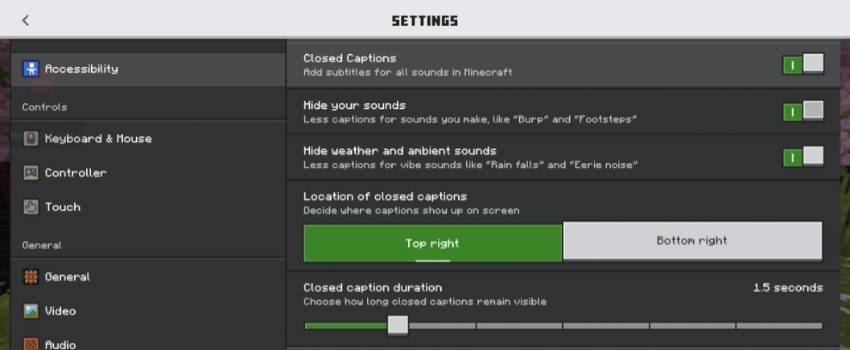
Works with subtitles enabled in Accessibility Settings
Install and enjoy your gameing experience

Language
[["en_US","English (US)"],["en_GB","English (UK)"],["de_DE","Deutsch (Deutschland)"],["es_ES","Español (España)"],["es_MX","Español (México)"],["fr_FR","Français (France)"],["fr_CA","Français (Canada)"],["it_IT","Italiano (Italia)"],["ja_JP","日本語 (日本)"],["ko_KR","한국어 (대한민국)"],["pt_BR","Português (Brasil)"],["pt_PT","Português (Portugal)"],["ru_RU","Русский (Россия)"],["zh_CN","简体中文 (中国)"],["zh_TW","繁體中文 (台灣)"],["nl_NL","Nederlands (Nederland)"],["bg_BG","Български (BG)"],["cs_CZ","Čeština (Česká republika)"],["da_DK","Dansk (DA)"],["el_GR","Ελληνικά (Ελλάδα)"],["fi_FI","Suomi (Suomi)"],["hu_HU","Magyar (HU)"],["id_ID","Bahasa Indonesia (Indonesia)"],["nb_NO","Norsk bokmål (Norge)"],["pl_PL","Polski (PL)"],["sk_SK","Slovensky (SK)"],["sv_SE","Svenska (Sverige)"],["tr_TR","Türkçe (Türkiye)"],["uk_UA","Українська (Україна)"]]
30 + Language Support
Settings
Creater Tamil Crafters
Don't use file code with out my permission
Thank you for Supporting💕
Discord link
YouTube
Cara memasang Subtitle icons
With Millida Launcher
Install Millida Launcher
The launcher is free: download it at millida.net/launcher and sign in with any nickname.
Click “Install” on this page
The launcher opens and installs the resource pack for Minecraft 26.3–26.30 automatically.
Launch the game
A profile with it appears in the launcher: click “Play”.
Manually
Download the archive
Pick the file Subtitle icons 1.3.mcpack (474 KB) for your game version. No need to unpack it.
Put it in the resourcepacks folder
The easiest way: “Options”, then “Resource Packs”, then “Open Pack Folder”, and drag the archive there.
Enable the pack
In the same window, move the pack to the right-hand “Selected” column and click “Done”.
Versi
Dengan dependensi
| Minecraft | Loader | File | Tanggal | Tindakan |
|---|---|---|---|---|
| 26.3 | — | Subtitle icons 1.3.mcpack474 KB 1 |
FAQ
Which Minecraft versions does Subtitle icons work on?
There are files for 26.3–26.30, 7 versions in total. The newest is 26.30.
Where can I download Subtitle icons safely?
On this page: the file Subtitle icons 1.3.mcpack (474 KB) is stored on Millida’s server, with no link shorteners. SHA-1 checksum: 79da87c4488ef35d76e1659aa2489055274b6a01.
Ulasan
Jadilah yang pertama menilai Subtitle icons


