
Smooth Wool Paket sumber daya untuk Minecraft 26.40
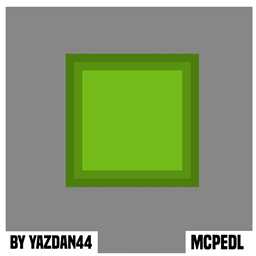
Menyempurnakan blok wool dengan tekstur yang halus dan garis luar yang bersih untuk tampilan yang rapi dan modern
Tentang paket sumber daya Smooth Wool
This texture pack enhances Minecraft’s wool blocks by giving them a smooth, uniform surface and adding a subtle but defined outline around each block. Every color of wool receives the same treatment, ensuring visual consistency across all variants. The smooth texture removes the default woven fabric look, replacing it with a clean, solid appearance, while the outline provides sharper edges for better contrast in builds.
For builders, this refinement allows wool to function more like modern construction materials, making it ideal for sleek designs, pixel art, or structured landscapes where clean lines matter. The outlines help wool stand out against other blocks, reducing visual clutter in complex structures. Survival players will also benefit, as colored wool remains instantly recognizable while gaining a more polished aesthetic. Since the pack only modifies wool textures, it maintains full compatibility with other resource packs, shaders, and mods.
By eliminating the noisy default texture and adding definition, this pack transforms wool into a versatile, visually pleasing block-perfect for detailed creations without altering gameplay mechanics or requiring additional resources.

Cara memasang Smooth Wool
With Millida Launcher
Install Millida Launcher
The launcher is free: download it at millida.net/launcher and sign in with any nickname.
Click “Install” on this page
The launcher opens and installs the resource pack for Minecraft 26.3–26.40 automatically.
Launch the game
A profile with it appears in the launcher: click “Play”.
Manually
Download the archive
Pick the file SmoothWool.mcpack (54 KB) for your game version. No need to unpack it.
Put it in the resourcepacks folder
The easiest way: “Options”, then “Resource Packs”, then “Open Pack Folder”, and drag the archive there.
Enable the pack
In the same window, move the pack to the right-hand “Selected” column and click “Done”.
Versi
Dengan dependensi
| Minecraft | Loader | File | Tanggal | Tindakan |
|---|---|---|---|---|
| 26.3 | — | MainFile_2654.1 KB 3 |
FAQ
Which Minecraft versions does Smooth Wool work on?
There are files for 26.3–26.40, 8 versions in total. The newest is 26.40.
Where can I download Smooth Wool safely?
On this page: the file SmoothWool.mcpack (54 KB) is stored on Millida’s server, with no link shorteners. SHA-1 checksum: 2adb0201e3e5abc6c5a519dc28dd36ceaefd8083.
Ulasan
Jadilah yang pertama menilai Smooth Wool



