

Simple X-Ray Paket sumber daya untuk Minecraft 26.50
Resource Pack X-Ray + Outlined Ores yang ringan untuk Minecraft Bedrock 1.21.26+ (Didukung di Server Juga)
Tentang paket sumber daya Simple X-Ray
Simple X-Ray

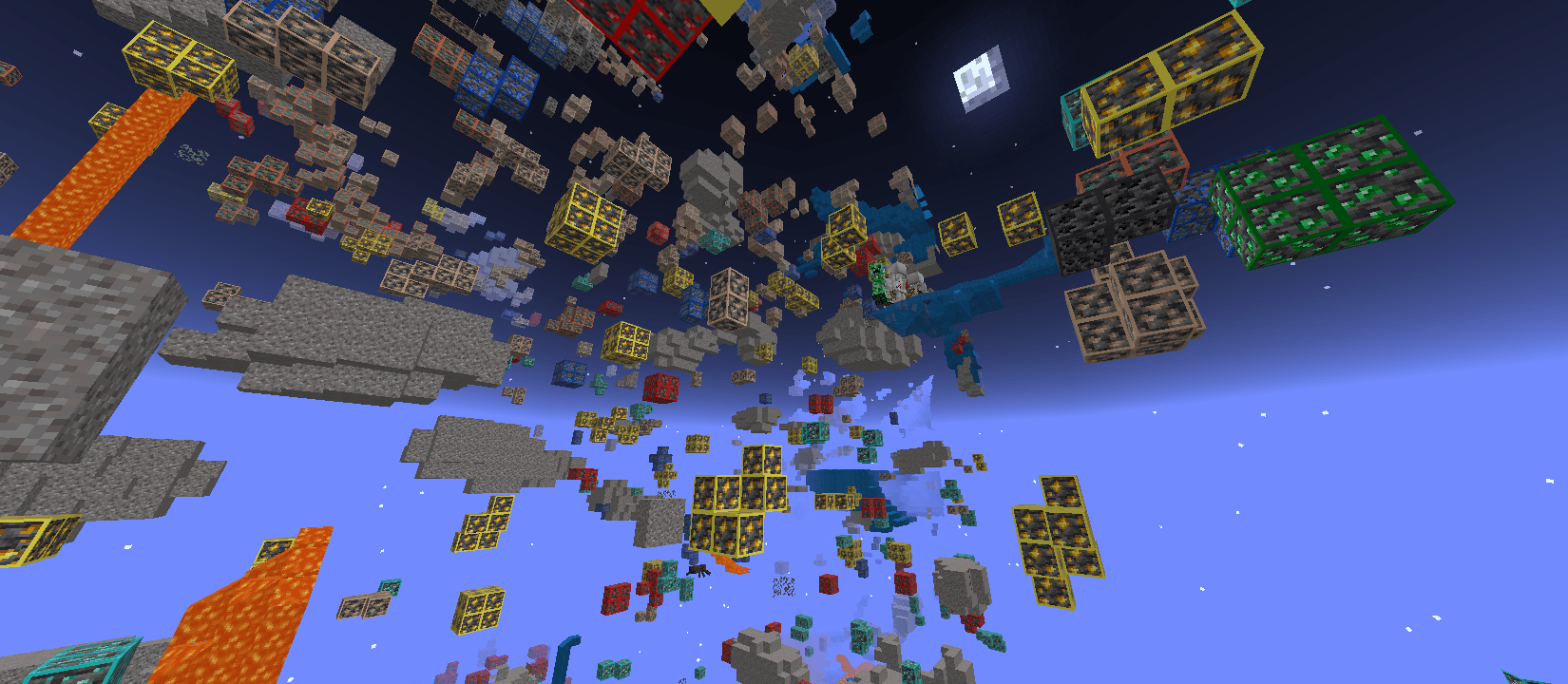
Mine smarter with Simple X-Ray, a lightweight X-Ray Resource Pack designed for Minecraft Bedrock Edition 1.21.26+ and newer versions. Instead of spending hours digging random tunnels, this pack helps you quickly locate valuable ores and important underground resources, making every mining session faster, safer, and more efficient.
Built with performance in mind, Simple X-Ray is optimized to run smoothly on both low-end and high-end devices. Whether you're searching for Diamonds, Ancient Debris, or the latest Sulfur biome resources, this resource pack delivers a clean and reliable X-Ray experience without unnecessary visual clutter.
✦ Features
- View all major Minecraft ores through surrounding blocks.
- Outlined ores make valuable resources much easier to spot while mining.
- Supports Minecraft Bedrock Edition 1.21.26+ and newer versions.
- Easily locate Diamonds, Emeralds, Gold, Iron, Redstone, Lapis Lazuli, Coal, Copper, Quartz, Ancient Debris, and the new Sulfur biome resources.
- Lava remains visible, making underground exploration much safer.
- Water sources are clearly visible for easier cave navigation.
- Gravel stays visible to help identify cave layouts while mining.
- Simple, clean, and lightweight X-Ray design.
- Optimized for smooth performance with minimal impact on gameplay.
- Perfect for survival mining, cave exploration, and resource gathering.
✦ Why Use Simple X-Ray?
Mining is one of the most important parts of Minecraft, but finding rare resources can take a long time. Simple X-Ray reduces unnecessary digging by highlighting valuable ores and important underground blocks, allowing you to focus on exploration instead of guessing where resources are hidden.
Unlike bulky X-Ray packs filled with unnecessary effects, this resource pack focuses on speed, simplicity, and excellent visibility while maintaining smooth performance across modern Minecraft Bedrock versions.
Tip: You can also activate this pack from Global Resources to use it on supported servers, although using it as a world resource pack is recommended for the best experience.
✦ Important Settings
For the best X-Ray experience and maximum underground visibility, we recommend adjusting the following settings before using this resource pack:
- Turn Smooth Lighting OFF.
- Set the in-game Brightness to 100%.
- If the textures don't update immediately, simply rejoin your world after enabling the resource pack.
- For the clearest underground visibility, use a Night Vision Potion and set your device's screen brightness to maximum.
✦ Installation Guide
- Download the Resource Pack.
- Open the downloaded file using ZArchiver or any file manager app.
- Tap Open With and choose Minecraft.
- Wait for Minecraft to import the Resource Pack.
- Open your world settings.
- Go to Resource Packs.
- Activate Simple X-Ray.
- Enter your world and enjoy faster, smarter mining.
Created by FleetMc Studio
Images 👇🏻
Cara memasang Simple X-Ray
With Millida Launcher
Install Millida Launcher
The launcher is free: download it at millida.net/launcher and sign in with any nickname.
Click “Install” on this page
The launcher opens and installs the resource pack for Minecraft 26.10–26.50 automatically.
Launch the game
A profile with it appears in the launcher: click “Play”.
Manually
Download the archive
Pick the file Simple_X-Ray.mcaddon (25 KB) for your game version. No need to unpack it.
Put it in the resourcepacks folder
The easiest way: “Options”, then “Resource Packs”, then “Open Pack Folder”, and drag the archive there.
Enable the pack
In the same window, move the pack to the right-hand “Selected” column and click “Done”.
Versi
Dengan dependensi
| Minecraft | Loader | File | Tanggal | Tindakan |
|---|---|---|---|---|
| 26.10 | — | Simple_X-Ray.mcaddon24.5 KB 2 |
Ulasan
Jadilah yang pertama menilai Simple X-Ray



