

 Game vanilla
Particles Remastered! (Reborn) 2.0v
This is a Seperate update to fix the mistakes and changes made to the original "Particles Remastered!" This includes some static particles recieving Animations such as glint, flame, lava, smoke, explosions and etc.
All contents listed: (couldn't be included into gallery due to the limit on upload)

Big Smokes!
Explosions!
Notes!
Potion Effects!
Critical Hit, Damage Indicator, Death sprite!
Bubbles!
Angry Villager!
idiot, haha
Glint!
Raid Omen + Trial Omen!
Shine!
Fireworks!
Sweeping Hit!
Infestation!
Particles Remastered! 1.1v
Particles remastered is a Simple resource pack that smoothens out the edges of the particle textures and overall gives more saturation and "tweaks" to make the vanilla feel more great!
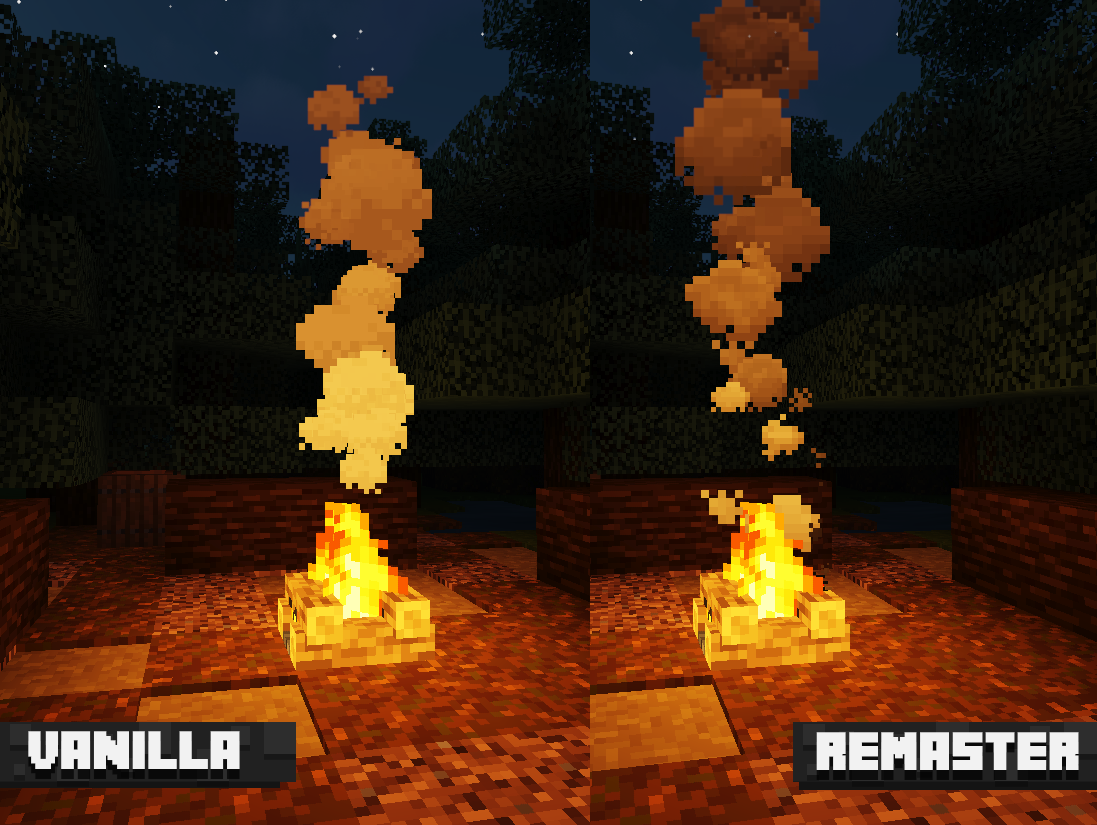
Features 194 files of particle remasters such as: Smoke (campfires), Souls, warden charge, Villager hurt (dark clouds) and many more!
Campfire smoke example:
Cara memasang Particles Remastered!
With Millida Launcher
Install Millida Launcher
The launcher is free: download it at millida.net/launcher and sign in with any nickname.
Click “Install” on this page
The launcher opens and installs the resource pack for Minecraft 1.8.8–26.2 automatically.
Launch the game
A profile with it appears in the launcher: click “Play”.
Manually
Download the archive
Pick the file Particles Remastered! (2.0v).zip (224 KB) for your game version. No need to unpack it.
Put it in the resourcepacks folder
The easiest way: “Options”, then “Resource Packs”, then “Open Pack Folder”, and drag the archive there.
Enable the pack
In the same window, move the pack to the right-hand “Selected” column and click “Done”.
Versi
Dengan dependensi
| Minecraft | Loader | File | Tanggal | Tindakan |
|---|---|---|---|---|
| 26.2 | — | 26.2224 KB 11 | ||
| 1.12.2 | — | 1.12.2192 KB | — |
Ulasan
Jadilah yang pertama menilai Particles Remastered!


